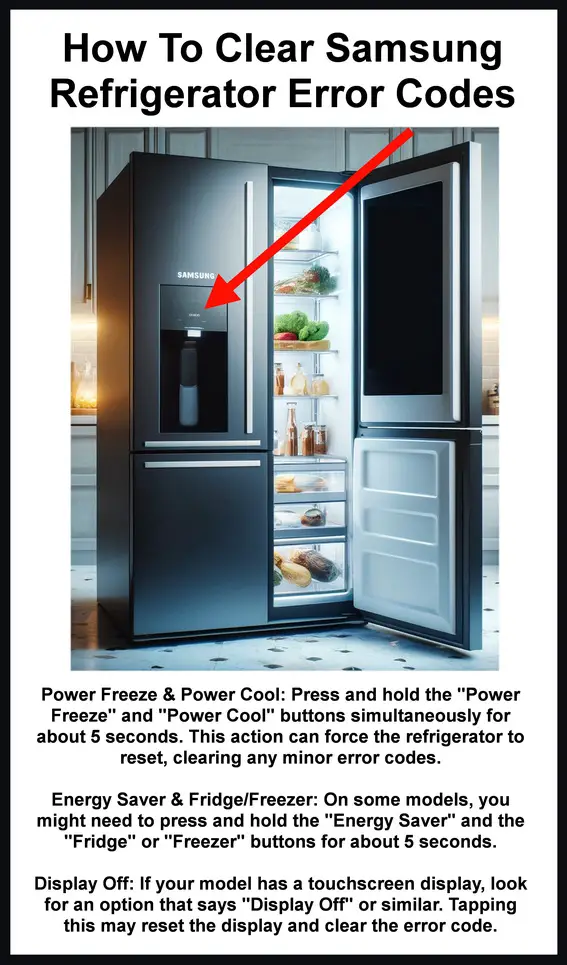
Is your Samsung refrigerator displaying an error code? Newer style Samsung refrigerators have built in diagnostic systems. If your refrigerator finds, sees, or detects a fault or error in the system, it will show an error or fault code. The error code will display where the usual numbers are on the display screen. When an error code is displayed, your refrigerator is telling you a specific fault. If the error or fault is not fixable by you, it will require a repair technician. There are many different model numbers of Samsung refrigerators with digital displays so if you see an error code write down what is flashing or displaying. Don’t pull the power from the fridge if it shows an error code. If you pull the power plug it will erase the fault code.
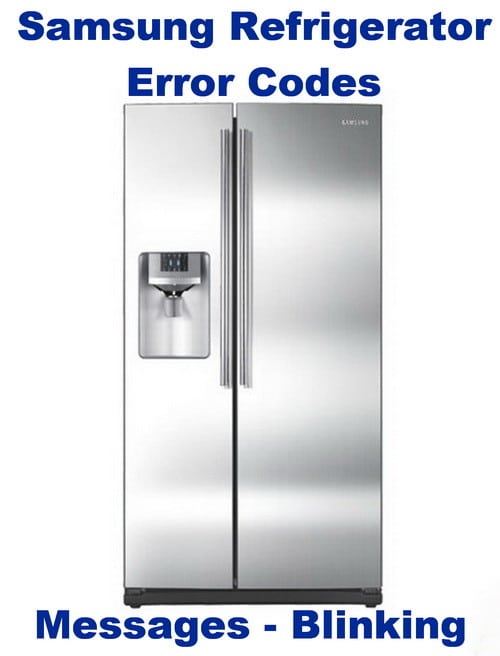 Samsung refrigerator error codes
NOTE: If the icons on the display flash after you plug it in, don’t worry, your Samsung refrigerator is simply going through a self check!
Refrigerator Display is Flashing Temperature:
If the temp in the fridge gets above the warmest temperature available that is set, the display blinks and a chiming noise will sound. When this happens make sure the fridge is not in cool off mode and the door hasn’t been left open for long periods of time. When the temp goes back down to normal, the flashing and sound will stop. If the fridge stays in cool off mode, here is how to stop Samsung fridge from going into cool off mode?
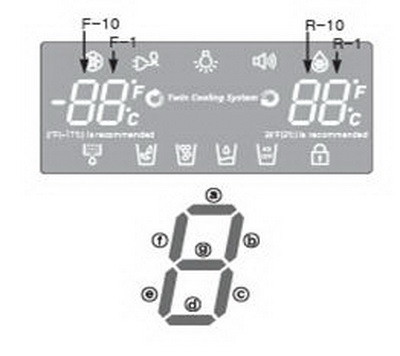 Samsung fridge front panel
O FF / OF OF code: (OF OF COMPLETE FIX SOLUTION HERE)
If your Samsung fridge displays O FF or OF OF, this means it has entered the cool off or demo mode.
Samsung Refrigerator 1E, SE, or 5E Error Reset
NOTE: During a power outage your Samsung French Door refrigerator
may experience a display failure indicating 1 E, 1E, 5 E, 5E, SE, or IE
on the front display. Simply hold the POWER SAVE and LIGHTING
buttons (or FRIDGE and FREEZER) simultaneously for
about 5 to 6 seconds and the panel will reset automatically.
——————————————————————————————-
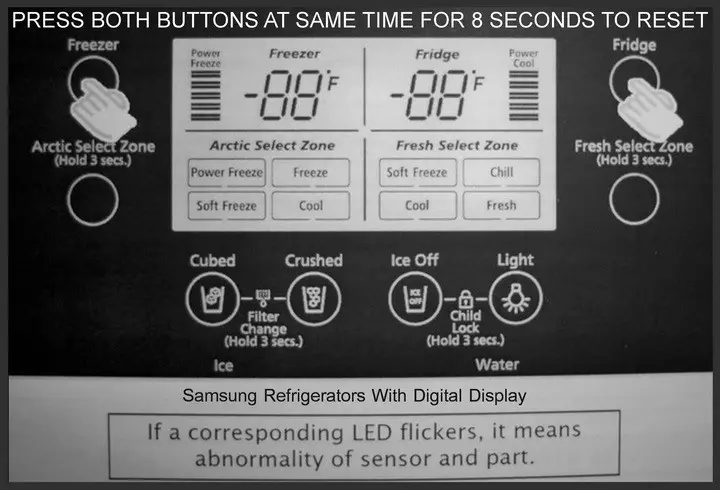 Samsung Refrigerator Error? – Press both buttons same time to reset for 8 seconds!
If you remove any Electronic Components:
If you remove the ice maker or change a lightbulb, the display will show an error code. If this happens, unplug the refrigerator and install the new part. Plug the refrigerator back in and the fault code will clear itself.
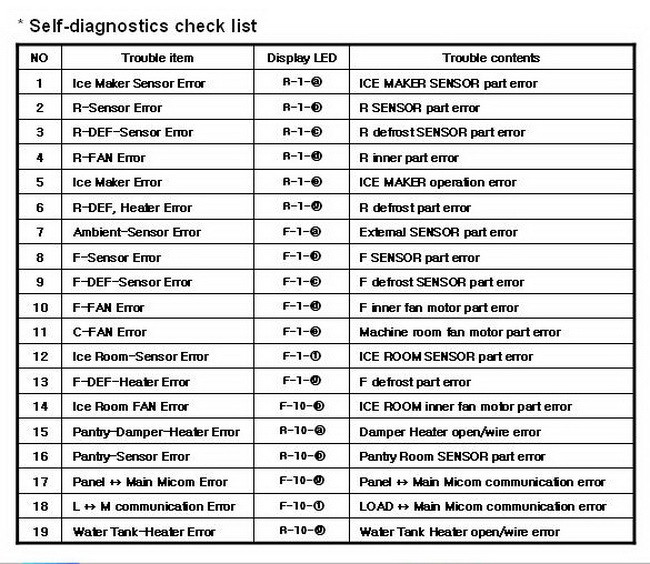 MOST Samsung refrigerator self diagnostic check list
Other error codes for a Samsung Refrigerator:
Display Panel Is Showing PC-ER:
If the display panel shows PC-ER, make sure the wire harness under the top left door hinge is properly connected. Unplug the refrigerator and remove the top left hinge cover. Unhook the wire harness and reconnect it. Plug the fridge back in and if the fault code goes away then the issue is fixed. See illustrations below…
Samsung RF267ABRS refrigerator Display Panel Is Showing PC-ER:
To reset the display panel showing PC-ER…
1: Make sure the wire harness under the top left door hinge is properly connected.
2: Unplug the refrigerator from power and remove the top left hinge cover.
3: Unhook the wire harness and reconnect it.
4: Plug the fridge back in and if the fault code goes away then the issue is fixed.
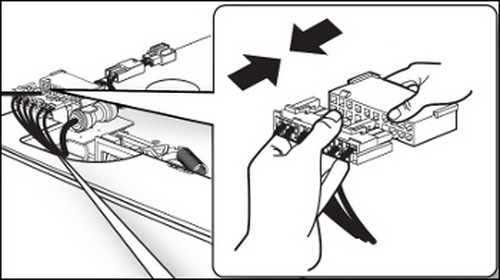 Disconnect wire harness to fix PC-ER error
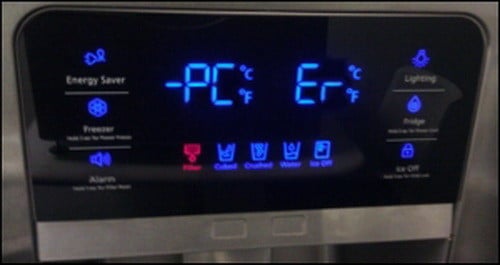 PC ER ERROR CODE – SAMSUNG REFRIGERATOR
Display is 88 88 And Will Not Respond:
To fix this error code, unplug the refrigerator for 1 minute and then plug back in to clear the fault code.
Error Code 1 E:
Freezer Sensor error.
Error Code 2 E:
Freezer Sensor error.
Error Code 4 E:
Freezer Defrost Sensor error.
Error Code 5 E:
Fridge Defrost Sensor error.
Error Code 6 E:
Ambient Sensor error.
Error Code 8 E or 39 E:
Ice Maker Sensor error.
Error Code 21 E:
Freezer Fan error.
Error Code 22 E:
Fridge Fan error.
Error Code 23 E:
Condenser Fan error.
Error Code 24 E:
Freezer Defrost error.
Error Code 25 E:
Fridge Defrost error.
Error Code 26 E or 39 E:
Ice Maker Function error.
Error Code 83E, 85E, or 86E Error Codes:
These error codes are related to voltage and current reception at the PBA Inverter. 83E specifically is caused by abnormal current caused by things like a power outage. This error is temporary and can be fixed by unplugging the unit for 1 minute and then plugging it back in.
When the error code tells you which part on your Samsung Refrigerator
has failed, here are Samsung Refrigerator Replacement Parts for less
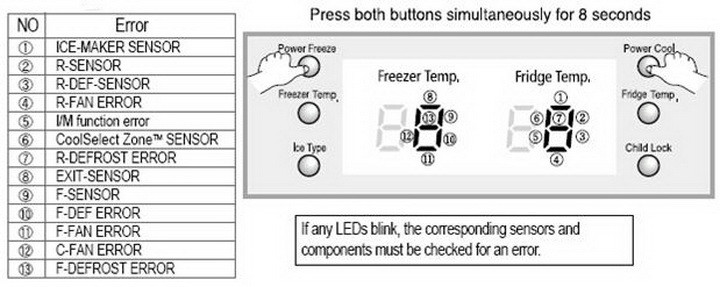 Samsung refrigerator error codes 1 through 13
See below for description of part that may be causing error code
If you need to understand the Samsung Display Panel LED Line Segment Errors you can find more info here.
Samsung Blinking Dash Line Error Code List
1 – Ice Maker Sensor – Ice Maker sensor connector missing
2 – Refrigerator Sensor – Refrigerator sensor connector missing
3 – Refrigerator Defrost Sensor – Refrigerator evaporator internal defrosting sensor connector missing
4 – Refrigerator Fan Error – Refrigerator Fan motor operation failure
5 – Ice Maker Function Error – Ice-ejector and level failed three times or more
6 – CoolSelect Zone Sensor – CoolSelect Zone TM sensor connector missing
7 – Refrigerator Defrost Error – In the refrigerator room, if frost removal mode is finished due to limited time of 80 minutes error is displayed
8 – Exit Sensor – Air sensor connector missing
9 – Freezer Sensor – Freezer sensor connector missing
10 – Freezer Defrost Error – Freezer evaporator defrosting sensor connector missing
11 – Freezer Fan Error – Freezer Fan motor operation failure
12 – Condenser Fan Error – Condenser Fan motor operation failure
13 – Freezer Defrost Error – In the freezer room, if frost removal mode is finished due to limited time of 70 minutes error is displayed
IMPORTANT NOTE: Any codes not listed above should be assumed your refrigerator is in DIAGNOSTIC MODE, DEMO MODE, or LOAD MODE. These modes tell you or the repair person what is functioning properly on your fridge and what is not. Many people get into one of these modes by accident and cannot get out. To disable any of these modes, you can simply unplug your Samsung refrigerator for 30 seconds to 1 minute to clear. See below for the code numbers that may appear on your Samsung refrigerator display panel when in diagnostic, demo, or load mode.
 Samsung fridge load mode – Used to check current status of all operational components.
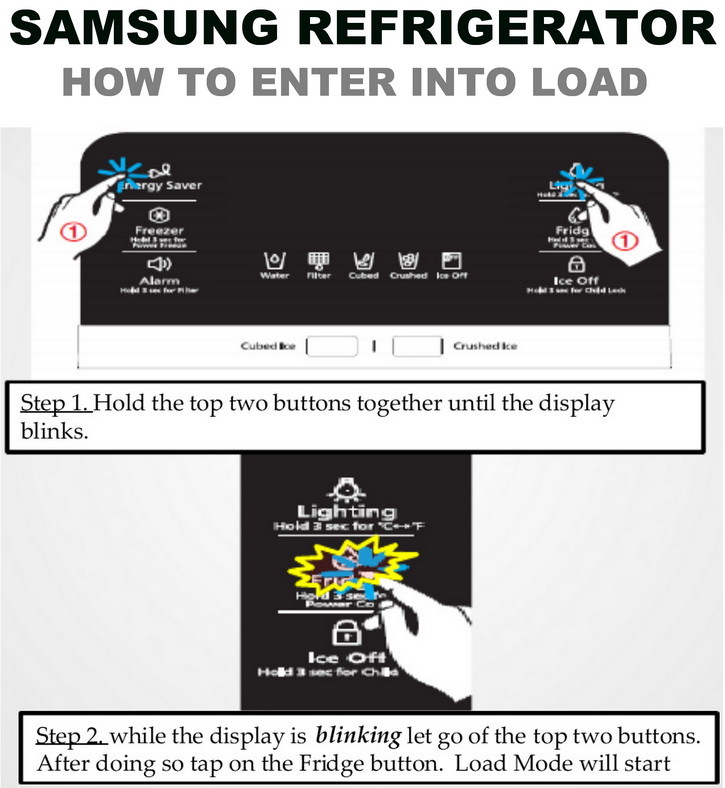 Samsung Refrigerator How to enter into LOAD MODE
Do the same thing as shown above to stop LOAD MODE or unplug fridge.
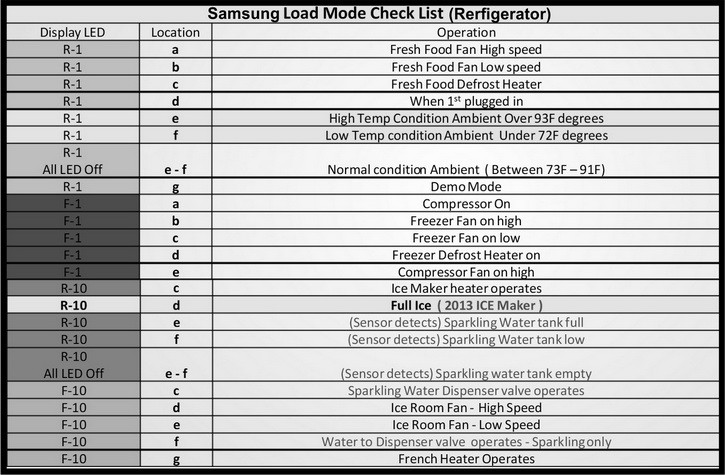 Samsung refrigerator load mode chart
Tells you current operational status relating to the parts in your fridge.
Samsung Refrigerator Load Mode Check List (TEXT LIST)
(image above is the display for the LOAD MODE CODES below)
Display LED = R-1
Location = a
Fresh Food Fan High speed
Display LED = R-1
Location = b
Fresh Food Fan Low speed
Display LED = R-1
Location = c
Fresh Food Defrost Heater
Display LED = R-1
Location = d
When 1st plugged in
Display LED = R-1
Location = e
High Temp Condition Ambient Over 93F degrees
Display LED = R-1
Location = f
Low Temp condition Ambient Under 72F degrees
Display LED = R-1
Location = e – f
Normal condition Ambient ( Between 73F – 91F)
Display LED = R-1
Location = g
Demo Mode
Display LED = F-1
Location = a
Compressor On
Display LED = F-1
Location = b
Freezer Fan on high
Display LED = F-1
Location = c
Freezer Fan on low
Display LED = F-1
Location = d
Freezer Defrost Heater on
Display LED = F-1
Location = e
Compressor Fan on high
Display LED = F-1
Location = f
Compressor Fan on Low
Display LED = F-1
Location = g
When the Sparkling water to dispenser valve operates
Display LED = R-10
Location = a
Damper Open
Display LED = R-10
Location = c
Ice Maker heater operates
Display LED = R-10
Location = d
Full Ice
Display LED = R-10
Location = e
(Sensor detects) Sparkling Water tank full
Display LED = R-10
Location = f
(Sensor detects) Sparkling Water tank low
Display LED = R-10
Location = e – f
(Sensor detects) Sparkling water tank empty
Display LED = F-10
Location = c
Sparkling Water Dispenser valve operates
Display LED = F-10
Location = d
Ice Room Fan – High Speed
Display LED = F-10
Location = e
Ice Room Fan – Low Speed
Display LED = F-10
Location = f
Water to Dispenser valve operates – Sparkling only
Display LED = F-10
Location = g
French Heater Operates
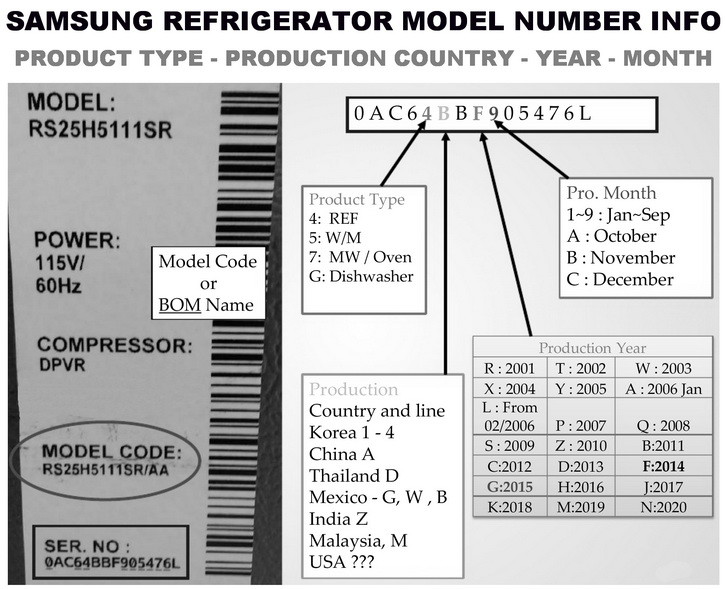 Samsung Refrigerator Model Number Identification Chart
HOW OLD IS MY REFRIGERATOR?
WHICH COMPANY BUILT MY REFRIGERATOR?
WHAT MONTH AND YEAR WAS MY REFRIGERATOR MADE?
Find out Appliance Type, What country it was made in, What year, and What month.
Do you know of any other Samsung refrigerator error codes we have not mentioned or are you having trouble with your Samsung fridge? Please leave a question or comment below and we can assist.