Hold one of the cloudy glasses up to a window and tilt it. If the haze looks like a dull, even film, or white speckles that follow the water spots, you’re probably looking at minerals. If it has a rainbow shimmer in certain light, that points to something else. Either way, the dishwasher is rarely broken. Here’s how to sort out which one you’ve got.

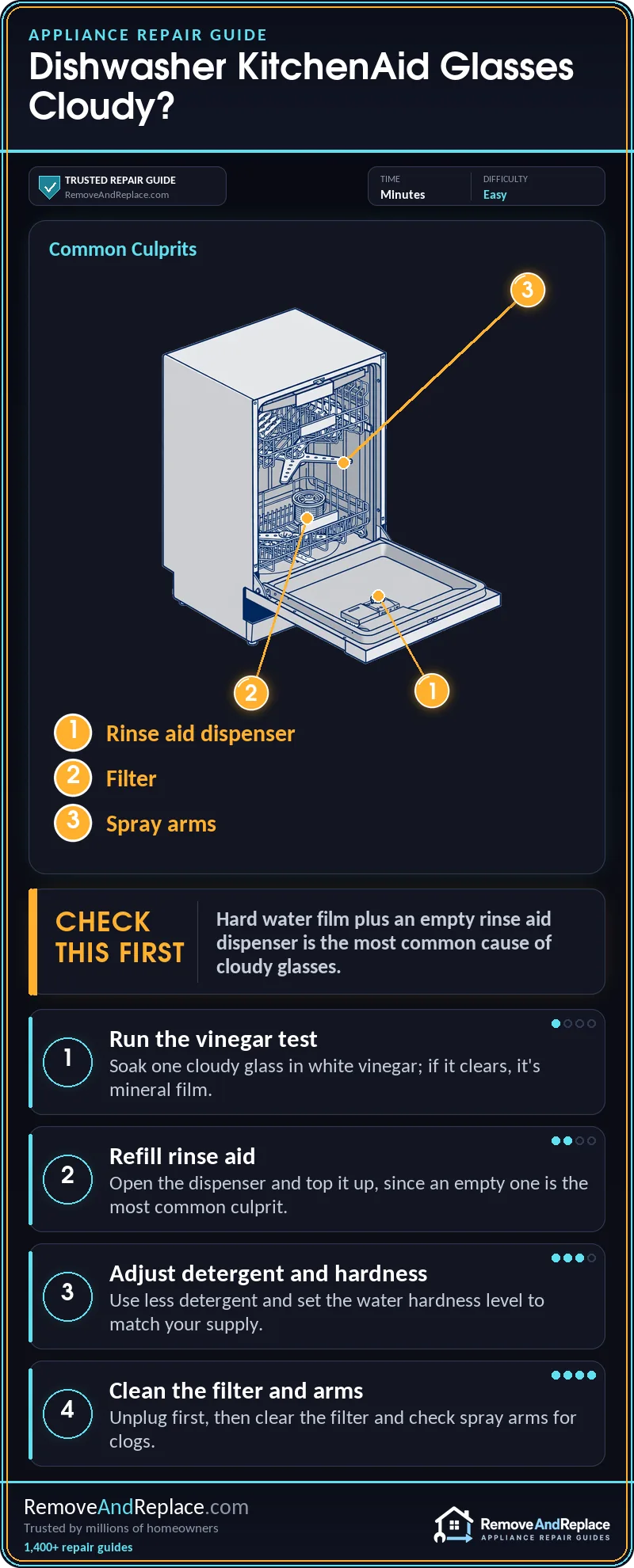
For KitchenAid dishwasher cloudy glasses, soak one affected glass in white vinegar before you change anything else. If the haze clears, it’s mineral film, so refill the rinse aid and set the hardness level to match your water. If the haze stays, the glass is etched for good, and only gentler washing prevents more.
The Short Version
- The vinegar soak decides everything: film comes off, etching doesn’t.
- Rinse aid and detergent amount are the free first checks.
- Your manual covers the hardness and rinse-aid settings for your exact model.
- If rinse aid is maxed out and glasses are still cloudy, look at the filter and spray arms.
- Etched glass can’t be repaired, only replaced.
Why Does a KitchenAid Dishwasher Leave Glasses Cloudy?
Most of the time it’s a chemistry problem, not a mechanical one. Hard water leaves minerals behind as the water dries, and rinse aid is what helps the water sheet off the glass so it doesn’t leave them. I’ve leaned on the same test-before-you-replace habit through 11 years of commercial food service equipment repair, including commercial dishwashers, and it applies here: figure out whether it’s film or etching before you buy anything. The most likely cause of a KitchenAid dishwasher cloudy glasses complaint is hard water combined with an empty or under-set rinse aid dispenser. Next most likely is too much detergent for the water you have. Less common is weak water reaching the top rack. Rare, but permanent, is etching from years of the wrong chemistry. Start with the free checks and work toward the harder ones.
The wrong assumption most people arrive with is “cloudy means dirty, so it needs more detergent.” Usually it’s the opposite. Extra detergent can leave its own film, and in soft water it can etch the glass.
The Vinegar Test: Film or Etching?
Take one cloudy glass and soak it in plain white vinegar for a few minutes, then rinse and dry it. If the cloudiness is gone or much lighter, it’s mineral film, and everything below will fix it. If it looks exactly the same, the surface itself has been eaten away. KitchenAid describes the difference on its own filming or etching on glassware page, and it’s worth a read before you decide.
OK, the glass cleared up with vinegar. That narrows it down to supplies, settings, or water flow, and we’ll go in that order.
This video walks through the repair visually, so you can see what to check inside the machine before you start. It’s a good companion to the steps below, especially if you haven’t pulled the filter or spray arm before.
Likely Causes at a Glance
| Cause | Likelihood | Fix Cost | DIY Time |
|---|---|---|---|
| Hard water film plus low rinse aid | Most common | Low (rinse aid) | Minutes |
| Too much detergent | Common | Free | Minutes |
| Hardness setting wrong | Common | Free | Minutes |
| Clogged filter or weak spray arm | Less common | Free to low | An afternoon the first time |
| Etched glass | Less common | New glasses | Not repairable |
Unplug the appliance or switch off its breaker before you touch anything. That includes pulling the lower rack, the filter, or the spray arms.
The Haze Comes Back Every Load: Check Rinse Aid and Detergent
Check the rinse aid dispenser first. It’s free to look, and an empty one is the most common reason glasses go dull. Many models have a window or indicator on the cap, but I wouldn’t trust it blindly. Open it and look.
- Unplug the dishwasher. Open the door and find the rinse aid cap, usually near the detergent dispenser.
- Open the cap and look inside. If the reservoir is dry or low, refill it with liquid rinse aid. Wipe up any spill, because spilled rinse aid causes oversuds.
- Cut back on detergent. Use less than you think you need, especially if your water is soft. A heavy dose leaves residue and can etch glass over time.
- Run a normal cycle with a few vinegar-soaked glasses and check them when the load is done.
The wrong fix I see people try is scrubbing the glasses by hand with an abrasive pad. It does nothing to film and scratches the surface. If the detergent seems to be dumping early or not releasing, that’s a different problem, and my guide on how to remove and replace a dishwasher detergent dispenser covers it.
Is the Hardness Setting Matched to Your Water?
KitchenAid dishwashers have settings for water hardness and for how much rinse aid is dispensed, and the way you reach them varies by model. I won’t guess at your control panel’s key sequence. Pull up the instructions for your exact model number, or look it up in these dishwasher service and repair manuals. If you know your water is hard, raise the rinse aid level. If it’s soft, go lower on both. If the buttons don’t respond when you try to change a setting, see my KitchenAid dishwasher buttons not responding guide first.
Still Cloudy With Rinse Aid Turned Up? Check the Water Reaching the Glasses
This is the part most articles skip. If rinse aid is full and set higher and the glasses are still cloudy, the film may not be getting washed off at all. A glass in the middle or top rack that sits in a weak spray pattern will come out hazy while the bottom rack looks fine. That’s your clue.
- Unplug the unit and pull the lower rack. If the door drops hard when you lean on it, my guide to adjusting dishwasher door spring tension will make this job easier.
- Remove and rinse the filter under warm water. Food grit and mineral crust in the filter choke the flow.
- Spin each spray arm by hand. It should turn freely. Look for blocked holes, a cracked arm, or an arm that sticks or wobbles on its mount. Clear the holes with a toothpick.
- Check the water temperature. Run the kitchen tap until it’s hot before starting a cycle. Detergent dissolves poorly in lukewarm water. Your manual lists the recommended incoming temperature for your model.
- Reassemble, plug it back in and run a cycle to test.
A clean filter and free-spinning arms are what let rinse aid do its job. Skip them and no setting will help.
The Glass That Won’t Clear
If the vinegar test did nothing, the glass is etched. KitchenAid explains the problem on its dull surfaces on dishes page. Nothing brings the finish back. Replace those glasses, and adjust the detergent and settings so the new ones last.
Call a pro when the filter is clean, the spray arms spin freely, the water is hot and everything is set right, but the middle and top racks still get little water. That points to a circulation pump or heating problem, and I’d rather you pay for a diagnosis than guess at parts.
Keeping Glasses Clear After the Fix
Rinse the filter regularly, top off the rinse aid before it runs dry, and don’t pack the top rack so tightly that the arm can’t reach the glasses. Run hot water at the tap before you start the cycle.
Frequently Asked Questions
Does vinegar in the dishwasher fix cloudy glasses?
A vinegar soak removes mineral film, but I wouldn’t pour vinegar into the machine itself as a regular habit, because some manufacturers advise against it. Use it on the glasses to test, then fix the cause.
Why is my KitchenAid dishwasher cloudy glasses problem worse in the top rack?
Weak spray from a partly blocked arm or a clogged filter hits the upper rack first. I’d check those before I’d touch any settings.
Can I use too much rinse aid?
Yes. Too much can leave a streaky film that looks like haze, so turn it down a notch if you notice streaks.
Is cloudy glass safe to drink from?
Film from minerals is a cosmetic problem, not a health one.
Should I replace the dishwasher over cloudy glasses?
No. In my experience, the machine is almost never the problem, and replacing it won’t change what’s in your water.

Written by Keith Schneerer
Certified Appliance Tech · Founder, RemoveAndReplace.com
Keith has spent 30+ years repairing machines, starting as a military mechanic and later maintaining food processing equipment before moving into appliance repair. He founded RemoveAndReplace.com to share field-tested repair advice.
More about Keith →