

Kenmore dishwasher displaying an error code, flashing LED light or blinking LED lights? Kenmore dishwashers have built in diagnostic systems. If your dishwasher finds, sees, or detects a fault or error in the system, it will show an error, the LED lights will flash, blink, or a fault code will be displayed. The error code or LED lights will display on the panel. When an error code or LED light is blinking, your dishwasher is telling you a specific fault. The error code or the LED light sequence will tell you which parts on your Kenmore dishwasher to replace or check. You can also Search YouTube for Kenmore Dishwasher Flashing Blinking Lights or get advice from your Kenmore dishwasher owners manual when your Kenmore Dishwasher Is Displaying An Error Code or flashing the LED lights.
 Kenmore dishwasher error codes LED flashing blinking
Error Code = Start Resume light blinking slow
Error Condition = When the dishwasher door opens or electrical power is removed during the cycle then the dishwasher will not start again. The door is detected as being closed and the Start Resume button is being pressed
Repair or Check = Inspect the door latch and switch assembly. A problem with the Start Resume button may also cause this problem
Parts to Test or Replace = Door Switch Assembly – Control Panel – Electronic Control Board
Error Code = Clean light is blinking 7 times
Error Condition = Heater circuit fail. Control panel did not detect the water getting hot. Did not detect heating element was energized to heat the water during the wash cycle
Repair or Check = Check heating element, wiring and control board
Parts to Test or Replace = Heating Element – Electronic Control Board – Thermistor – Circuit Wiring
Error Code = Sanitize LED blinking at end of cycle
Error Condition = Control panel could not detect if sanitation has been achieved
Repair or Check = Check the voltage to the dishwasher and the temperature of the water coming into the dishwasher – Check the diverter motor – Check the heater – Check the Thermistor
Parts to Test or Replace = Diverter Motor – Heater – Thermistor
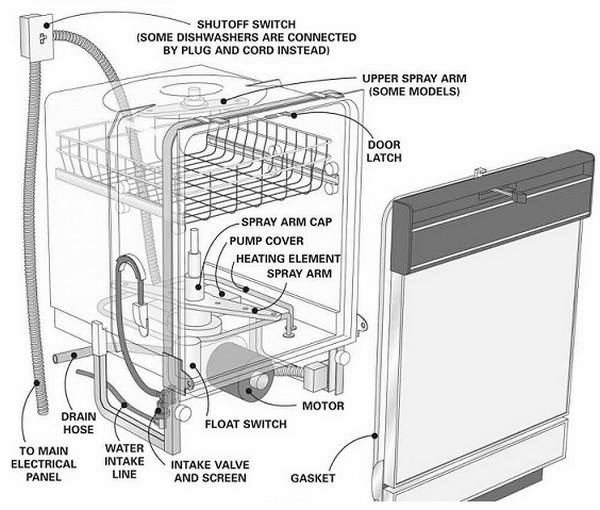 Dishwasher parts and location diagram
Error Code = Console light blinking rapidly
Error Condition = There is a stuck button on the control panel
Repair or Check = A bad control panel or electronic control board can cause the console light to blink. Check buttons on the control panel using a multimeter
Parts to Test or Replace = Control Panel – Electronic Control Board
Error Code = Clean light is constantly illuminated
Error Condition = Dishwasher cannot start a wash cycle until it sees that the door has been opened after the previous washing cycle
Repair or Check = Turn off power to the dishwasher by unplugging or removing power and restarting it. If removing from power does not fix the issue, the door switch assembly is faulty and needs to be replaced
Parts to Test or Replace = Door Switch Assembly
Error Code = Control lock LED is ON but not responding to pressing of the keys
Error Condition = Turned on by accident or there is a control detected key pad problem
Repair or Check = Press the Heated Dry button for 5 to 10 seconds. This turns off the control lock feature. If pressing for 5 seconds the problem persists, replace the complete keypad
Parts to Test or Replace = Keypad
Kenmore Elite Dishwasher blinking light Control Board FIX
Kenmore Dishwasher – Start button touch pad not working
Kenmore dishwasher clean light flashing
Kenmore ultra wash quiet guard 3 flashing
Do you have an error code or LED light sequence indicating a problem with your Kenmore dishwasher? Please leave your question below and we can help assist to troubleshoot your dishwasher issue.

I have a Kenmore Elite with a continually flashing red Normal Wash button. Have been unable to reset anything.
My Kenmore Ultra dishwasher had the blinking CLEAN button issue. I reset it as you suggested. It went off, but, am I to understand that I now have to find out what the malfunction was or if it turns back on and works well, then its problem solved. Answers to the blinking light did not instruct what to do after or if the blinking light was the only problem. Thanks, you help people and save money. I am not handy with fixes like this, but hate to call for expensive repair if I can do something fairly simple. Deb
My Clean button was flashing. Not sure WHAT the issue was, the troubleshooting guide says “malfunction-get service” I did the reset but wonder IF it is a malfunction signal, will just resetting be the fix? Or when it doesn’t run, I go from there. THANKS, you really help people. Model 665.1372, 73, 82, 83 or 1322.
I have a model 66517772990 dishwasher. Its approximately 1 million years old or there about. Anyway the water heat light started to flash when the dishwasher is not in use. I downloaded the english version of the manual but it did not offer any tips about flashing lights. Please advise.
My Kenmore elite dishwasher 665.12789K311 when I did diagnostics test the complete light blinked 8 times then paused and then blinked 4 more times. I can’t find what this is diagnosing
The first thing to try is to totally power down your dishwasher. This is generally done at the circuit breaker panel. Allow the machine to be powered down for at least an hour. This should clear the mother board (brain) of the computer of any faults.
I have a model number 66514793n510 and need to reset. There is no “heated dry” button to push. My choices for buttons to push are:
Cycles: Smart wash, pots/pans, normal wash, china, express wash, quick rinse
Options: Turbo zone, Hi temp wash. sani rinse, smart dry.
587.15413100A Kenmore Dishwasher with “Er” message flashing. Machine fails to complete full cycle.
Lights illuminated on “Quick Rinse”, as well as the three items under “Er”, “washing, clean, sanitized”, -and the lock symbol.
I have Kenmore 665.15892 dishwasher. I wish to run diagnostic cycle. What is the sequence to push to initiate this? I’ve read to push Heated Dry/Normal/Heated Dry/Normal but I don’t have a Heated Dry button (*)nor a Normal – it is Normal Wash actually.)
There is no “heated dry” on my display. It says sensor dry or some such thing and that doesn’t work. I will try the hold on the start -.