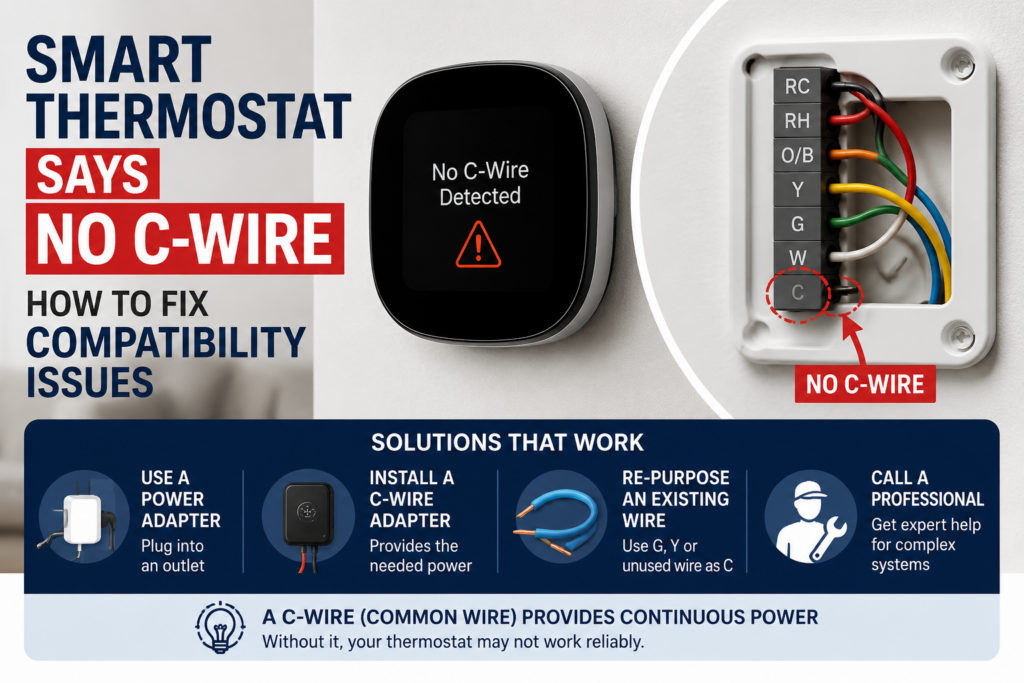
When a Smart Thermostat Says No C-Wire, it almost always means the low-voltage bundle behind the wall plate isn’t using its common wire to keep the thermostat powered full-time. Most homes already have a spare wire sitting unused in that bundle, so a rewiring job or a $15-40 add-a-wire adapter usually fixes it — no need to run brand-new wire through the walls.
- Most homes wired for a furnace or air handler already have a spare wire in the bundle — pulling new wire is rarely the first move.
- Add-a-wire and power extender kits solve this for single-stage systems most of the time, but multi-stage, zoned, or dual-fuel setups need extra care or you can lose a heat stage.
- A battery-only or “power-stealing” thermostat isn’t a permanent fix — it can cause its own flickering-screen and relay-chatter problems down the road.
- Kill the power at the breaker before touching any of these wires — a short here can blow a furnace transformer fuse, which is a much bigger headache than the thermostat itself.
| Cause | Likelihood | Fix Cost | DIY Time |
|---|---|---|---|
| No C-wire ever pulled to the thermostat | Most common | $15-40 (adapter) or $150-300 (new wire pull) | 30-60 min / 1-3 hrs |
| Spare wire in the bundle, just not landed right | Very common | Free-$10 | 20-30 min |
| Power-stealing thermostat glitching under load | Common | $0-30 | 10-20 min |
| Multi-stage/zoned/dual-fuel wiring conflict | Less common | $0-60 | 45-90 min |
Is There Already a Spare Wire Behind Your Thermostat?
A Smart Thermostat Says No C-Wire when it can’t find steady, low-voltage power for its screen, Wi-Fi radio, and internal logic. Older mercury thermostats only sipped power when needed, but a smart thermostat needs constant power from the C-wire, or common wire, to stay running around the clock. In most homes, there’s already a spare 18-gauge wire coiled up behind the plate, left over from a simpler thermostat that never needed one. After 19 years of U.S. Air Force aircraft maintenance work, I’ve learned to see it the same way here — the unit isn’t broken, the circuit’s incomplete. Pull the old thermostat off the wall and count the wires before you assume you need an electrician, and check whether that spare wire is already sitting there waiting to be landed on the C terminal.
That message on the screen is doing you a disservice, honestly — “No C-Wire” isn’t a real diagnosis. It’s a generic low-voltage warning the thermostat throws whenever it can’t confirm steady power, the same way a TV throws the “No Signal” message when the input’s not connecting right. Treat it as a starting point, not an answer (I check the actual wire count before I ever trust what the screen tells me).
If you want the fuller rundown on what the C-wire does and why smart thermostats need it so much more than the old mercury ones ever did, I get into that in this piece on what the C-wire is. Honeywell’s own writeup on how the C-wire works is a solid technical reference too, if you want the manufacturer’s version of the same thing.
The wrong move I see more than any other: someone installs an add-a-wire kit at the thermostat, then stops, without ever checking the other end at the furnace or air handler control board. The C-wire needs a home on both ends — skip the board side and you’re kinda gambling with the transformer’s internal fuse the first time the system cycles. (Ask me how I know — I tape off both ends before power ever goes back on, every time.)
Watch This Before You Touch Any Wires
I’d rather you watch someone do this once than guess at it from a written list — the wire colors and terminal labels vary just enough between brands that a two-minute visual walkthrough saves a lot of confusion.
This video walks through checking whether you’ve actually got a spare wire in the bundle, how to test a suspected common wire with a multimeter before you commit to anything, and where the add-a-wire adapter boards mount on the furnace side. It’s a good companion to the steps below, especially if you’ve never popped the cover off a furnace control board before.
Kill the power at the breaker for the furnace or air handler — not just the thermostat’s little on/off switch, if it even has one — before touching any of this. Twenty-four volts won’t shock you, but a shorted wire can blow the transformer fuse on your control board, and I’ve seen people fry a $150 board because they figured low-voltage meant no-risk.
The Add-a-Wire Adapter Wasn’t Landed on Both Ends
If you already installed an add-a-wire or power extender kit and the thermostat still says it’s missing a common wire, the kit is rarely the problem. Check it in this order:
- Open the furnace or air handler access panel and find the low-voltage terminal block.
- Confirm the extra wire from the kit is landed on a dedicated C terminal, not doubled up with a humidifier or zone panel wire.
- Check the thermostat side again to make sure the same wire is landed on its C terminal too.
- Restore power and watch the display for a few minutes to confirm the error clears.
A Venstar Add-A-Wire adapter or a Fast Stat power extender kit both run somewhere around $30-45, and either one does the job on a single-stage system. What they won’t do gracefully is share a terminal with an existing accessory — that’s the mistake that gets people calling twice.
When a Power-Stealing Thermostat Is Actually the Problem
For a long time, my first instinct with any “no C-wire” error was to just tell people to buy a power-stealing thermostat and skip the wiring headache entirely — it seemed like the simpler answer, and it clears the error message right away. Then I started fielding callbacks about flickering displays and relay chatter on multi-stage systems, and that’s when I learned power-stealing is a patch, not a fix — especially on newer high-efficiency furnaces that don’t tolerate the borrowed current well. If your thermostat’s screen dims for a split second every time the system cycles, or the Wi-Fi drops out right as the blower kicks on, that’s power-stealing struggling under load, not a wiring defect.
In hot climates, this shows up more than almost anywhere else. Systems run nearly nonstop through the summer, and that’s exactly when a marginal power-stealing setup starts glitching, because the thermostat’s fighting for scraps of power while the AC’s demanding to run around the clock. If you’re in a hot climate and seeing intermittent no-C-wire errors only during peak summer months, that’s your clue.
What Nobody Mentions: Zoned and Dual-Fuel Systems
Most guides skip this part entirely. On a multi-stage, zoned, or dual-fuel system, adding a C-wire adapter isn’t always a clean drop-in. I’ve seen it knock out an entire heat stage, or trigger an aux-heat lockout, because the extender kit borrowed a terminal the zone board was already using for stage communication. If your system has more than one zone panel, or a heat pump paired with a gas furnace, don’t just wire the adapter in and walk away. Run the system through a full heat and cool cycle afterward, and confirm every stage still fires. Some furnace control boards have a built-in EMI/RC noise filter, and that can block a power extender kit from reading correctly. This looks exactly like a bad install even when the wiring’s fine. Swapping the extender kit for one rated for noise-filtered boards, or landing the C-wire directly instead of through the extender, usually clears it.

How to Wire It Yourself (Step by Step)
You’re not gonna need an electrician for this nine times out of ten. This is how I actually do it:
- Cut power at the breaker. Confirm it’s off by checking the thermostat screen goes dark.
- Pull the thermostat off the wall plate and take a photo of the existing wire colors and terminal letters before you touch anything.
- Count the wires in the bundle. If you see a wire that isn’t landed on any terminal, that’s very likely your spare common wire.
- Test the spare wire with a multimeter for continuity back to the furnace board before assuming it’s usable.
- Land the wire on the C terminal at both the thermostat and the furnace control board — not just one end.
- If there’s no spare wire, install an add-a-wire adapter or power extender kit following the kit’s terminal diagram exactly.
- Restore power and run a full cycle — heat, then cool, then check every zone or stage if you have them.
Budget 45 minutes to an hour the first time you do this. Once you’ve done it once, it’s a 15-minute job. If you’re resetting the thermostat as part of this process, this guide on resetting a Honeywell thermostat covers that part cleanly.
Preventing This From Coming Back
Label every low-voltage wire with a piece of tape the next time you’re in that wall — R, C, W, Y, G — so the next person (probably you, in three years) doesn’t have to guess. Check wire nuts and terminal screws for corrosion once a year if you live somewhere humid. A loose or green-tinted connection is the usual reason a “no C-wire” error reappears on a system that’s worked fine for years. Stay ahead of it (trust me on this one) — it’s a five-minute check that saves a repeat service call.
A diagnostic visit from an HVAC tech usually runs $75-125 just to show up, with the actual repair landing around $150-300 if new wire has to be fished through the wall. If you’re comfortable with a screwdriver and a multimeter, you’re saving most of that.
- Call a pro if you have a zoned or dual-fuel system and adding the adapter knocks out a heat stage.
- Call a pro if the breaker trips again after you’ve corrected the wiring — that points to a bigger short you shouldn’t chase blind.
- Call a pro if the wire run requires opening finished walls or ceilings to reach the furnace.
Whoever decided “No C-Wire” was a helpful phrase to put on a thermostat screen never had to explain it over the phone to someone standing in front of their wall. It’s cryptic, not helpful — “insufficient power” would’ve saved everyone a lot of confusion.
FAQ
Why does my thermostat keep saying no C-wire after working fine for years?
When a Smart Thermostat Says No C-Wire out of nowhere on a system that’s run fine for years, I’d check for a loosened terminal screw or a corroded wire nut before assuming anything’s actually broken. That’s a five-minute fix, not a new adapter.
Can I just use a C-wire adapter instead of running new wire?
Yes, and honestly it’s what I recommend first. An add-a-wire or power extender kit costs a fraction of running new wire and works fine on single-stage systems — just make sure it’s landed correctly on both ends.
Will a battery-powered smart thermostat fix the no C-wire problem?
It sidesteps it rather than fixing it. Battery models avoid the wiring issue entirely, but you’re back to swapping batteries and losing some smart features that need constant power to work right.
Is it safe to jump the R and C wires as a temporary fix?
No. That’ll short your transformer, not solve anything. I wouldn’t do it as even a temporary fix — it’s one of the fastest ways to fry a control board I can think of.
How much does it cost to run a C-wire if I need a pro?
Figure $150-300 for a tech to fish new 18/5 wire through the wall, on top of a $75-125 diagnostic visit if you haven’t already confirmed the cause yourself. Amazon’s support page for connecting a C-wire adapter and Sensi’s C-wire installation guide are both decent references if you want to compare notes before calling anyone.

Written by Keith Schneerer
Certified Appliance Tech · Founder, RemoveAndReplace.com
Keith has spent 30+ years repairing machines, starting as a military mechanic and later maintaining food processing equipment before moving into appliance repair. He founded RemoveAndReplace.com to share field-tested repair advice.
More about Keith →