If your dishwasher won’t turn on or start, here are a few things to check yourself before calling a technician. The most common problems with a dishwasher not getting power or lights not turning on are listed below. You can follow the steps below to repair your dishwasher and get it working again. The issues below are listed in order of most probable causes starting at the top of the list.
Note: The majority of dishwashers (whether Maytag, Kitchen Aid, Frigidaire, Kenmore, Whirlpool, and Bosch) work the same way. Using this guide to troubleshoot your dishwasher works for all dishwashers on the market today.
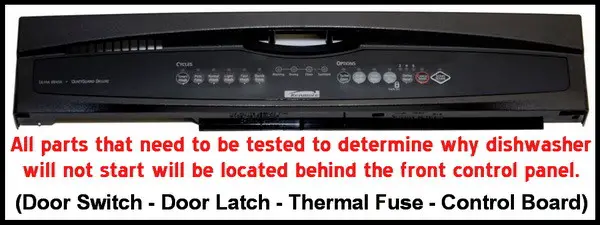
Dishwasher Getting Power?
If your dishwasher does not light up or is not getting power, check where the dishwasher plugs into the wall. Be sure it is plugged in. If the outlet the dishwasher plugs into is a GFI outlet, make sure it has not tripped. Reset the GFI if needed. (To be sure the outlet is getting power you can unplug the dishwasher and plug something else in to be sure the outlet is getting power.) If the dishwasher is plugged in and the GFI has not tripped, then check the breaker on the wall and make sure it has not tripped and is in the on position.
Defective Door Switch?
The next thing that could be causing your dishwasher to not start could be the door switch. This door switch is also sometimes called a door lock or door interlock switch. This switch is a safety feature and makes it so the dishwasher will not run if the door is open. If your dishwasher won’t start, then it is possible this switch is bad. This switch is located inside the door panel. To determine if the door switch is bad, remove the control panel, locate the door switch, and test it for continuity.
Blown Thermal Fuse?
Another part in your dishwasher that could be causing it to not start could be the thermal fuse. This fuse is designed to blow if the dishwasher overheats. If this fuse blows, it will need to be removed and replaced to make your dishwasher work. Most dishwashers have the thermal fuse located in the control panel area. To determine if the thermal fuse is bad, remove the control panel, locate the fuse, and test it for continuity.
Broken Door Latch?
The part that holds your dishwasher door shut is called a door latch. 99% of the time this latch is made from plastic. If this latch becomes broken or cracked, it will prevent your door from closing properly. To determine if your door latch is bad, inspect your dishwasher door and be sure the latch is not broken.
Defective Main Control Board?
The control board in your dishwasher supplies power to all components. If your dishwasher won’t start, this could mean that the board is bad. If you have tested and confirmed working all the other steps above, then the control board in your dishwasher is most likely bad and replacing it would be a smart option at this point.
What to Do When the Dishwasher Won’t Start
Do you have other troubleshooting methods for a dishwasher that won”t start? Please lend a hand to all of the people that read this page seeking help and leave your troubleshooting method below. Thanks.

Written by Keith Schneerer
Certified Appliance Tech · Founder, RemoveAndReplace.com
Keith has spent 30+ years repairing machines, starting as a military mechanic and later maintaining food processing equipment before moving into appliance repair. He founded RemoveAndReplace.com to share field-tested repair advice.
More about Keith →
Whirlpool model # WDF310PAAB4. Hit start button. Select cycle light is blue and select options light is blue. 10 seconds later both lights turn off and dishwasher does not start. Why?
I have a kitchenaid drawer dishwasher, which I love. Top drawer working perfectly, bottom drawer lights foe cycle work on the inside but when you close the drawer to,put the go button on the outside, nothing, they don’t light up and it won’t go?.
My Kenmore Elite wont drain. It’s not a problem with the drain being plugged. The drain cycle isn’t even starting. The lights are still on. Then eventually the machine will turn off. I think it has something to do with the door latch. But can’t figure out why the wash cycle works but not the drain.
I had this blinking light problem on a GE GDF520PGD2WW dishwasher where when you push the START button, the unit would not come on and after a few seconds the green light would start to blink.
Here’s what my problem was and is likely what is happening with many of these GE dishwashers.
Fortunately, the SOLUTION IS SIMPLE:
PROBLEM: The dishwasher door has a plastic strike that is shaped like a fin. When the door is shut, the strike (fin) depresses a switch on the dishwasher’s housing. The problem in my case is that the strike was not hitting the switch (attempting to strike below the switch) If you use a flashlight, it’s hard to tell but it is detectable. The reason it is not hitting the switch is because when the dishwasher was mounted to the underside of the counter top, the screws drew the top of the housing ever so slightly upward and caused the top of the unit to bow. Thus, the strike misses the switch by striking just below the switch. To test this, reset the unit by pressing and holding the START button for 3 seconds. While the door is open, use a knife to depress the switch on the housing of the unit (where the fin would normally strike the switch). Then press the START button. If the dishwasher comes on, then you know this is your problem. Remove the knife and the unit will stop (simulating a door open condition).
SOLUTION: Place a shim (perhaps 3/8″ thick or so) between the countertop and the top center of the housing (just above the strike plate switch). You goal is to force the top of the housing to push downward about an 1/8″ so that the door strike (the fin) will hit the switch when the door is closed. To wedge the shim into place, you’ll need a small crowbar or screwdriver to create the needed gap to slide the shim into place. Test it and once positioned where it works reliably, glue the shim into place (Elmers is fine).
The cost: $0 and 20 easy minutes of your time.
Ed,
It may be a breaker issue. The breaker may be bad and therefore shutting off your dishwasher. Try this to be sure… Use a heavy duty extension cord and connect the dishwasher to it. Then plug the dishwasher extension cord into another outlet ON A DIFFERENT BREAKER and run a wash cycle. This will be for testing purposes only. If the breaker does not reset, you know the issue is in the dishwasher. Further troubleshooting will be needed at that point. Let us know what you find, and if you need more assistance, please supply us with the model number of your Kenmore dishwasher.
-RR
I have a similar but not exact same problem with a 2010 Kenmore dishwasher. The start button will light but immediately go out. If the breaker is recycled, the machine starts and works well…until the next time we try to start it. Then we have to reset the breaker again. Any ideas?
We have a older (2009) Kenmore dishwasher
the following light up:
– steam sanitize
– china gentle – lights up the heated dry
– normal wash
– pots pans
– smart wash
the following do not light up:
– start
– cancel
– turbo zone
– delay hours
– heated dry (unless linked to the china gentle dry)
– Hi Temp
– quick rinse
– one hour wash
When the breaker for the dishwasher in the fuse panel is cycled the cancel light comes on and it sounds like the dishwasher is doing some sort of initial testing but then the cancel light goes out and subsequently the machine reverts to the lighting problems listed above.
Thoughts?
Chris