My TV is a 55″ Smart LED/LCD HDTV. Made by Vizio. The TV picture has gone out but sound still works. Screen is NOT cracked. The screen is black. TV powers on. The LED light comes on briefly. Screen sometimes flickers. The screen flickers in a dark room for a split moment. Turning the TV from ON to OFF causes it to flicker white and gray. This is before the sound will come on. I removed the back panel cover and checked the boards. I am not sure what to look for to see if a board or a part on a board is damaged. The sound works. Is there a way to check and see if one of the boards is causing this issue? If I do find the problem, is there somewhere to buy a new board for my TV at a decent price?
 Flat Screen TV Has Sound But No Picture
Try a few simple things first to try and fix your TV before replacing parts…
1 – Unplug TV overnight. Plug back in and SOMETIMES it may work and fix your issue.
2 – Unplugging the TV and everything hooked to it, then plugging it back in may clear the problem.
3 – Be sure the TV is set to the correct input. If it is set to DVI or Component input when it should be in the HDMI input this will cause issues.
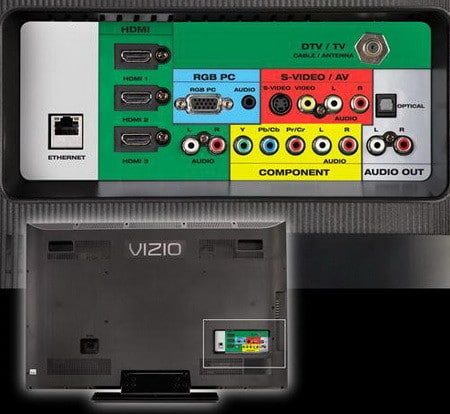 Back of HDTV inputs – Try another input if no picture
If the 3 quick fix checks above do not resolve your issue, try this:
Press the TV menu button. If no menu appears the problem could be a bad tcon display board or backlight inverter board. Turn off the room light and check TV for backlight glow. If it has a glow then the problem can be a loose tcon connection or bad tcon board. Check connections.
Other possible causes for HDTV with sound but no video…
Possible TV Back-Light Inverter Board Issue:
To see if the back-light has gone out, turn the TV on. Turn the lights off and make the room dark. Shine a flashlight onto the screen at different angles. If you can see some of the picture then the back-light has gone out. (It should glow a slight grey if it’s working) To fix this you need a TV backlight inverter board. You can buy one online for a relatively low price. Usually the board will have a few bad capacitors on it. You could attempt to repair it yourself if you can identify which capacitor has gone bad. A capacitor kit for a TV board is ultra cheap. You are best off buying the backlight inverter board and installing it yourself. A back-light inverter board should be from $10 to $25 dollars depending on your TV model.
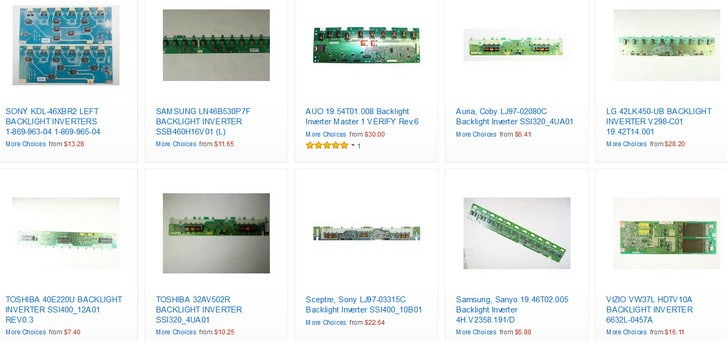 Back-light Inverter boards for all HDTV’s
Possible Power Supply Board Unit Issue:
If you cannot see the screen at all using the flashlight method, then you may have a bad power supply board or loose wire/connection. If you can still hear the TV sound then it may be the power supply board. If you find the power supply board is bad and you decide to order a new one, make sure the power board part number matches with the one in your TV, there are many different types out there for all TV’s. The power supply board will cost around $20 to $30 dollars. (Replacing the power supply is the last resort as if the sound is working but there is no picture, this is most likely not the issue but on SOME TVs this fixes the problem)
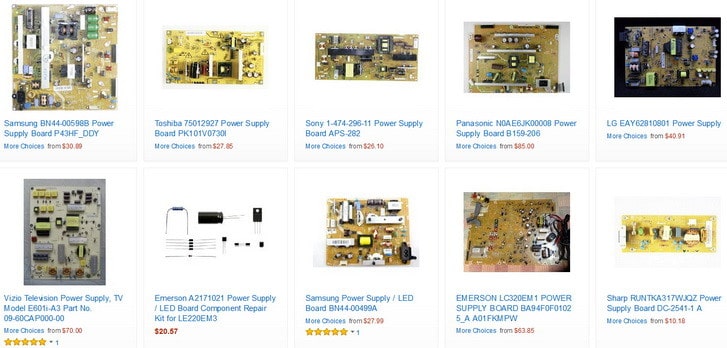 Power Supply Boards for HDTVs
NOTE: On some model TVs the Inverter board and the Power unit board are on one board, so check your TV model number to be sure you are ordering the correct parts.
MORE THINGS TO CONSIDER:
If you have your TV on an HDMI input, the HDMI board may have a bad capacitor. (With this issue there will be no sound as HDMI carries sound as well as picture) If you find the HDMI input is bad, hook your TV another input and order the correct HDMI board in the meantime.

Main Board Bad?
You may have a bad main board. There are videos below to help you to determine if you have a bad main board and how to test certain components on any type of circuit board in your TV.

If you have a Vizio TV, Vizio has a year replacement warranty. If your TV is under a year old contact Vizio or the maker of the TV to see if it is covered by warranty. TV brand links for warranty claims listed by popularity: Samsung, Vizio, LG, Sony, Sharp, Panasonic, Insignia, Toshiba, JVC, Philips, Magnavox, Sanyo, and Emerson. These links will help you to contact the manufacturer to file a warranty claim.
LCD TV Easy Fix (sound but no picture)
TV Has Sound But No Picture Troubleshooting Guide
No Picture LCD TV Repair
How to test Capacitors, Diodes, Rectifiers on TV Power supply using a Multimeter
Test diodes, capacitors, bridge rectifiers in TV power-supply boards, “how to use multimeter”
to test or read TV parts on power circuit boards commonly in LCD, LED, Plasma.
Do you have other methods or tips for a flat screen LED or LCD TV that has sound but NO PICTURE? Please leave a comment below to assist others in solving what may be wrong with their TV as well.

Written by Keith Schneerer
Certified Appliance Tech · Founder, RemoveAndReplace.com
Keith has spent 30+ years repairing machines, starting as a military mechanic and later maintaining food processing equipment before moving into appliance repair. He founded RemoveAndReplace.com to share field-tested repair advice.
More about Keith →
Is this what to expect now for new tvs 2 years and they are junk especially Vizio have two that broke right at 2 year mark definitely will never buy a Vizio again
Mr Bumpy,
If you have replaced multiple boards and components in your Samsung TV and you still have “TV Shutting off after 20 or 30 minutes but still has sound”, you need to completely factory reset your TV and disable all power saving options.
HERE IS HOW:
-Get the Samsung Remote
-Go to Menu
-Go to PLUG & PLAY
-Scroll to AUTO PROTECTION TIME and set to OFF
-Press RETURN to exit one level and go to ECO SOLUTION
-Turn Energy Saving to OFF
-Turn AUTO POWER OFF to OFF
It’s those Samsung settings that make the TV turn off sometimes.
Do you use Anynet?
That is a Samsung HDMI-CEC feature. This can sometimes accidentally link to a different device and turn the screen off.
-RR
I have a Samsung 55″ Ln52b750. The screen shuts off after 20 to 30 mins of watching but there is still sound. I replaced the power board and the TV worked and didn’t shut off for hours but the picture was not very bright. I turned up the brightness and then it would flicker and click off. So I then replaced the main board which got me to where it is now, shutting off after 20 min but there is still sound. So then I replaced the t-con board. Same result, shut off after 20 but still sound. I will do the trick you wrote about in checking the back light (with flashlight on screen) Would you have any other tips? Is it time to cut and run?
Ki-Ho Chung,
You may have a bad HDMI port(s) as in the wiring that connects the HDMI ports in the TV (inside the TV behind where the HDMI ports are located) may have a wiring issue.
Use caution, unplug TV, and open TV up to check for bad ribbon cables and or wiring harnesses near where the HDMI ports are located.
(Be aware that some components in the TV may still hold voltage, unplug TV and wait a few hours before opening TV up to avoid electric shock)
-RR
I have another cable box, which was hooked up to another TV which is fine, to try it and gave same results.
I tried all four HDMI ports and gave same results.
Ki-Ho Chung,
If your Samsung TV shows the image perfectly from the SD card, then you know the screen is okay.
You may have a bad coax cable that is causing the NO SIGNAL DETECTED.
Usually WEAK SIGNAL from a cable box may mean the cable is not working or there is an issue with Signal strength.
Or the cable box is OFF, cable box is faulty, etc…
You may want to call your cable company.
Have you tried hooking up another component to the TV either through HDMI or other input to see if you get the same result?
-RR
I have Samsung TV model # UN46C6300SFXZA. One day suddenly no picture is showing from all sources (all HDMIs, Components) but with sound. Message is “no signal detected”. From TV source it shows horizontal white and black flickering image with message “weak signal” in the center of screen (I have no antenna cause I have cable service). Only image is showing from the source of USB reader with SD card (not CF card). Still it displays all the list of sources.
What is the problem? I will appreciate any help. Thank you very much.