If your Samsung refrigerator is not cooling, it COULD be because it is in Demo Mode. This mode is also called Exhibition Mode, Cooling Off Mode, or Showroom Mode.
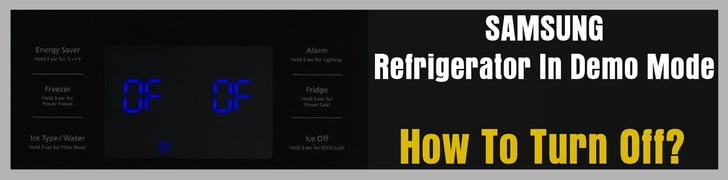 Samsung Refrigerator In Demo Mode
What is Demo Mode on a Samsung Refrigerator?
This is a mode built into the Samsung refrigerator to display them in a showroom so the lights work but THE COMPRESSOR DOES NOT therefore the fridge will not cool. You may have purchased a “showroom model” Samsung refrigerator or you may have inadvertently put the fridge into this mode yourself. Either way see below for HOW TO GET THE FRIDGE OUT OF DEMO MODE.
NOTE: There is no information about Demo or Cooling off mode in you owner’s manual since this mode is not for consumers. Some Samsung model refrigerators have a label attached on the display therefore you would have an understanding of what Demo mode is. If demo or cooling off mode is activated and the label is missing, you will not understand why the refrigerator will not cool.
What Happens When in demo mode?
- When door is open, internal Lights are on but the refrigerator is not cooling.
- The refrigerator showroom store sets the refrigerator to Demo mode to save power consumption.
- The consumer will not know about cooling or demo mode and will notice that the fridge will not cool.
If your refrigerator is not cooling, it may be in Demo Mode. Demo mode is a feature used by retailers to display the refrigerator without running the compressor.
To see if your Refrigerator is in Demo Mode
Type A models display “OF FF” if the refrigerator is in demo mode.
Type B models have the icon on the display illuminated if the refrigerator is in demo mode.
Type C models display setting temperature if the refrigerator is in demo mode.
See images below for examples of Type A, Type B and Type C models and also Type A and Type B display panels.
How To Remove Your Refrigerator from Demo Mode
If your refrigerator is in Demo mode, press the two buttons together as shown in the images below in the red boxes for 3 seconds to resume normal operation.
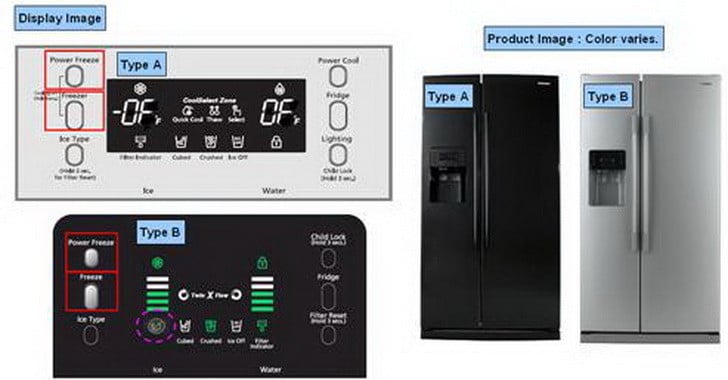 Samsung refrigerator display panels – demo mode – what to press to deactivate
For the rest of the Samsung refrigerator models, Please find the information tables below…
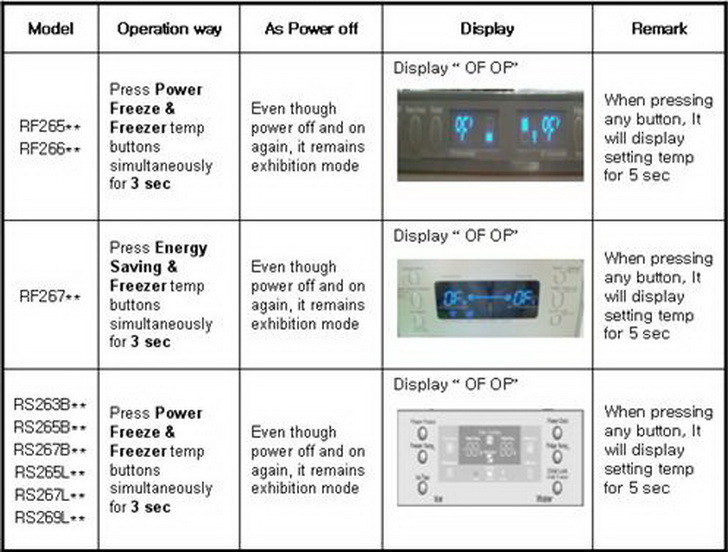
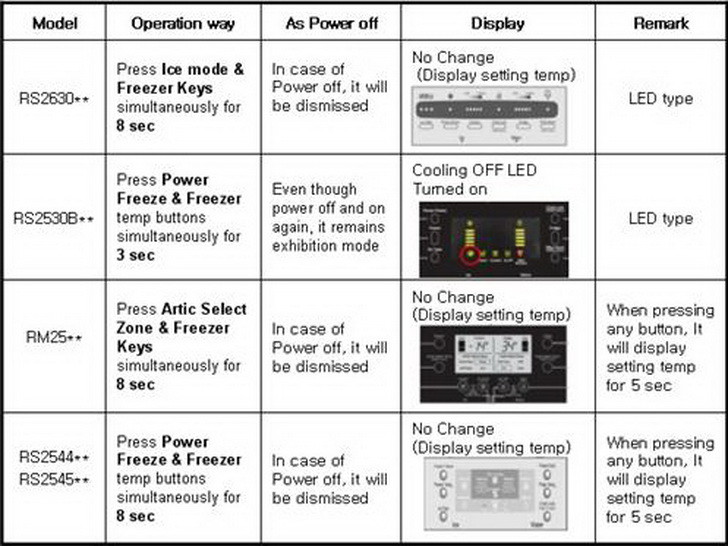 Samsung Refrigerator US Main Models – How To Get Out Of DEMO MODE
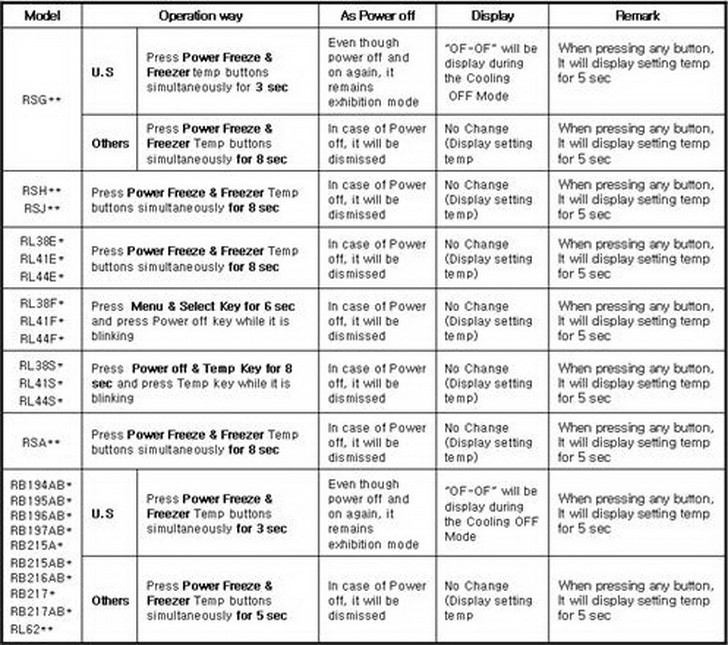 Samsung Refrigerator US & Other Countries – How To Get Out Of DEMO MODE
Unplug Refrigerator from Power for a Reset
If none of the above works for removing demo or showroom mode from your Samsung refrigerator, the last thing to try would be to unplug the refrigerator from power for about 10 minutes. This will attempt a reset and make it so your refrigerator should now be reset and showroom mode or demo mode may now have gone back to normal mode.
What Else do I Need to Know?
- If you bought a display model, make sure if it is on display mode when it initially powers on.
- During Demo or Exhibition mode… If both compartment sensors detect the room temperature higher than 65ºC, it will cancel the exhibition mode automatically and return to freezing operation. There is no buzzer sound by the temperature when cancel the exhibition mode.
How to disable Cooling Off Mode For Samsung Family Hub Refrigerator
Have questions about your Samsung refrigerator and how to get it out of Demo Mode, Exhibition Mode, Show Room Mode, or Cooling Mode? Please leave a comment below and we will be happy to assist.
Please Share The Love


Written by Keith Schneerer
Certified Appliance Tech · Founder, RemoveAndReplace.com
Keith has spent 28 years repairing machines, starting as a military mechanic and later maintaining food processing equipment before moving into appliance repair. He founded RemoveAndReplace.com to share field-tested repair advice.
More about Keith →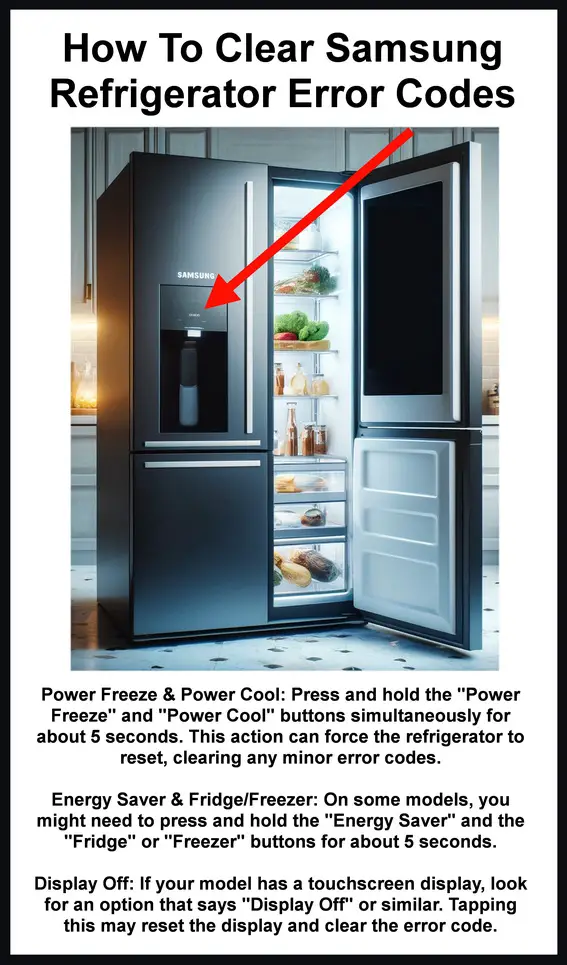
I have a RT 60 Samsung fridge. IT gives 4e and 21e error.
I’m afraid that now it’s in demo mode. How Can I let It work correctly?
Salomão Francisco Muchanga,
When the error did show on your Samsung Refrigerator, was it nr 1, or was it possibly another error code that showed up?
The error code nr 1 is not in our database of error codes.
Can you try and duplicate the issue and get the error code again and be sure what it is?
-RR
My Samsung RSA1WTPE fridge does not freeze, that is, it shows the temperature in the panel much higher than the one set by the manufacturer, it does not shows any errors in the panel, I already tried to disconnect the power plug and to turn on again but the Problem is not resolved.
Yesterday the fridge temperature was blinking continuously and showing nr 1, then I turned off the power and switched on again and the temperature blinking stopped … but the fridge still not freeze.
The panel is not showing any error, it looks like functioning normally, but with higher temperatures.
The temperature setting for freezer is -25ºC to 0ºC and for fridge is 1ºC to 7ºC.
But today the temperature is above the 18º positives for freezer and 16º positives for fridge.
Claudia Swisher,
To disable Cooling Off mode or DEMO MODE on your Samsung Refrigerator, touch and hold the words “Energy Saver” and “Power Freeze” on the display panel at the same time. Continue holding until you hear a chime sound and both temperatures for the freezer and fridge display. If after 10 seconds, OF OF is displayed again, then Cooling Off mode or DEMO MODE was not deactivated. Again touch and hold “Energy Saver” and “Power Freeze” until you hear the chime and the temperatures display.
If it keeps going into DEMO MODE by itself, then most likely you have a bad front panel control board or possibly the main control board is somehow setting the fridge to demo.
-RR
My fridge has kicked itself into demo mode twice! In a month. The last time while we were out of town. All the food spoiled. Samsung has tried to tell me someone brushed up against the fridge and set it into demo… or there was a fluctuation in the current coming into the fridge. OR there was a general outage. I need to know how to prevent this. I’ve lost too much food to this demo mode. Twice in 34 days. Any tips for prevention?
Joe coleman,
Okay, if your Samsung fridge was in DEMO MODE, and you have it OUT OF DEMO MODE, give the fridge some time for the compressor to run. Is the fridge temp controls turned to a cold setting?
-RR
Brilliant…. it’s back to normal but unfortunately it’s not cooling.