Recently we had a power outage and the display on our refrigerator went blank. The refrigerator is working but the screen/display panel is not. Our power went out for a few hours and now we can’t get the display panel working again. The fridge is cooling and so is the freezer. The only issue is that the display is not working and not showing the numbers. I have heard you can press a button on the display and it will reset it. What do I press to get the numbers to come back? I have a Samsung refrigerator.
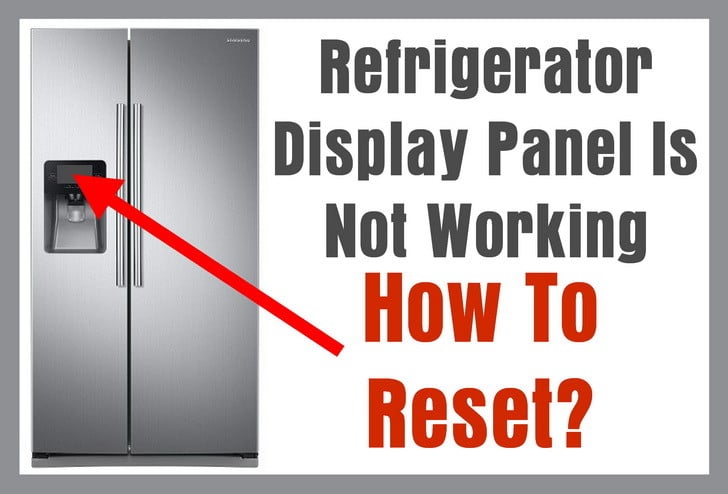 Refrigerator Display Not Working
Usually after a power outage your refrigerator will reset itself. The fridge and freezer section should be working just fine after the power outage. The only issue is the digital display panel will not be lit. Some refrigerators may not begin cooling again and the reset needs to be done once power is restored. We have seen many people having all the food in the refrigerator and freezer going bad as the power was out for many many hours.
If after a power outage, your refrigerator is cooling or not cooling, you will usually need to reset the front display panel. This is to get the panel working again and also to get the refrigerator to begin cooling again if applicable. All the below methods and conditions for reset will vary depending on the make and model of your refrigerator.
We will show you which buttons to press to reset the display control panel on your refrigerator. Many of the examples below apply to Samsung refrigerators but also can apply to GE, LG, and many other refrigerator makes and models. If your fridge flashes E and 5 after a power outage, or is blinking a blue letter, you can use the methods below to reset your refrigerator.
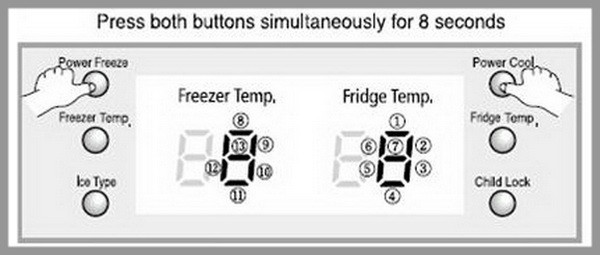 Refrigerator display panel reset example
To reset your refrigerator display panel: (Different methods for different refrigerators)
Refrigerator Display Reset Method 1 – Hold down the “Energy Saving” and “Lighting” buttons at the same time for 10 seconds (or top left & right buttons). Your display panel should immediately return to normal.
Refrigerator Display Reset Method 2 – Press “Power Freeze” & “Power Cool” at the same time for 10 seconds and the display should reset and come back on.
Refrigerator Display Reset Method 3 – Hold the top left and top right soft touch buttons on the screen “power save” and “lighting” button and hold both buttons for about 8 seconds and it will reset.
Refrigerator Display Reset Method 4 – Press the “Freezer” and “Ref” buttons at the same time for 8 seconds and the reset should work.
Refrigerator Display Reset Method 5 – Press and hold the “power freeze” and “vacation” buttons for 8 to 10 seconds and the display will reset.
Refrigerator Display Reset Method 6 – Press and hold the “energy save” and “lighting” button for 10 seconds and the display will reset.
Refrigerator Display Reset Method 7 – Press and hold the “ice type” and “filter reset” button for 10 seconds and the display will come back on.
Refrigerator Display Reset Method 8 – Press and hold down “quick freeze” and “vacation” for 8 seconds and the display will reset.
These refrigerator display reset methods should reset the display panel on your refrigerator. If it does not, you may have a bad display board, bad main control board, or have a wiring harness issue.
- There are many types and models of refrigerators. The general way to troubleshoot a refrigerator that has a blank display panel, is to first try the reset methods above. If nothing resets the display, you will need to troubleshoot to find out what is causing the display to be blank.
- First try to see if the display panel may have a bad or loose connection with the wire harness. If you find it is connected properly and secure, you may have a bad display board. If you can determine that the display panel and display board are working properly, you need to trace the wire harnesses to find where the issue is coming from.
- If the wire harnesses are not damaged and secure, you may have a bad main control board. The main control board is located behind the refrigerator under a small rectangle shaped panel. Test all components and find which part is causing your no display issue. Below are some parts for all refrigerators including the display panel, display board, wire harnesses, and main control boards for all refrigerators.
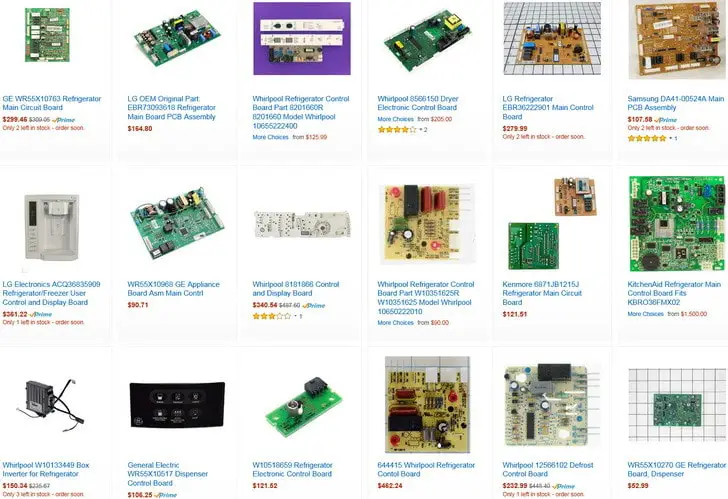 Refrigerator display boards and main control boards parts
If your refrigerator is NOT COOLING, check the page here for how to troubleshoot a refrigerator not cooling.
If you have an issue you cannot fix yourself on your refrigerator, please leave your question below and we will be happy to assist you with your refrigerator display problem. Please supply us with the make and model number of your refrigerator when asking a technical question.

Written by Keith Schneerer
Certified Appliance Tech · Founder, RemoveAndReplace.com
Keith has spent 30+ years repairing machines, starting as a military mechanic and later maintaining food processing equipment before moving into appliance repair. He founded RemoveAndReplace.com to share field-tested repair advice.
More about Keith →
I have Whirlpool god refrigerator model # GI5SVAXVQ01
We are snowbirds and just returned.
(When we leave we unplug everything)
I plugged the fridge and it doesn’t start to run.
Open the doors lights on.
Front panel if you press any button “000” come across the screen and when released they go blank.
Never had an issue before and have been doing this for 14 years.
I’ve had the fridge for 3 years.
No clue how to turn cooling on.
The control panel to my whirlpool refrigerator is not working after an outage.
I unplugged it for 5 min then plugged it back in and still not working.
Model # GI5FSAXVY02.
After a power outage, my Whirlpool Gold standard MODEL: GI5FSAXVY01 refrigerator has stopped working. The fridge is not cooling and I do not hear any noises however, the lights are on and when I press a button on the control panel all lights illuminate. When I press the ice or water button an alarm goes off continuously until I remove my hand. I have tried unplugging the fridge and tripping the breaker.
Hi there i have a sumsung side by side fridge/freezer model RSJ1KERS it flash small dot something like half 1 on the freezer side on panel and on displaying panel of fridge side its blank and the condessor fan motor does not run because of that my fridge is not working someone can help me please…
How do I reset a Refrigerator Hitachi?
Model Number: r-s700gru8
I currently have a Samsung American fridge freezer Model number is RSA1WTMH and I have activated the child lock.
However I now need to deactivate it and it is not responding.
I’ve turned the power supply off and even tried to do the display reset but these are not working.
I have a GE refrigerator mn#cfe29tsdbss 2013.
After I plugged the unit in after replacing a evap fan motor, the display on the ice control panel keeps turning on, displaying “GE” and shutting off, restarting display and looping over and over.
I tried a reset by unplugging the fridge between 30 and 45 seconds, then re applying power with no luck.
I am not sure if the main controller or the display board is bad at the ice maker door.
The refrigerator is cooling, and freezer is fine.
The ice and water does not work and no ability to control temperature up and down, cant access menu as the display resets over and over.