LG WASHER IE ERROR CODE = WATER INLET ERROR = NO WATER ENTERING WASHER is the definition of the IE or 1E error code on your LG washing machine.
If your LG washer is getting the IE error code, there can be a few reasons why the IE or 1E error code can display. The IE error code on the LG washers display is indicating water did not fill the tub or it did not fill properly in the allotted time. This can be from a faulty water inlet valve, drain hose issue, bent water hoses, the water valves to the washer are not “open”, or there may be a communication or wiring harness issue. All these issues can cause your LG washer to display the error code IE. Below we will show you what to check and how to fix and clear the IE error code.
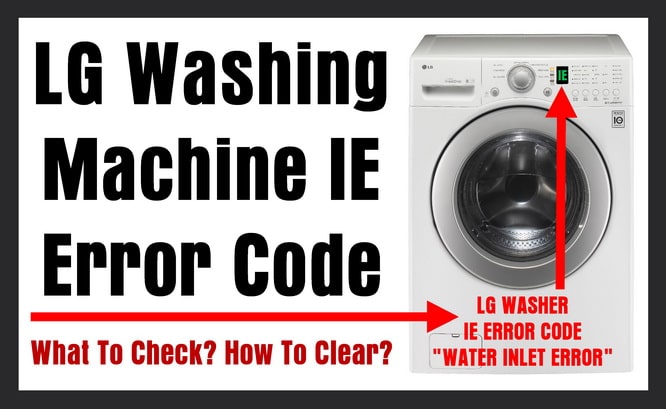 LG Washer Getting IE Error Code – What Does IE Mean? – How To Clear Reset Fix IE Fault Code?
When your LG washer shows the IE error or fault code, this means WATER INLET ERROR. This error code is telling you the washer tub did not fill with water in a specific time. The error means the water did not reach the correct level within 8 minutes.
LG Washing Machine = IE Error Code = NOT FILLING WITH WATER = WATER INLET FAULT
What to check and how to clear the LG washer IE or 1E error code:
1 – Check to be sure the drain hose is not stuck too far down the standpipe. (If it is too far down then the WATER MAY FILL AND DRAIN AT SAME TIME)
 WASHER DRAIN HOSE TOO FAR DOWN STANDPIPE
WATER FILLS AND DRAINS AT SAME TIME
2 – Check and be sure the HOT and COLD water supply valves are fully open.
3 – Check that the HOT and COLD water supply hoses are not bent, damaged, or clogged with hard water.
If the above 3 simple fixes all checked out good and no issues, next remove the water hoses to check for proper waterflow…
To check that water is flowing without interruption to the washer:
1 – Turn OFF the HOT and COLD water supply valves on the wall.
2 – Remove the HOT and COLD water supply hoses FROM THE WASHING MACHINE. (Do not remove the water lines from the wall)
3 – While the water hoses are removed, check where the hoses connect on the washer and be sure the INLET VALVE FILTER SCREENS are not clogged.
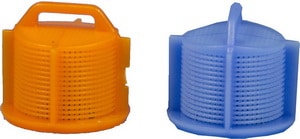 LG WASHING MACHINE INLET VALVE FILTER SCREENS
BE SURE THEY ARE NOT CLOGGED
4 – Get a large bucket to hold a few gallons of water.
5 – Place the ends of both the HOT and COLD water valves into the bucket.
6 – Turn the water valves on the wall to OPEN and run water through the hoses to test water flow and pressure.
7 – If water flows with no issues then you may have an issue with the water inlet valve.
If all the above checked out, next you need to check the water inlet valve. You will need to get to the water inlet valve and check to be sure it is secure and the wire harnesses to power it are secure and connected properly. You can test the valves with a multimeter to determine if it is faulty. If you find that the water inlet valve is not working, you should replace it.
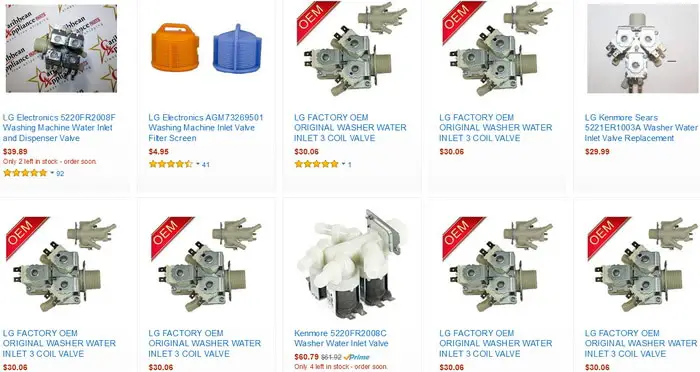 LG WASHER WATER INLET VALVES
IF WATER INLET VALVE IS FAULTY – REPLACE IT
OEM WATER INLET VALVES FOR LG WASHERS ARE ABOVE
NOTE: If you get water fill and both water inlet valves are working properly and you still get the IE error code, this MAY indicate a problem with the water level pressure switch. So check the pressure switch to be sure it is operating properly.
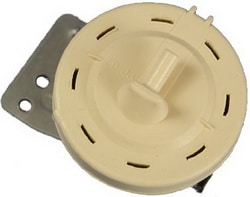 LG WASHING MACHINE WATER LEVEL SENSOR PRESSURE SWITCH
LG Washing Machine Displaying Fault Code IE or 1E = The official error code is IE but may look like 1E. So if your LG washer shows IE or 1E error or fault code, you know the washer is not receiving water.
Do you have questions about your LG washing machine getting the IE or 1E error code and need HELP? Please leave a comment below and we will be happy to assist.

Written by Keith Schneerer
Certified Appliance Tech · Founder, RemoveAndReplace.com
Keith has spent 30+ years repairing machines, starting as a military mechanic and later maintaining food processing equipment before moving into appliance repair. He founded RemoveAndReplace.com to share field-tested repair advice.
More about Keith →
hi,
just wanted to say thanks for posting this…
your first solution worked for me :)
the tub would not fill up because as the
water went in it was siphoned out down
the drain… pulled back the hose a bit…
problem solved… easy breezy!… thanks again!
Ben Stewart,
Concerning the water issues with your LG washer getting the IE error code…
First check to see if the water hoses behind the washer are kinked!
Also, be sure you have the water supply taps FULLY OPEN.
Sounds like a clog in the line that brings water to the detergent compartment.
If one side gets water and the other does not, you need to troubleshoot the water lines.
Check the water lines inside the washer where water flows to the detergent compartment.
You may have clogged inlet filters that prevent the water from coming in properly.
Check where the water hoses meet the washer.
Clean or replace the inlet filters.
Let us know what you find.
-RR
On my LG washer I have had issues with an IE error code for some while now, however we have just pressed ‘play’ and the wash had continued until the next cycle, then another IE code, and we would just press play again and it would finish.
This was obviously inconvenient as we would have to stay by the machine and couldn’t leave it to wash by itself.
Now though we changed from liquid to powder detergent and we’ve noticed at the detergent compartment isn’t being used.
The detergent is staying completely dry.
I must assume that this was always the case since the first IE error code, only noticed now that we changed to powdered detergent.
I blew out hoses from inlet valve and they are fine.
Finally I sat by a wash with the detergent compartment out and noticed that though the water seems to get in, and pushes out of the pre-wash (right ) side, it certainly doesn’t come out on the main wash (left) side.
It just appears to flow out the back (after the prewash)
Does that sound like I need to replace the inlet valves or would there be a blockage or something else?
I had already replaced the drain valve after constant DE error codes about 6 months ago.
When I first power on my LG / Kenmore washing machine you get the sound of what I think is the drain pump running when I try to run a cycle through, the water runs into the machine but never fills the tub after a while I get an IE error code and it shuts off. Appreciate your help with this matter.
So I’m getting an ie error but the washer has over filled. Water all over. I’m guessing the water level sensor. Help
Thanks all for the suggestions. After E1 code on my machine, I found 2 of the inlet nozzles completely plugged with mineral deposits on the water/soap box: main & prewash. Screens were only slightly dirty. Hope this helps.
LG front load washing machine. Error code is IE. It takes water sufficient. And drains immediately without wash.
And also I can’t use rinse and spin option.
It only does that spinning.
What to do. Kindly guide please. Thank you.