Samsung Refrigerator Beeps? Alarm constantly beeps on Samsung refrigerator. The refrigerator beeps at all times when no one is near the refrigerator. The beeping/chiming occurs randomly and coming from the dispenser area. Refrigerator has an audible alarm when setting the Flex Zone Drawer. What can cause the alarm to go off on a Samsung refrigerator? Samsung Support Here…
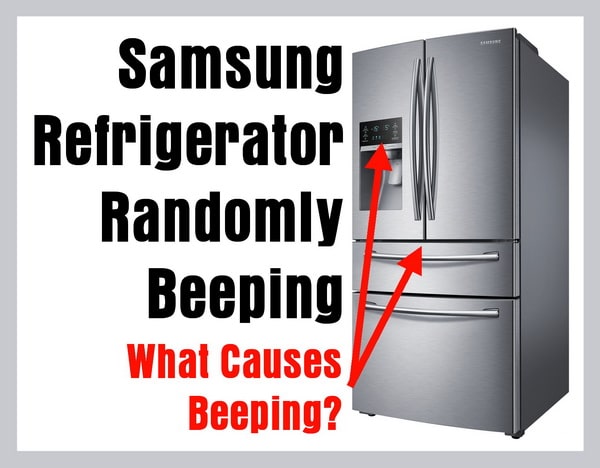
The Samsung refrigerator alarms are the “Door Alarm” and the “High Temperature Alert Alarm”. (If the refrigerator will not stop beeping randomly, press the ALARM BUTTON to OFF or NOT ILLUMINATED until you can troubleshoot the issue)
Samsung Fridge Beeps Quick Fix
DOOR ALERT ALARM
-The “Door Alarm” beeps when the door is not completely closed or left open for approximately 3 minutes.
THE DOOR ALARM STOPS BEEPING WHEN THE DOOR IS CLOSED – CLOSE DOOR
HIGH TEMPERATURE ALERT ALARM
-The “High Temperature Alert Alarm” beeps and the temperature display blinks when the refrigerator senses a high temperature rise.
THE HIGH TEMP ALARM CEASES TO BEEP WHEN THE TEMP IS COOLED TO NORMAL – SET TEMP LOWER
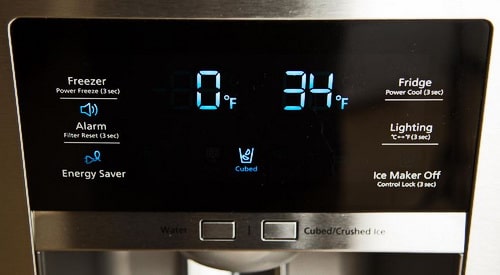 Press ALARM BUTTON to OFF or NOT ILLUMINATED until you fix the issue…
Samsung Refrigerator Beeps Alarm Check
The temperature display is blinking?
It is too warm in the refrigerator and the fridge will beep indicating high temperature.
LOWER TEMPERATURE or CHECK THAT FRIDGE IS COOLING PROPERLY
The alarm button is illuminated?
The refrigerator doors are detected to be open.
TURN ALARM BUTTON OFF TO SEE IF THE BEEPING STOPS.
Samsung Refrigerator Beeps Troubleshooting
1. Open the fridge doors to inspect inside and confirm nothing is blocking them from completely closing.
2. If the temperature display blinks but the fridge doors were not left open there could be a cooling problem.
MORE INFO: How To Troubleshoot Refrigerator Not Cooling
3. Check that the wiring was installed properly on the top of the refrigerator door if this issue has occurred since install.
4. Make sure the alarm sound is coming from the refrigerator and not another item in your kitchen.
To Be Sure Beeping Comes From Samsung Refrigerator And Not Another Appliance
1. Press the buttons on the display panel to see if the beeping sounds different to be sure beep is not coming from elsewhere.
2. Leave the refrigerator door open for 3 minutes to hear if the alarm you hear is the same as the fridge alarm.
3. Remove power to the refrigerator to see if the beeping continues when the refrigerator is powered off.
What To Check If Samsung Refrigerator Continually Beeps
1. Beeping occurs at random times without even touching the refrigerator.
Unplug or remove power to the Samsung refrigerator to attempt to reset the beeping problem.
2. Was the door removed when you received the fridge? The wire harness on top of the door is partially connected and this can cause the random beeping.
Find the wire harness on top of the door and check to be sure it is fully connected and no damage is found.
3. The ice maker display switches from water to crushed ice to cubed ice and therefore beeps.
Try resetting the ice maker to reset this issue.
4. The display panel indicates temperature and cycles thru the ice settings.
Check this by inspecting the wire harness for partial connection on the display control board.
5. The REED SWITCH (on some models) can become faulty and cause an OPEN DOOR ERROR and might BEEP, replace REED SWITCH if found faulty.
6. The flex drawer causes the beeps as it changes temperatures.
-Reset drawer by flipping the switch from OFF to ON. You should now be able to change the temperature and stop the beeping.
-Remove the plastic film from the temperature control panel on the drawer, as this has shown to fix the issue.
-Try resetting the connector that connects the wires to the flex door face. (SEE IMAGES BELOW)
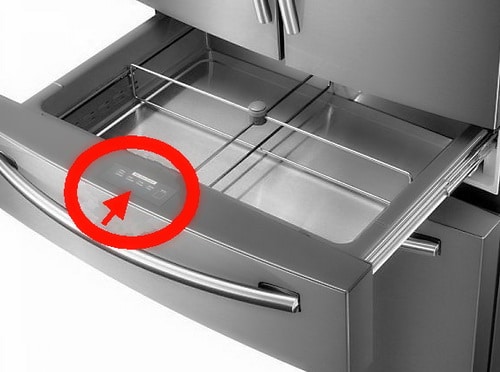
Samsung Flex zone Drawer Control Panel
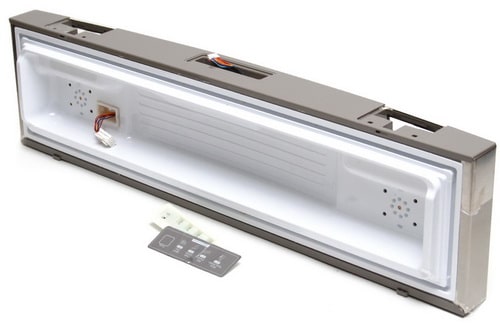 Samsung Flex zone Drawer Back Panel View
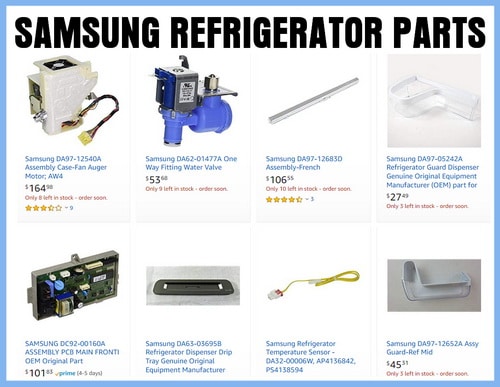 Parts for Samsung Refrigerators
Other Issues With Samsung Refrigerators
FOR MODEL NUMBERS: RF28HMEDBSR, RF28HFEDBSR, RF30KMEDBSR, RF31FMEDBSR, and more.
1. The flex zone drawer changes temperatures on its own and then beeps.
2. Flex zone control panel is unresponsive and randomly beeps.
3. The control panel illuminates and changes from water to crushed ice to cubed ice on its own.
4. When dispensing water the refrigerator switches to ice by itself.
5. Once the compressor spins down, it beeps and then switches from cubed to crushed ice.
MORE INFO: Samsung Refrigerator Flashing – Blinking – Faults – Reset
If you have observed any of the problems above and found a resolution for the control panel chiming once or twice then changes from water to ice, the flex zone drawer changing the temperature on its own, flex zone drawer temperature panel not responsive, or the display panel switches to ice after dispensing water. If a Samsung refrigerator owner or an appliance technician has resolved any of these specific issues, please leave a comment below and let us know how this was resolved.
Samsung Refrigerator Control Panel Features Explained
Do you have questions or comments related to a Samsung Refrigerator Randomly Beeping? Please leave your issue and model number below and we can assist with troubleshooting.

Written by Keith Schneerer
Certified Appliance Tech · Founder, RemoveAndReplace.com
Keith has spent 30+ years repairing machines, starting as a military mechanic and later maintaining food processing equipment before moving into appliance repair. He founded RemoveAndReplace.com to share field-tested repair advice.
More about Keith →

I have a Samsung 3 door refrigerator. It has 2 refrigerator doors and a bottom large freezer drawer. It does not have a water or ice dispenser in the top door. There is an ice maker in freezer. Not able to attach a water line to it so we do not use it. Ice off alarm is constantly beeping. Since it is not used would removing it stop the constant beeping?
Samsung Model # RF2566AEWP beeps at random times.
I cannot seem to find out where it’s coming from or how to stop it.
It’s not the same as the ‘door open” beep.
AND when it’s beeping I can turn on and off the E. Saver light.
When it, finally, quits beeping the E. Saver light button has NO effect.
This seems to happen during the night and is waking us up.
Samsung RS2545SH/XAA (side by side refrigerator), started to beep during the night, the POWER FREEZE led turns on and off by itself and beeps each time, as if someone was pressing the key.
At the same time temperature starts to rise, the freezer -40C went up to -27C. Unplugged power for a minute, replugged, came back beeping, after few hours temp went back to -40C and beeping stopped. This refrigerator already wet the floor few times, and there is no water line connected to it (this is the second fridge and we don’t use it for water or ice), what seems to be the de-icer malfunction. I was thinking maybe the POWER FREEZE key is shorting itself, or the control board (DA41-00104Y) is going crazy and malfunction. Suggestions?
My Samsung French Door SRF680CDLS model will not stop changing everything & the beeping is very quick & constant at times as well as stops altogether for minutes & then starts again. The fridge is working fine, the temperature is fine. I have followed every suggestion, yet can not fix the problem. It is driving me insane & I really need some help finding out what to do to stop it please
Samsung RS277ACWP/XAA Ice maker. Ice cubes stick in plastic tray and don’t drop out when tray twists and when tray returns into position water pours onto full tray and overflows and freezes elsewhere.
Is there anything you can spray on the ice cube tray to prevent the ic cubes from sticking?
Samsung RS277ACWP/XAA side by side refrigerator.
Temperature set at -2 and 38.
Every few hours Power cool beeps on and off frequently but randomly gradually cooling to 27 then stops beeping until temperature is at 38 for a while.
Tried unplugging and hard reset several times but no change.
Would appreciate any suggestions.
Have you found a solution? I have the same problem. We disconnected the ice make to see if it was a sensor issue but the beeping continues. Constantly cycling from ice maker in and off. HELP!