We have a Samsung HDTV 55″ inch LCD TV which is showing lines (vertically) and getting extremely hot. At times it powers on at only half of the brightness for a 20 seconds or so and then goes completely black like it is turned off. I do not know what I should be looking for or how to diagnose these TV problems. Do you think that replacing the power boards would be a good place to start? Maybe I need to open up the TV and start to check to see if the capacitors are okay? Where do I even get these TV repair replacement parts? Please help.
The issue could be related to a bad capacitor or capacitors. Maybe 10 years ago there was a Chinese capacitor supplier company selling faulty and low quality caps. Your TV may have these.
THINGS TO TRY TO FIX YOUR TV FAST:
- Try to connect all connectors including HDMI, coax, etc, to be sure all inputs are producing same issue.
- Push the HDMI connector firmly into the back of the set.
- Be sure your actual cable is not bad and causing the issue.
First: Open up the TV case (unplugged of course) and look for a bulging or leaking capacitor. If you see any that are leaking or fat and bulging, replace them. If you find no bad caps, you could replace the complete circuit board but that may be more than the TV is worth. Some of these issues are common on Samsung, Sony, Vizio, and Toshiba. Here are some places to buy caps and circuit boards for replacement HDTV parts.
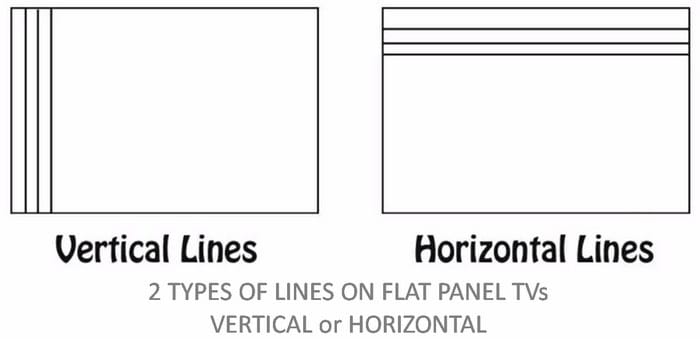 2 Types of lines on a broken LCD TV screen
Possible Components That Could Be Bad:
Bad T-Con Main Control Board can cause vertical lines or half of the screen is black. Horizontal lines usually indicates a defective screen not a bad t-con board.
Bad Power Supply (Bad Capacitors, Blown Fuse, Bad rectifier) This means that the TV won’t turn on or shuts off randomly.
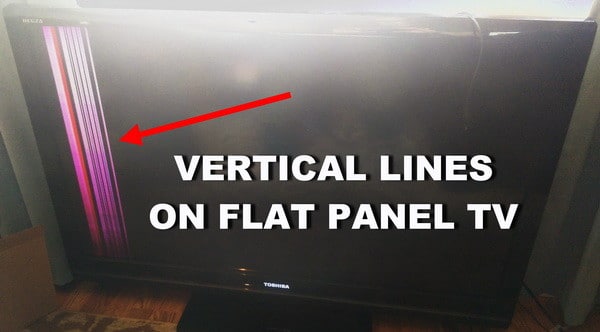 TV repair – Vertical lines on flat panel TV
- You have to find out, are the lines vertical or horizontal?
- Are the lines a certain color or black and white?
- What section of the TV, do the lines show up in?
- The top half?
- The lower half?
- The right side?
- Or the left side
- Is your screen discolored?
- Do the lines always appear on the screen when using different inputs?
- If you switch from HDMI-1 input to HDMI-2 input, are the lines still there?
- Do the lines on the screen show up over the menu or behind the menu?
- Do the lines always appear on the screen or are they intermittent?
HOW TO FIX LED TV VERTICAL LINES ON SCREEN
Do you have experience in fixing these types of TV issues? Please leave a comment below.

Written by Keith Schneerer
Certified Appliance Tech · Founder, RemoveAndReplace.com
Keith has spent 30+ years repairing machines, starting as a military mechanic and later maintaining food processing equipment before moving into appliance repair. He founded RemoveAndReplace.com to share field-tested repair advice.
More about Keith →

I have vertical coloured lines on my 4 years old SAMSUNG PS51D6900 plasma TV.
The lines are visible on every input and on top of the menu.
Could it be possible to fix it by changing some board?
Brad,
First, be absolutely sure the screen is NOT cracked or indented and damaged.
If your Samsung TV screen is not cracked, then yes the CORRECT part number t-con board for your TV should make the faint red color on the screen go away.
However if the screen is cracked or damaged in anyway, a new t-con board will not fix the issue, obviously….
Get a flashlight and look at the TV screen from an angle and inspect it to be sure no cracks or indentations.
Do you have any vertical or horizontal lines on the TV screen?
Or, is it simply just 50% of the left side has a red tint to it?
-RR
I have a Samsung 55″ 3D LED tv and the left side of the screen has turned a faint red color. I tried replacing the tcon board but they sent me the wrong one, however it made the problem become a lot less red. Does this mean it could still be the tcon board if I get the right one or is it something else like the panel?
I have a Panasonic 42 inch plasma TV, model #th-c42fd18. It has a red line down the very center of the screen (vertically). It has been that way for some time and of course Panasonic refuses to do anything about it.
Tanisha,
Try Performing a Picture Test.
Go into MENU or SETTINGS and scroll to SUPPORT… Then perform a PICTURE TEST.
It will determine the quality of the TV picture and if the TV is working correctly.
The picture should be free of vertical or horizontal lines.
If the lines are present on the TV screen, press the SMART button Smart Button on the remote control and select Settings > SUPPORT > Picture Test.
-RR
I have a LG 55 LB5900 flat screen tv. Just recently little horizontal lines appeared across the top have of my tv. Now every few seconds it jumps from multiple thin lines to one thin line. I still have a picture. I just need to know how to fix this. Please help!
I need to twist my Samsung TV in order to get a good image. Upon startup I get weird vertical lines with random colors and flickering, then i twist my screen to get a good image but i need to keep it twisted or else it comes back.