GE refrigerator displaying an error code? Newer style GE refrigerators have built in diagnostic systems. If your profile refrigerator finds, sees, or detects a fault or error in the system, it will show an error or fault code. The error code will display where the usual numbers are on the display screen. When an error code is displayed, your refrigerator is telling you a specific fault.
 GE fridge error codes
If the error or fault is not fixable by you, it will require a repair technician. There are many different model numbers of GE refrigerators with digital displays so if you see an error code write down what is flashing or displaying. Don’t pull the power from the fridge if it shows an error code. If you pull the power plug it will erase the fault code.
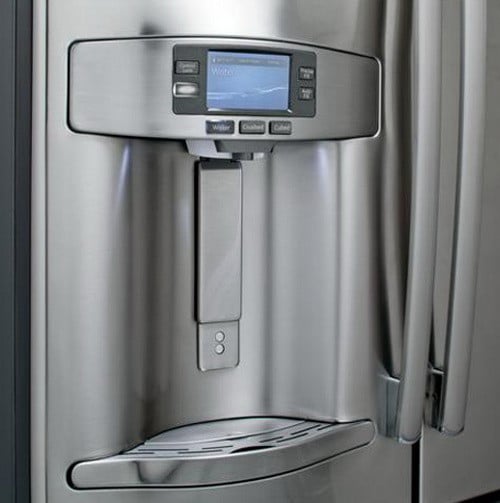 GE refrigerator dispenser and led lcd panel
A flashing green error, fault or function code will be displayed on the control panel when a failure has been detected. This will be accompanied by a beep. Here is a list of error, fault and function codes and what they mean.
GE Refrigerator Quick Error Code Definition (What Does The Error Code Mean?):
CC: Check the temperature controls as the temperature for the refrigerator is not correct.
CI: Check the ice maker for proper operation.
DF: No current flow through the defrost circuit in 48 hours.
dE: The defrost system has not been operating properly in the last 24 hours.
FF: Check frozen food for thawing because the temperature is rising excessively.
PF: The power to the refrigerator has been out from a power outage or similar.
The GE fridge codes below may seem to be error codes but are normal:
tC: If the temperature display shows a tC (could look like an EC, an upside down F with a C), this is not an error code, it is the Turbo Cool (tC) setting.
tF: If the temperature display shows a tF (Could look like an EF, an upside down F with an F), this is not an error code, it is the Turbo Freeze (tF) setting.
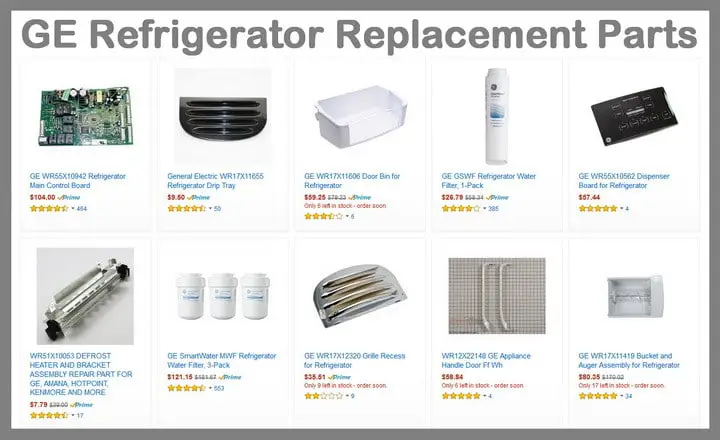 When the error code tells you which part on your GE Refrigerator
has failed, here are GE Refrigerator Replacement Parts for less
These in depth GE error code descriptions can help you troubleshoot a problem with your GE refrigerator:
GE Refrigerator Fault Code = 88 or 89
Refrigerator/Freezer Condition = Possible power surge/electrical issue.
Repair or Check = Clear the display by unplugging the refrigerator for 5 minutes and then plugging it back in. The control board may have experienced a power surge.
Replace Parts = Unplug to reset or Control Board faulty
GE Refrigerator Fault Code = CC
Refrigerator/Freezer Condition = Freezer temperature is too warm
Repair or Check = Freezer temperature has been above normal temp for more than 120 minutes. Adjust the controls according to the instructions in your GE manual. Close the refrigerator and freezer doors completely. Replace the door gaskets if needed. Press the System Check button to clear the error code.
Replace Parts = Door gasket
GE Refrigerator Fault Code = CI
Refrigerator/Freezer Condition = Ice maker not working properly
Repair or Check = Clear jammed ice cubes from the ice mold. If the ice mold isn’t filling with water, turn back on the water supply to the ice maker. If you turned off the water intentionally, also turn off the ice. Press the System Check button to clear the error code and check for other system failures. If the CI code reappears, replace the complete ice maker assembly.
Replace Parts = Ice maker assembly
GE Refrigerator Fault Code = dE
Refrigerator/Freezer Condition = Defrost system error
Repair or Check = The defrost cycle has not run for more than 48 hours. Unplug the refrigerator and reconnect any loose wires in the defrost system. Replace the wire harness if needed. Replace the defrost heater if it is damaged. It may be normal for the refrigerator to operate without defrosting for more than 48 hours when operating in an area that’s below 55F degrees. Reset the code by pressing the System Check button.
Replace Parts = Defrost system components
GE Refrigerator Fault Code = DF
Refrigerator/Freezer Condition = No current flow through the defrost circuit in 48 hours
Repair or Check = Check defrost heater, defrost thermostat and the defrost timer. Press the System Check button to clear the error code.
Replace Parts = Defrost heater, Defrost thermostat or Defrost timer
GE Refrigerator Fault Code = E2
Refrigerator/Freezer Condition = Main control board error
Repair or Check = Check wire harness to Main control board
Replace Parts = Main control board
GE Refrigerator Fault Code = FF
Refrigerator/Freezer Condition = Check frozen foods for thawing
Repair or Check = Freezer temperature has been above normal for more than 2 hours. Make sure that the refrigerator and freezer doors are closed. Replace the door gaskets if needed. Press the System Check button to clear the error code and check for other system failures. If the PF code appears, then the FF code, this was likely caused by a power failure. Keep the refrigerator and freezer doors closed as much as possible to allow the interior temperatures to come back to normal.
Replace Parts = Door gasket
GE Refrigerator Fault Code = HRS
Refrigerator/Freezer Condition = Unit stuck in Defrost
Repair or Check = Main board / Check wire harnesses
Replace Parts = Main board or Wire harness
To clear an error code on your GE refrigerator, press the System Check button to clear the code. If the code comes back, then this means a component, part, or other problem is present in your refrigerator, refer to the codes above.
Do you know of any other GE refrigerator error codes we have not mentioned or are you having trouble with your GE fridge? Please leave a question or comment below and we can assist.

Written by Keith Schneerer
Certified Appliance Tech · Founder, RemoveAndReplace.com
Keith has spent 30+ years repairing machines, starting as a military mechanic and later maintaining food processing equipment before moving into appliance repair. He founded RemoveAndReplace.com to share field-tested repair advice.
More about Keith →

GE GFE28HMHES Fridge-Freezer was purchased and plugged in. We left for a 2 day holiday and the thing never cooled off. 56 degrees in freezer. 55 in fridge. All frozen food trashed. All perishable fridge items trashed. Now code says ” dE no “. Is this what 2800 dollars buys these days. I should be worry free for at least 10 years, not 10 minutes.
Thanks for response. The main control board was replaced with an approved GE motherboard. The problem before replacing this control board was that the electronic temperature settings showing at the top front inside the refrigerator were increasing in increments every day, while simultaneously noticing that the refrigerator was not cooling properly and finally did not cool at all – whereas the freezer though not cold enough was still cold. At this time, a clicking noise was apparent coming from the rear back.
After the mother board installation, the appliance is running, the compressor and compressor fan are in motion and the freezer settings show 22 – 26 F and the refrigerator settings show 56 – 60.
So the initial problem of the refrigerator not cooling is not fixed. It appears that now there is a fine frost showing on the back inside panel of the freezer, though previously there never was frost there before.
It could be the defrost heater in the freezer or the freezer temp sensor or thermostat are the cause.
Anne,
On your model of refrigerator the GE PSF26NGTD, there should be some wire harnesses at the bottom right under the refrigerator door that supply power to certain parts of the fridge. You could try making sure they are connected properly and then disconnect and reconnect. If you replaced the main control board for your refrigerator, what was happening with the refrigerator before that made you replace it? Was the problem the same after replacing the board? Did you replace the board with a GE OEM part? Are all the wire harnesses that connect to the main board secure and not damaged? Have you set the correct temp on the temp control and let the fridge sit for at least 48 hours to stabilize? How long has the refrigerator been silent since it ran for 24 hours continuously?
-RR
I noticed the following advice you gave someone in an above section, such as, quote:
“Unplug the wire harness that goes from inside the fridge to the display panel and plug it back in.”
I’d like to know where to find the wire harness inside my GE Profile Side by Side Artica Refrigerator. My model number is: PSF26NGTD CC
We just put in a new Motherboard, after which the compressor and it’s fan ran continuously for over 24 hours. Now the refrigerator is silent and not running it seems. The compressor feels fairly warm. I’d like to see if the Reset you mention above will kick start the refrigerator into operation.
Can you help? I’d appreciate very much.
Dee,
Can you give us the FULL model number of your GE refrigerator and we can tell you what part to replace or what you can disconnect to stop the beeping.
-RR
My GE model GFE28 fridge works fine, but the beeping sounds it makes are driving us crazy. There is a code tF on the display – I understand this is something about the turbo freeze and not an error code, but how do I make it shut up??? All the constant beeping actually wakes us up at night since the kitchen is just off our bedroom. Any help would be much appreciated.
Thank you! The display is clear now. I appreciate your quick response.
Shirley