If your Samsung refrigerator is not cooling, it COULD be because it is in Demo Mode. This mode is also called Exhibition Mode, Cooling Off Mode, or Showroom Mode.
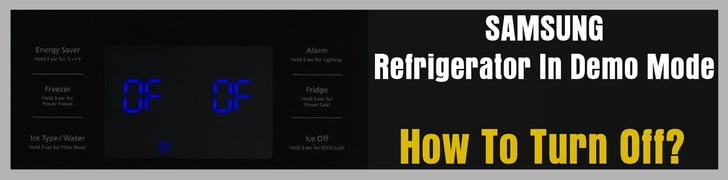 Samsung Refrigerator In Demo Mode
What is Demo Mode on a Samsung Refrigerator?
This is a mode built into the Samsung refrigerator to display them in a showroom so the lights work but THE COMPRESSOR DOES NOT therefore the fridge will not cool. You may have purchased a “showroom model” Samsung refrigerator or you may have inadvertently put the fridge into this mode yourself. Either way see below for HOW TO GET THE FRIDGE OUT OF DEMO MODE.
NOTE: There is no information about Demo or Cooling off mode in you owner’s manual since this mode is not for consumers. Some Samsung model refrigerators have a label attached on the display therefore you would have an understanding of what Demo mode is. If demo or cooling off mode is activated and the label is missing, you will not understand why the refrigerator will not cool.
What Happens When in demo mode?
- When door is open, internal Lights are on but the refrigerator is not cooling.
- The refrigerator showroom store sets the refrigerator to Demo mode to save power consumption.
- The consumer will not know about cooling or demo mode and will notice that the fridge will not cool.
If your refrigerator is not cooling, it may be in Demo Mode. Demo mode is a feature used by retailers to display the refrigerator without running the compressor.
To see if your Refrigerator is in Demo Mode
Type A models display “OF FF” if the refrigerator is in demo mode.
Type B models have the icon on the display illuminated if the refrigerator is in demo mode.
Type C models display setting temperature if the refrigerator is in demo mode.
See images below for examples of Type A, Type B and Type C models and also Type A and Type B display panels.
How To Remove Your Refrigerator from Demo Mode
If your refrigerator is in Demo mode, press the two buttons together as shown in the images below in the red boxes for 3 seconds to resume normal operation.
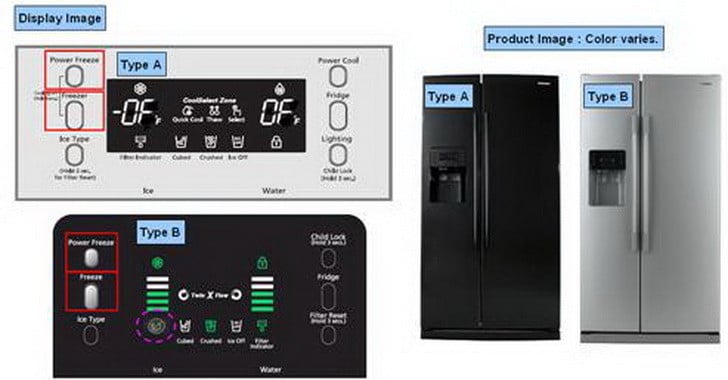 Samsung refrigerator display panels – demo mode – what to press to deactivate
For the rest of the Samsung refrigerator models, Please find the information tables below…
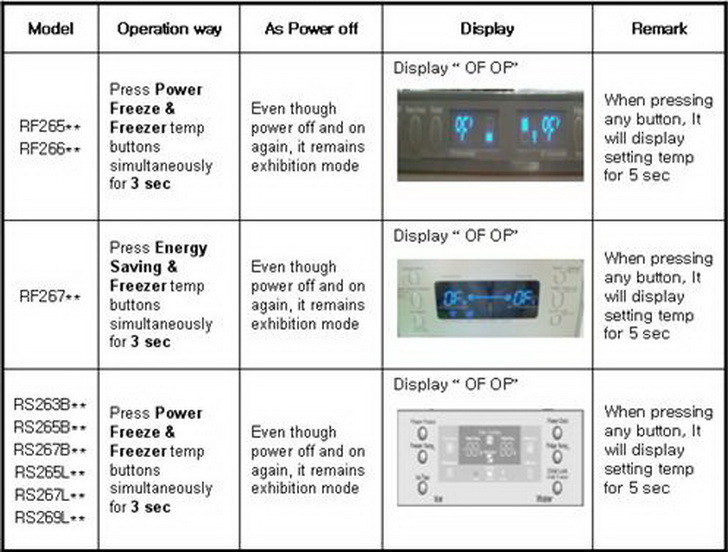
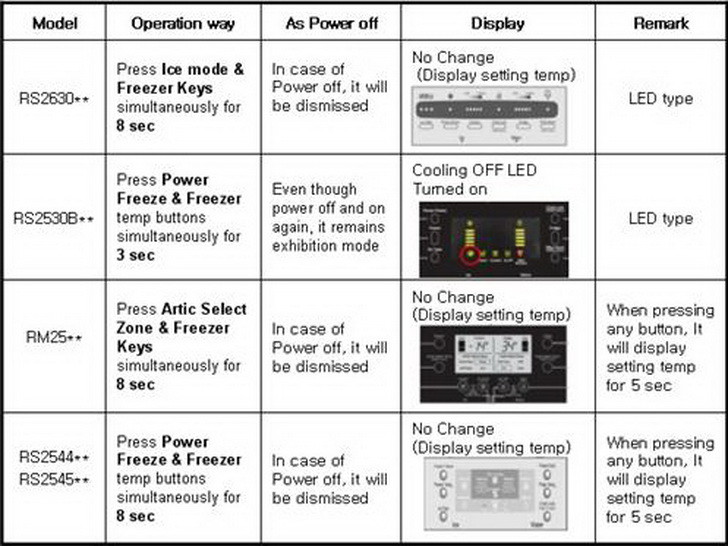 Samsung Refrigerator US Main Models – How To Get Out Of DEMO MODE
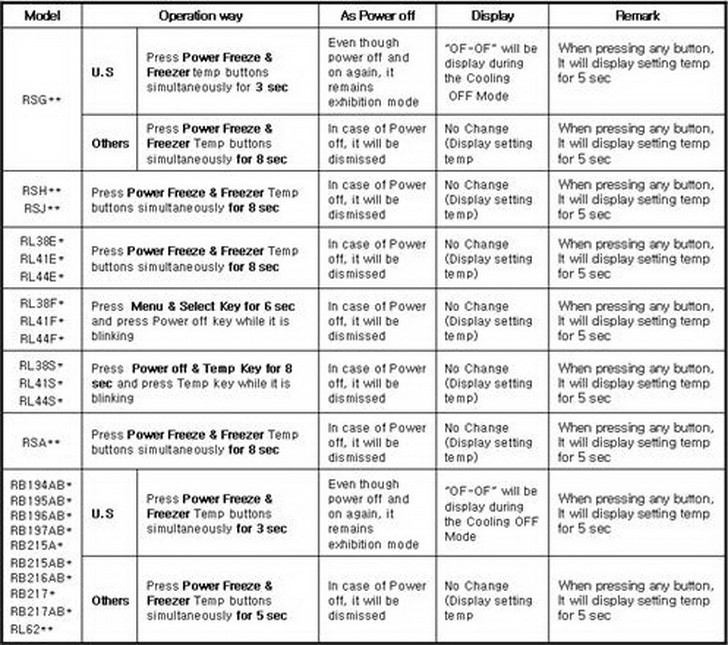 Samsung Refrigerator US & Other Countries – How To Get Out Of DEMO MODE
Unplug Refrigerator from Power for a Reset
If none of the above works for removing demo or showroom mode from your Samsung refrigerator, the last thing to try would be to unplug the refrigerator from power for about 10 minutes. This will attempt a reset and make it so your refrigerator should now be reset and showroom mode or demo mode may now have gone back to normal mode.
What Else do I Need to Know?
- If you bought a display model, make sure if it is on display mode when it initially powers on.
- During Demo or Exhibition mode… If both compartment sensors detect the room temperature higher than 65ºC, it will cancel the exhibition mode automatically and return to freezing operation. There is no buzzer sound by the temperature when cancel the exhibition mode.
How to disable Cooling Off Mode For Samsung Family Hub Refrigerator
Have questions about your Samsung refrigerator and how to get it out of Demo Mode, Exhibition Mode, Show Room Mode, or Cooling Mode? Please leave a comment below and we will be happy to assist.
Please Share The Love


Written by Keith Schneerer
Certified Appliance Tech · Founder, RemoveAndReplace.com
Keith has spent 28 years repairing machines, starting as a military mechanic and later maintaining food processing equipment before moving into appliance repair. He founded RemoveAndReplace.com to share field-tested repair advice.
More about Keith →
My Samsung side by side is stuck in demo mode. The model is not shown in your post. It is RS25J500DSG. None of the instructions for the other models works. Can you please give me the magic procedure? Thank you!
My Samsung 263beaesr/aa is just one big freezer. Seems to have a mind of its own periodically freezing everything in the frige, happens all the time. Have not seen any error codes.
Can you offer any suggestions?
We have a Samsung RFG297 series AARS. The refrigerator is working fine but the freezer has stopped working completely. There are no error codes and we have tried the trouble shooting unplugging, holding buttons etc any ideas?
Can’t get Samsung rf217 refrigerator out of demo mode?
Kassie,
From Samsung Refrigerator Service Manual:
If after 5-10 seconds, OF OF is displayed again, Cooling Off mode was not deactivated.
Once again, touch and hold “Energy Saver” and “Power Freeze” until you hear the distinctive chime and the temperatures are displayed.
-RR
I am able to get my Samsung refrigerator out of Demo Mode, it just keeps going back.
I have tried over and over.
Any suggestions?
My Fridge is not cooling. I found a mouse in the fan but there is no power back there. The mouse appears to be over 2 weeks old. The lights in front are going down the line. I have tried a few ways to turn on but no results. This is my second Frig but it was full of stuff (which went bad).