What does CL mean on LG washing machine? I was using my LG washer and the digital screen displayed the CL code and flashes back and forth. All the buttons on the washer do not work. What makes the washer show CL on the screen? How do I clear it and get all the buttons to work again? I have never seen the CL code before and need to get this cleared so I can use the buttons again and wash my clothes. How do I turn off the CL code on my LG washing machine?
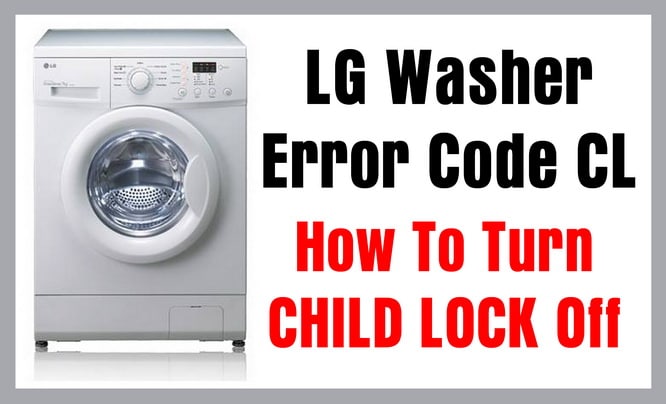 What does CL mean on LG washing machine?
LG Washer CL Code Definition (What does it mean?) = The CL Code on front loading LG washing machines simply means the CHILD LOCK feature is turned ON.
The CHILD LOCK feature on your LG washer is meant as a safety precaution so children are not able to change wash settings. CL is not an error code. It is indicating that the CL or CHILD LOCK feature has been turned ON and is active.
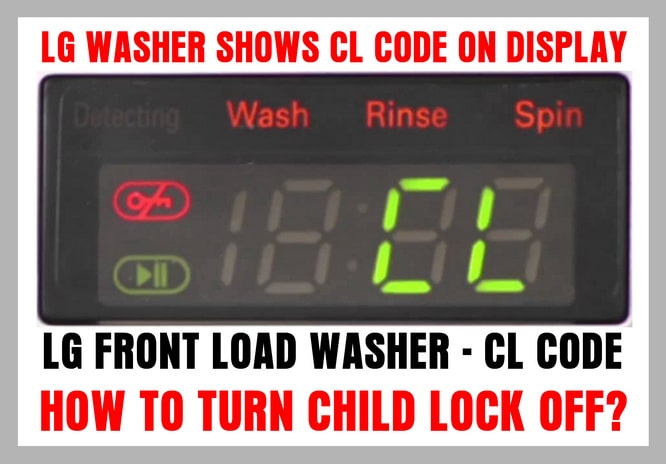 LG washer code cl error
TO TURN OFF CL CODE ON NEWER LG FRONT LOAD WASHERS:
To TURN OFF CHILD LOCK on your LG washer, press and hold the CHILD LOCK button for 3 to 5 seconds.
The washer should now have CHILD LOCK mode DISABLED and all buttons will function properly.
NOTE: ON other newer LG front load washing machines hold the PREWASH/CHILD LOCK button for 3 to 5 seconds to turn CHILD LOCK OFF.
This method is for LG washers with inverter, direct drive, smart drum, and others.
TO TURN ON CHILD LOCK ON NEWER LG FRONT LOAD WASHERS:
To TURN ON CHILD LOCK on your LG washer, press and hold the CHILD LOCK button for 3 to 5 seconds.
The washer should now have CHILD LOCK mode ACTIVATED and all buttons will not function except the POWER button.
NOTE: ON other newer LG front load washing machines hold the PREWASH/CHILD LOCK button for 3 to 5 seconds to turn CHILD LOCK ON.
 LG washer cl code – How to turn off – Newer LG washers
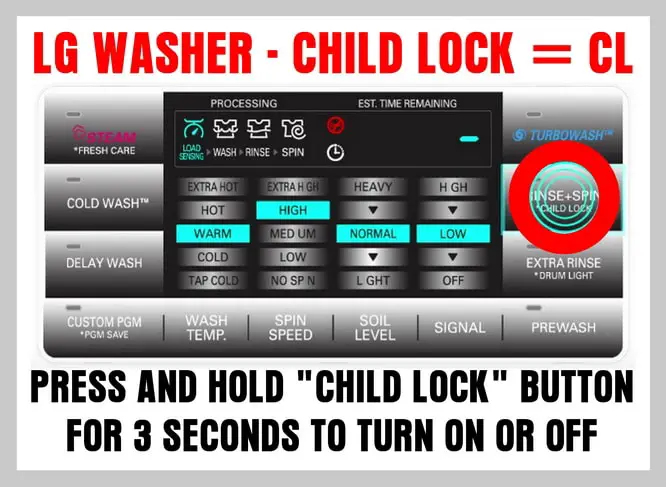 LG washer cl code
Press RINSE SPIN (CHILD LOCK) Button for 3 seconds to turn OFF
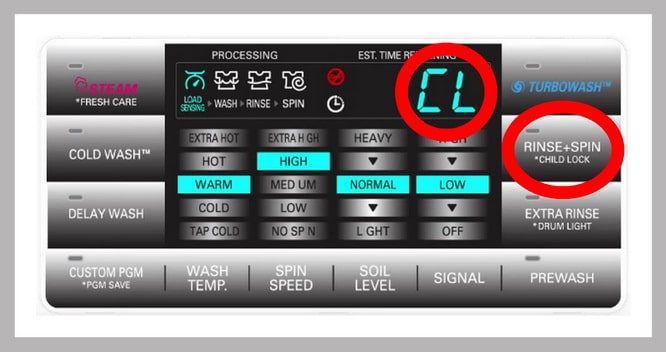 CL code on LG Washer – Press and hold RINSE+SPIN for 3 Seconds
TO TURN OFF CL CODE ON OLDER LG FRONT LOAD WASHERS:
On some LG washing machines that do not have a CHILD LOCK button, to TURN CHILD LOCK OFF, press and hold the TEMP and OPTIONS buttons at the same time for 3 to 5 seconds. Some LG washers have a little face above the lock key that is in between the WASH and RINSE buttons. If you have this on your LG washer control panel, simply press and hold the WASH and RINSE buttons for 3 to 5 seconds. The washer should now DISABLE CHILD LOCK mode and all buttons will function properly.
TO TURN ON CHILD LOCK ON OLDER LG FRONT LOAD WASHERS:
On some LG washing machines that do not have a CHILD LOCK button, to TURN CHILD LOCK ON, press and hold the TEMP and OPTIONS buttons at the same time for 3 to 5 seconds. Some LG washers have a little face above the lock key that is in between the WASH and RINSE buttons. If you have this on your LG washer control panel, simply press and hold the WASH and RINSE buttons for 3 to 5 seconds. The washer should now ACTIVATE CHILD LOCK mode and all the buttons will NOT function except the POWER button.
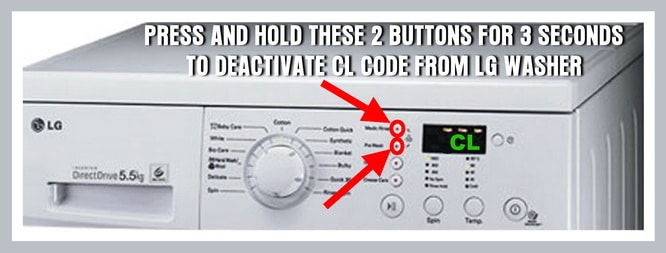 LG washer panel shows CL error code – How to clear – Older LG Washers
LG Front Loading Washing Machines: Child Lock Activation
Child Lock function on your LG washer helps to prevent children from changing the cycle settings.
LG Washer and Dryer – Child Lock
The Child Lock function prevents changing of wash settings by disabling the buttons on the display.
Have questions about the CL error code on your LG washer? Please leave a question below and we will be more than happy to assist you in turning it ON or OFF.

Written by Keith Schneerer
Certified Appliance Tech · Founder, RemoveAndReplace.com
Keith has spent 30+ years repairing machines, starting as a military mechanic and later maintaining food processing equipment before moving into appliance repair. He founded RemoveAndReplace.com to share field-tested repair advice.
More about Keith →
I have a top loading LG 10kgs , and CL is on I can’t even open my matchine, please help as I have a son that’s school cloths are stuck in it
I have a LG Direct Drive 8kg machine with a child lock button. The manual says to press and hold it for 3 seconds to de-activate the child lock but that doesn’t work. Any suggestions?
How do I restart LG washing machine when it display lock and CL flashing?
Thank you so so much… I was so tensed because I was alone in someone’s house because of this quarantine and this machine suddenly stopped working. I tried this and it worked. You have to On your machine and press on the child lock button or touch panel.
Blessings to you!
Caroline Teo,
LG washer child lock is stuck on, how to turn off?
To turn off the CL or child lock on your LG washer…
First the washer must be powered ON.
Then press the CL button for 3 seconds.
The panel will now be available to use.
The hint here is, the washer must be powered ON to be able to turn the child lock ON or OFF.
-RR
I have LG washer wft -1181dd. I tried and hold the rinse and spin button , but the CL never deactivate! Please help!
Please can you assist me getting rid of the CL error code from the display panel, I have tried all the LG tricks.
It’s the LG Direct Drive 10kg.
On the manual it reads FH4U1JBSK(0-9)