My Xbox One shuts off by itself. It starts up initially and I can use it for a few seconds. It then either turns off after about 5 seconds or just randomly turns off by itself. I can sometimes start playing a game, but once the game loads up, the Xbox shuts off. I have updated the Xbox One S to the last update from Microsoft but it still keeps turning off. Can I fix this myself or should I send it back to Microsoft for repair? I would like to know if there is anything I can do, like a simple fix I can do myself before I send it back to get it fixed. The last time I turned it on, there was an Xbox system update. I attempted to install the update but the Xbox shuts off before it will allow it to download and install. Please let me know if there is anything I can do to fix the Xbox One “Shut Off” issue.
 Xbox One – Xbox One S – Keeps Turning Off – How To Fix
If your Xbox One or Xbox One S keeps TURNING OFF, it is most likely due to OVERHEATING.
Your Xbox can also turn off under these following conditions:
1 – MOST LIKELY – The console is too hot internally (overheating – fan issue – blocked air vents)
2 – The power supply or power supply cord has an issue or is faulty (end of power cord going into Xbox is bent or damaged)
3 – The TURN OFF setting is enabled and the console has been inactive for the period of time (change the power ON and OFF settings)
Turn on the console – Scroll left from Home to open the guide – Select Settings – Select All Settings – Select Power – Select Turn off or restart. If you still have issues with the Xbox turning off by itself, continue reading below…
CHECK First – Check to be sure the power supply cord is connected to the Xbox securely and is not loose or damaged.
CHECK Second – Be sure the Xbox power cord going to the outlet is secure and not loose or bent.
CHECK Third – Make sure there is no heavy dust build-up on the air vents of the Xbox that could allow it to overheat.
If you find an issue with the Xbox power supply cord, replace it. If the power supply itself is faulty, replace it.
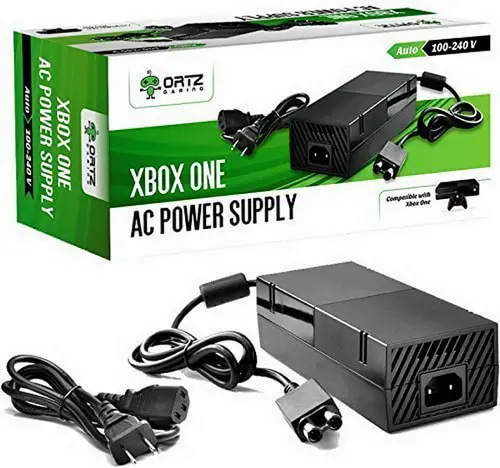 AC Adapter Power Supply Cord for Xbox One
If you see a message that says your Xbox One console is not getting proper ventilation or the Xbox is very HOT, then follow these quick and easy steps:
– Turn off the Xbox console and unplug it from the wall outlet.
– Wait at least 30 minutes to 60 minutes before plugging back in and restarting.
– If needed move the Xbox to a good ventilated area away from other components.
– After 30 to 60 minutes, plug the Xbox back in, and turn on the Xbox.
If the Xbox is working and does not shut off by itself, then the issue is resolved, if not continue reading below…
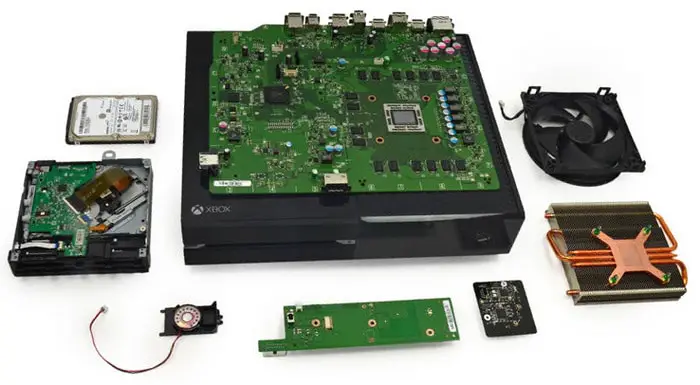 Xbox One Internal View Parts
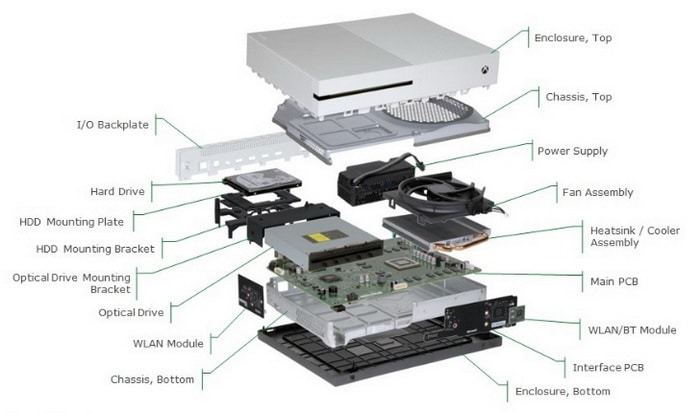 Xbox One S Internal View Diagram
Your Xbox One may have a mass of dust built up on the internal fan or on the air vents. This fan expels the heat from the Xbox through the vents and keeps it cool. If your Xbox keeps shutting off or randomly turns off, check these 3 things that can make it turn off…
XBOX TURNS OFF – FIX SOLUTION 1: A component may be on top of the Xbox One S causing overheat (blocking the hot air vents).
EXPLANATION OF PROBLEM: If you have something such as a Blu-Ray Player or a Cable Box sitting on top of the Xbox One S, this may be causing the console to overheat as the fan inside the console is unable to expel the hot air and is therefore overheating. Also, depending on which Xbox you have, the heat fan may expel the hot air out the back. Make sure the Xbox is not in too small of an enclosed area or there is nothing touching or too close to the back of the Xbox air vents and therefore not letting the hot air expel properly.
HOW TO FIX XBOX THAT TURNS OFF WITH NO VENTILATION: Make sure the Xbox is well ventilated. Remove anything on top or behind the Xbox console that may be blocking the vents where the hot air is being released and therefore the Xbox overheats and shuts off. Keep the Xbox away from other components and do not place anything on top of it if you have the Xbox One S where the heat expels from the top of the console.
XBOX RANDOMLY TURNS OFF – FIX SOLUTION 2: Dust has built up on the Xbox internal Heat Fan thus causing overheat and therefore the console turns OFF by itself or randomly shuts off.
EXPLANATION OF PROBLEM: A mass of dust, animal hair, or lint may have built up on the internal heat fan. A mass of dust or dirt can cause the Xbox to overheat and turn OFF. The heat fan may not be able to spin properly or is not spinning at all and cannot expel the heat from within the Xbox, therefore the Xbox overheats and turns off by itself.
HOW TO FIX XBOX WITH HEAT FAN CAKED WITH DUST: First try and use “Dust-Off” or “Air in A Can” to blow air into the vents of the Xbox to try and remove any dust that is preventing the Xbox from expelling hot air. If this does not work then you will need to take the Xbox apart and clean the heat fan and air vents from the inside. If this is the case… Use caution and take the Xbox apart. Clean the heat fan and vents with Dust-Off or a similar anti static dust remover. Clean the fan and remove all the dirt, dust, or animal hair that is causing the fan to not be able to expel the hot air. Use the Dust-Off product to clean out the complete inside of the Xbox including the fan and the vents where the hot air is expelled. Use caution when taking the Xbox apart by using a static wrist band. Do not touch any internal parts inside the Xbox to avoid static damage.
How To Clean Your Xbox One – Ventilation
XBOX SHUTS OFF – FIX SOLUTION 3: The end of the power cord going into the Xbox or into the outlet is damaged or loose.
EXPLANATION OF PROBLEM: The power cord going into the Xbox may have been damaged or bent. This could mean the power cord going into the Xbox is disconnecting intermittently and this is why the Xbox shuts off.
HOW TO FIX XBOX WITH FAULTY POWER CORD: You can try and bend the power cord back into the correct shape to fit and stay secure into the Xbox. If not, it is best to simply replace the power cord, either just one part of the cord or the complete power supply (depending on the model of Xbox you have). Inspect the complete power cord from end to end, if you find any damage, replace it with a new one.
XBOX KEEPS TURNING OFF – FIX SOLUTION 4: The internal heat fan in the Xbox may be faulty, thus causing the Xbox to overheat and turn off.
EXPLANATION OF PROBLEM: The heat fan inside your Xbox may be faulty or disconnected. This means the Xbox has no way to expel the hot air within. If this is the case, you will have to open the Xbox and inspect the fan (make sure it is electrically connected). If you find the fan to be faulty, remove and replace the Xbox heat fan.
HOW TO FIX XBOX THAT KEEPS TURNING OFF: Use caution and take the Xbox apart. Use caution when taking the Xbox apart by using a static wrist band. Avoid touching other internal parts inside the Xbox to avoid static damage. Remove the Xbox heat fan and replace it with a new one. Once it is connected and installed properly, clean the rest of the inside of the Xbox with “Air In A Can” or similar to remove any other dirt or dust that may be inside the console.
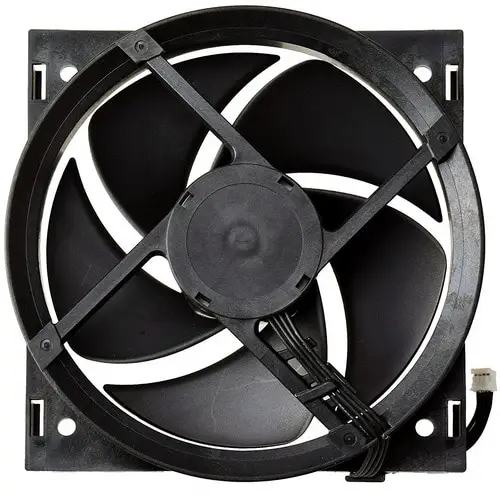 Replacement Internal Cooling Fan for Xbox ONE
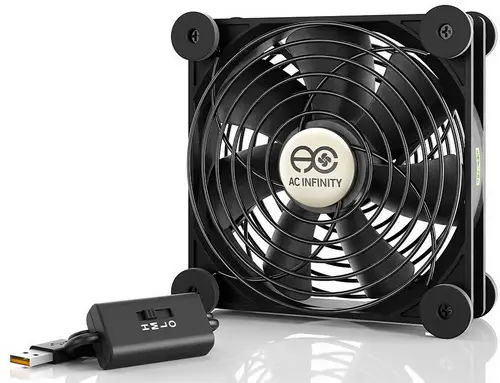 120mm USB Fan for Xbox One S Cooling (Not Internal – Use USB)
If you have made sure there is nothing blocking the air vents, the heat fan is not caked with dust, the power cord is not damaged or bent, and the heat fan is connected and working, but the Xbox still shuts off by itself, there may be another issue that could be software related or hardware related. Try resetting the Xbox. Also, be sure you have the latest Xbox update so the console is up to date.
NOTE: If your Xbox is connected to the internet using a wireless connection: Some wireless routers have some settings that can cause your Xbox One console to shut down randomly. A power saving setting on the router or another network setting may cause your console to shut down or turn off by itself.
Other frequently asked questions about Xbox:
How do I turn off my Xbox One S?
From the main menu, go to HOME, then move the controller to the left and scroll down to SETTINGS and you will see where it says TURN OFF CONSOLE, select this option to turn off the Xbox console.
How do I restart my Xbox One S?
From the main menu, go to HOME, then move the controller to the left and scroll down to SETTINGS and you will see where it says RESTART CONSOLE, select this option to restart the Xbox console.
If your Xbox still shuts off by itself, please leave a comment below explaining your issue and let us know the Xbox model number you have and the exact issue you are experiencing and we can assist you in troubleshooting your Xbox to get it working again.

Written by Keith Schneerer
Certified Appliance Tech · Founder, RemoveAndReplace.com
Keith has spent 30+ years repairing machines, starting as a military mechanic and later maintaining food processing equipment before moving into appliance repair. He founded RemoveAndReplace.com to share field-tested repair advice.
More about Keith →
I just got my son an Xbox One S and its been literally 24 hours since i’ve had it home from the store i purchased it from new and its powering off randomly and now won’t even turn back on.
Just defective? i mean its been a day only and was purchased new.. any ideas?
My Xbox turns off about 15 seconds after it starts and I have tried everything above and nothing has worked it seems as the Xbox itself is just super slow. If you could please get back to me it would be greatly appreciated. It’s an Xbox one.
My Xbox one s isn’t working it keeps shutting off like 5 seconds after I turn it on
And I’ve tried everything I could think of
Hey, Nathan Nisbet I am currently having this problem with my Xbox x. Extremely frustrating I was wondering if you may have figured out what the issue was? I even dusted the crud out of it and still remains having this issue.
Did you find a solution for this problem. My so. Have a Xbox one and has the exact same issue. One day it was working fine then all of a sudden it won’t stay on. I’ve brought a new power cable which was a waste of time as it still done it. It’s all been taken apart and cleaned, but still does the same.
My Xbox has none of the issues above that I am aware of. This week it started shutting off on its own, with no rhyme or reason. I have tried every solution in the above thread and I can’t seem to figure it out. Sometimes I can play for hours and sometimes just a short amount of time before it just shuts down completely. I don’t get any error codes or anything like that so I’m not sure what’s going on. The Xbox model is an Xbox One S. And the serial number is 451274563948. Thanks
How do you solve this problem. The fan wont run at all.