Before pulling any panels — do a Master Reset first. Unplug the washer for one full minute, plug it back in, then open and close the lid six times within 12 seconds to signal the control board. This clears a stuck cycle and gets a washer spinning again surprisingly often, before you ever touch a part.
- Try the Master Reset before anything else — it’s free and fixes a stuck control board more often than people expect.
- On top-loaders, a bad lid switch stops the spin cold. It’s a cheap part and a quick continuity test tells you for sure.
- A washer that drains fine but won’t spin usually points at the water level (pressure) switch or, on direct-drive Whirlpools, the motor coupling.
- Belts, couplings, and control boards are the usual mechanical suspects — check the free and cheap stuff first, in that order.
- If it spins on one setting but not another, that’s almost never a dead motor — it’s electrical (timer or control) or a fail-safe reacting to a drain problem.
Start Here: The Master Reset (Free, 90 Seconds)
A washer that won’t spin or drain is not automatically a broken washer. Nine times out of ten I tell people to run a Master Reset before they grab a screwdriver, because the control board can get stuck mid-cycle and refuse to advance to spin — top loader or front loader, doesn’t matter. Here’s how you do it: unplug the machine for a full 60 seconds, plug it back in, then lift and close the lid six times within a 12-second window. That sequence tells the board to recalibrate. I’ve watched this bring a “dead” washer back to life in under two minutes, and it costs nothing. If the machine has been vetted by a repair manual and still sits there humming, that’s when you start pulling parts. I spent 19 years on Air Force flight lines where the first move on any balky system was clearing the controller before condemning hardware — same logic applies right here in your laundry room.
If the reset doesn’t take, don’t panic. Grab your washing machine service repair manual so you’ve got the wiring and parts diagram handy, and let’s work through this in order — free fixes first, expensive stuff last.
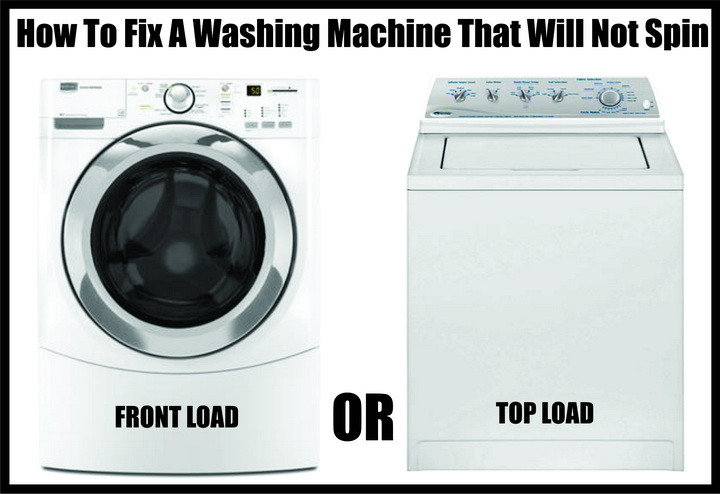
The Assumption That Costs People $600
Everyone assumes a washer that won’t spin needs a new motor or a new machine. It almost never does. I’ll say it plainly: if your washer spins on one cycle but not another, the motor is fine — a dead motor doesn’t spin on ANY cycle. What you’ve actually got is an electrical or control problem, and those are the cheap ones. I used to quote people for motor work the second they said “won’t spin,” back when I first started doing commercial appliance repair. I did that for a couple of years. Then I learned to ask one question first — “does it spin on any setting at all?” — and my parts bills dropped by more than half. The motor is the last thing I check now, not the first.
Check the Lid Switch (Top Loaders)
On a top-load washer, a faulty lid switch will stop the spin cycle dead and won’t turn the agitator. On some models it’ll still agitate but refuse to spin. This is one of the most common failures I see, and it’s a cheap part. The lid switch lives inside the main housing near the door frame — the exact removal procedure varies by model, so check your user manual, or Google “Washing Machine Remove Lid Switch Model# Serial#” for your specific machine.
Unplug the washer before you test anything. I don’t care how quick the job looks — unplug it, don’t just turn it off. Once you’ve got the switch out, keep the wires attached so you can test it with a digital multimeter.
- Press the switch button in to simulate a closed lid. With the button pressed (lid CLOSED), the switch should show continuity.
- Release the button to simulate an open lid. With the button out (lid OPEN), the switch should show NO continuity.
- Read the result. If there’s no continuity when the button is pressed in, the switch is dead and needs replacing. You can find your washing machine lid switch and swap it in about 20 minutes.
If the lid switch tests good, move on to the next suspect.
The Water Level / Pressure Switch — The Sneaky One
Here’s the field insight most guides skip: when your washing machine pumps the water out but won’t spin, or when the water overflows on your washer, the “Water Level Control / Pressure Switch” is almost always the culprit. That’s the one part that shows up in both of those symptoms, and once you know that, you save yourself an afternoon of guessing. In my experience it’s the single most misdiagnosed part on a non-spinning top-loader — probably 60% of the “won’t spin but drains fine” jobs I’ve traced came back to this switch or its little air tube.
To get at it, pull the 4 screws holding the control panel in place. Once the panel’s off, you’ll see the Water Level Control Valve — look for the part with the small plastic tube attached to it. That tube is your first thing to check.
- Pull the plastic hose off the switch and blow air into it. You should hear or feel the switch click.
- If the tube’s clogged with soapy residue, try forcing white vinegar down the tube and into the switch itself with a turkey baster — the vinegar dissolves the soap gunk. (This trick has saved me more $40 switches than I can count.)
- Look at the switch body. If it’s visibly cracked or burned, it’s done — replace it. Removal varies by model, so check your manual or Google “Washing Machine Remove Replace WLC Pressure Switch Model# Serial#.”
Washer Drive Belt / Spin Belt (Front and Top Load)
On most top-load washers the drive belt connects the drive motor to the transmission. On most front-loaders the drive motor connects straight to the wash basket. When the machine won’t spin, check the belt for damage, rips, over-stretching, or whether it’s simply fallen off. This is the section a lot of folks fear, but honestly it’s usually a five-minute look.
If the belt’s in good shape, check that the idler pulley and/or the glide on the motor moves the way it’s designed to. On top loaders, make sure the transmission pulley turns in both the spin and agitate positions, and check that nothing is jamming the agitator or wash basket. Anything binding the tub makes the belt slip on the pulley — and a slipping belt won’t spin. Look for oil drips or water leaking onto the pulleys or belt, because that’ll cause slippage too.
On front loaders, reach in and spin the tub by hand — it should turn freely. And listen to me on this one: use the EXACT replacement belt for your model. The size, length, and width matter. A belt that’s even slightly long will slip, and then you’ve got a washer that spins on some cycles and load sizes but not others. I learned that the hard way trying to “make do” with a close-enough belt on a Whirlpool front-loader back around 2011 — it worked for a week, then started slipping on the heavy cycle. Gonna save you the trouble: order the right part number.
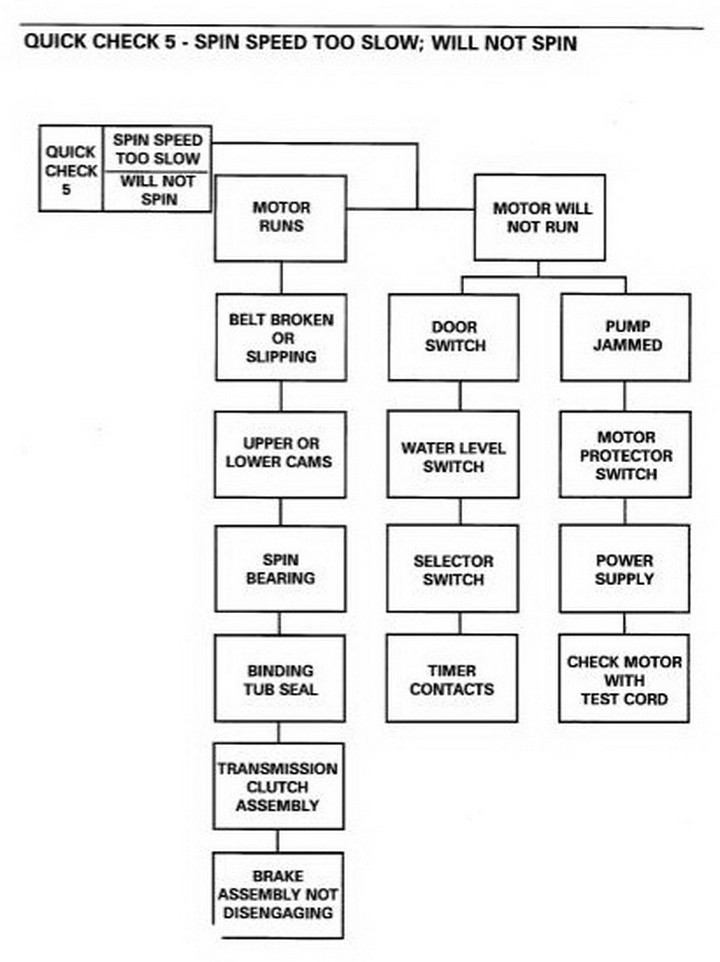
If none of the above matches what you’re seeing, the quick-check fix guide below walks you through it symptom by symptom.
Watch: How To Fix a Washer That Won’t Spin or Drain
If you’re more of a show-me-don’t-tell-me person, this walkthrough covers the same checks — lid switch, belt, drain path — in real time. Watch it once before you start so you know what the parts look like before you’re elbow-deep in the machine.
Washing Machine Will Not Spin on the Spin Cycle
Question: My top-load Whirlpool washing machine will not spin on the spin cycle for the regular wash anymore. It will spin if I put it on the pre-soak setting, and then all it does is fill up with water and drain when it goes into the actual “spin” cycle. Both cycles will not agitate the clothes. Will I need to buy a new one, or is there hope in saving my washer?
Answer 1 — Sounds like the coupling, as that’s usually the bad part on most Whirlpool models for what you’re describing. The Whirlpool direct-drive washer has no belts — it’s a direct drive gearbox. The motor coupling was originally a weak plastic part, and it’s been replaced with a steel coupling as a direct swap. That said, if it spins on pre-soak, it could be a bad switch instead. There’s repair info online for your specific model that’ll help you narrow it down. And for what it’s worth — Whirlpool direct drives are bulletproof if you maintain them, so I wouldn’t scrap it over a coupling.
Answer 2 — Our washing machine had spin trouble too. It’s a Kenmore front-loader, only a year old. We got advice from other owners and fixed it by replacing the motor control board, which ran about $130 online. Not a nothing repair, but a lot cheaper than a new machine.
Answer 3 — If it spins on one setting but not another, I’d bet it’s one of two things:
A — If it were a motor or mechanical issue, it wouldn’t spin AT ALL. This points at a control problem, and it may well be the timer itself. Test the timer.
B — Your washer may have an interlock or fail-safe that blocks the spin if something else in the system isn’t right — say, a clogged drain or a pump that isn’t pumping. If it fills at a normal rate and drains at a normal rate, that’s probably not it. But run the tests and find out for sure.
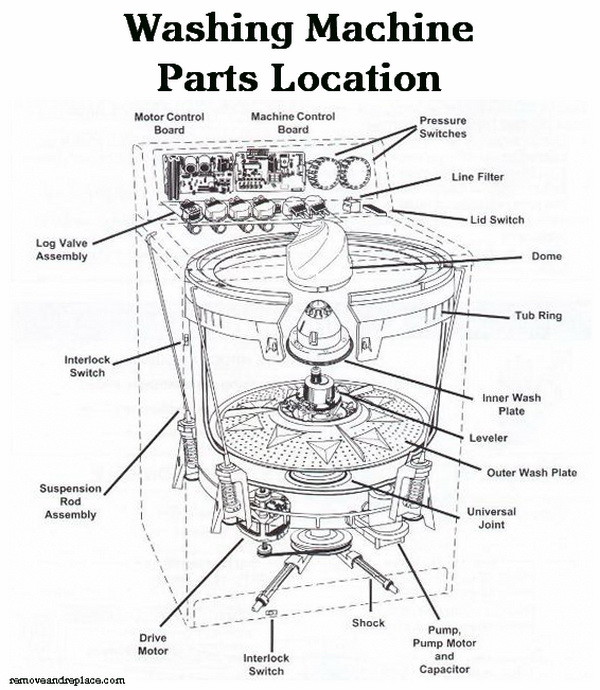
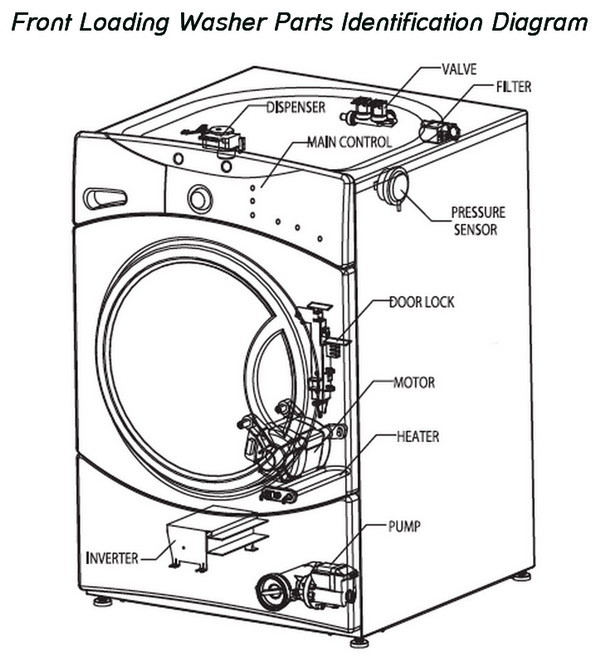
Either way, get a wiring and parts diagram, trace what leads to what, and test the components with a multimeter. Make sure each function is switching on when it’s supposed to. This is exactly the kind of methodical trace-and-test work I did on aircraft systems for 19 years — the appliance is a lot simpler, but the discipline’s the same.
How Do You Know When It’s Time To Stop and Replace?
Here’s my honest line in the sand. If your washer is under about eight years old and the fix is a lid switch, a pressure switch, a belt, or a coupling, repair it — those are all cheap parts and the labor’s a DIY afternoon. A control board like the $130 Kenmore board in Answer 2 is still worth it on a newer machine. But once you’re past 10-12 years and staring at a control board PLUS a mechanical failure, that’s when the math flips. Most washers give you around 10-14 years, and you can see how that stacks up against everything else in the house on the average lifespan chart for every major home appliance. I’ve talked more than one person out of dumping $300 into a 14-year-old machine that was going to need something else in six months.
Keeping It Spinning: A Little Prevention
Most no-spin calls I’ve traced back to two habits. First, overloading — cramming the tub past full throws the load off balance, and an unbalanced tub either won’t spin or bangs itself loose over time. Give it room. Second, detergent buildup, which is what clogs that pressure-switch air tube in the first place. Run an empty hot cycle with two cups of white vinegar once a month and you’ll flush the soap residue before it ever gums up a switch.
While you’re at it, if your machine has gotten loud on the spin cycle, that’s worth chasing down early — a walking or banging washer is telling you something, and there are some easy steps to quieting your washing machine before the noise turns into a real failure. Fix small, avoid big.
Frequently Asked Questions
Why does my washer drain but not spin?
That specific combo — drains fine, won’t spin — points hard at the water level (pressure) switch on top-loaders, and it’s the same part behind an overflowing tub. Check that switch and its air tube first. On a direct-drive Whirlpool, a worn motor coupling causes the same symptom, so that’s the second thing I’d look at.
What is a Master Reset and does it really work?
It’s a sequence that forces the control board to recalibrate: unplug for 60 seconds, plug back in, then lift and lower the lid six times in 12 seconds. And yes, it really works — I’ve fixed washers that owners were ready to junk with nothing more than this. It’s free and takes 90 seconds, so there’s no reason not to try it first.
Can I replace a lid switch myself?
Absolutely. If you can run a multimeter and turn a screwdriver, this is a beginner job — about 20 minutes and a cheap part. It’s actually one of the repairs I always point new DIYers toward. Just remember to unplug the machine before you test or remove anything.
My washer spins on one cycle but not another — is the motor dead?
No. I’ll bet money it’s not the motor. A dead motor won’t spin on ANY cycle, so if it spins on pre-soak but not regular wash, you’re looking at a control issue — usually the timer or a fail-safe reacting to something like a drain problem. Test the timer and trace the wiring before you even think about the motor.
Is it worth fixing a washer that won’t spin, or should I buy new?
If it’s under about eight years old and needs a switch, belt, or coupling, fix it — those repairs cost a fraction of a new machine. If it’s 12-plus years old and needs a control board plus a mechanical part, I’d let it go. If you want a longer walkthrough of jobs like this you can knock out at home, I put together a list of 15 easy appliance repairs you can do yourself that covers a lot of this same ground.

Written by Keith Schneerer
Certified Appliance Tech · Founder, RemoveAndReplace.com
Keith has spent 30+ years repairing machines, starting as a military mechanic and later maintaining food processing equipment before moving into appliance repair. He founded RemoveAndReplace.com to share field-tested repair advice.
More about Keith →

Oscar,
It sounds as if a large load of clothing pushed the washer out of balance by being overloaded. If everything worked properly in diagnostic mode except spin, it may be a damaged or faulty door locking assembly, your drain pump may be clogged or inoperable from objects being pumped into it. Did the error codes have a letter in front of them like E52 or E48? Please try and see the exact error codes and get back to us after you try the master reset. Your washer may not respond to the washer reset but if you can give us the EXACT error codes, we can assist further.
-RR
I have a front loading GE washing machine. I’m not sure what the model is, but these are the model numbers that show up on our owners/repairs manual :
1. GBVH6250
2. GCVH6260
3. WCVH6260
4. WBVH6240
5. WHDVH626
The washer has been having several issues that I unfortunately can’t figure out. When the machine was working, it was going through cycles and pausing numerous times. It didn’t matter what cycle it was set on, it would pause frequently. After dealing with the pausing for a few days, we noticed that it would have some really rough final spins while still having pausing issues(not sure if it was simply because of being loaded improperly/consisted of towels and jeans). A few days after that, the machine has stopped spinning and filling and it only performs the drain function. It sounds like it’s stuck on a continuous drain cycle no matter which was cycle we put it in (I’m also sure there is no water in the machine what it’s trying to drain).
After this all occurred, I decided to pull off the top panel and the back panel to take a better look (not mechanically inclined so not sure how much good this did). The belt looks good and it is still attached. I turned the drum manually to make sure it wasn’t suck or grinding on anything and it turned nicely. I checked the Hot and Cold water connections to make sure there was no build-up (read somewhere that this might cause some of the problems I’m experiencing). These connections were fine. Water pressure was also fine. I checked all of the bolts and wires and didn’t notice anything that stuck out as a “red-flag”. I drained pump at the bottom of the washer and found multiple items lodged in the hose. Took the time to take everything out and put it back on. Since I don’t have an electrical reader of any sort I was unable to check and see if my control module/motor were working properly. The motor “seemed” fine but I’m not an expert so I was just looking at it cosmetically.
After all of this I looked up how to put the washer in a diagnostic mode. Once in the diagnostic mode I performed a few tests to see what all was working. The washer will do everything BUT any of the spin diagnostics. It will fill up with hot/cold water (I found this curious because it won’t do it when the washer is out of diagnostic mode). It will light up to check all LED’s, and it will pump water out. Just not spin. I also got some codes (Hopefully I wrote them down right): 52, 48, 22.
A friend of mine is convinced that it is the pump and that I need to replace it…but I’m not so sure. When I go home today I’ll try the “Master Rest” but hopefully you have some suggestions so I don’t go and buy numerous/unnecessary parts! Thank you so much!
My problem, after replacing the door lock switch, and also, doing the resets. It ended up being the Motor Control Board or Spin Control Board, which is located at the rear, left bottom of my Sears-Kenmore [Frigidaire] front loading washer. I was able to access one on eBay, after I did thorough research of my particular model. I saved mega bucks by installing the new board myself. My Control Board was held down by only 2 Philips head screws and is connected by a wiring harness that is easily unplugged. Please make sure your machine is unplugged and that you are grounded when you ‘touch’ your New Control Board…… Again, Computers are sensitive, even to static. My machine, over ten years old, is up and running again. Plus, I am aware of the time-bomb with the inner stainless steel tub that is connected to the Aluminum spider assembly which holds the shaft…….Corrosion issues! Hope you can find my previous comments made several weeks, months ago. I really have researched this. The Control/Spin Board is a very easy fix for you!
Leo,
Were the door lock assy you bought OEM or generic replacements? If after installing the door lock the machine worked, but the second wash attempt did not, then either a sensor or possibly wiring is to blame. Does the current door lock assy test ok with a meter?
-RR
Jean-Guy,
Have you taken apart the control panel and inspected for loose wire harnesses? Check wires to be sure the vibration has not loosened something. If all else checks out you may need to look into replacing the board or timer.
-RR
Thanks for your prompt response. I failed to mention that my machine is front load and and as you mentioned, the pump does not seem to be the culprit of the SPIN cycle not engaging since it works when I managed to bypass manually the 9 min mark on the Quick Wash program (where it got stuck for a patient 10-15 min.) I suspect the timer in the electronics panel is at fault because when the program reaches 9 min the machine makes a little noise and then nothing follows. This seems to repeat every 2-3 minutes. I would not know how to identify the timer component of the electronics panel…..
Thank you so much for your wonderful master reset tip that got my Frigidaire Affinity Front Load Washer (ATF8000FS1) to start. The nagging problem is its inability to start even though all the lights are on. I even replaced the door lock assembly twice to no avail (worked once or twice). Your tip got it to start; however, the second load did not work and I had to press the Start button quickly many times to get it to start again.
So, it appears the washer is still having some problems by not starting consistently. Do you have any suggestions? I have tried to ask a repairman to come but had to cancel because I got it to start after replacing the door lock assembly but then it failed again. Another problem is the location of the washer as it is stacked beneath a dryer in a tight closet. Thus, having it repaired could be very costly due to the placement. Otherwise, I would think I could attempt some repairs myself.