We have a Samsung HDTV 55″ inch LCD TV which is showing lines (vertically) and getting extremely hot. At times it powers on at only half of the brightness for a 20 seconds or so and then goes completely black like it is turned off. I do not know what I should be looking for or how to diagnose these TV problems. Do you think that replacing the power boards would be a good place to start? Maybe I need to open up the TV and start to check to see if the capacitors are okay? Where do I even get these TV repair replacement parts? Please help.
The issue could be related to a bad capacitor or capacitors. Maybe 10 years ago there was a Chinese capacitor supplier company selling faulty and low quality caps. Your TV may have these.
THINGS TO TRY TO FIX YOUR TV FAST:
- Try to connect all connectors including HDMI, coax, etc, to be sure all inputs are producing same issue.
- Push the HDMI connector firmly into the back of the set.
- Be sure your actual cable is not bad and causing the issue.
First: Open up the TV case (unplugged of course) and look for a bulging or leaking capacitor. If you see any that are leaking or fat and bulging, replace them. If you find no bad caps, you could replace the complete circuit board but that may be more than the TV is worth. Some of these issues are common on Samsung, Sony, Vizio, and Toshiba. Here are some places to buy caps and circuit boards for replacement HDTV parts.
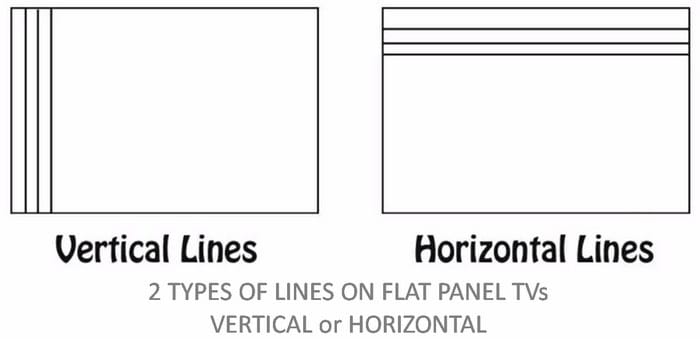 2 Types of lines on a broken LCD TV screen
Possible Components That Could Be Bad:
Bad T-Con Main Control Board can cause vertical lines or half of the screen is black. Horizontal lines usually indicates a defective screen not a bad t-con board.
Bad Power Supply (Bad Capacitors, Blown Fuse, Bad rectifier) This means that the TV won’t turn on or shuts off randomly.
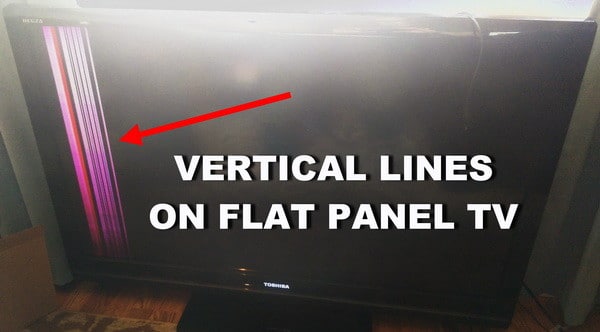 TV repair – Vertical lines on flat panel TV
- You have to find out, are the lines vertical or horizontal?
- Are the lines a certain color or black and white?
- What section of the TV, do the lines show up in?
- The top half?
- The lower half?
- The right side?
- Or the left side
- Is your screen discolored?
- Do the lines always appear on the screen when using different inputs?
- If you switch from HDMI-1 input to HDMI-2 input, are the lines still there?
- Do the lines on the screen show up over the menu or behind the menu?
- Do the lines always appear on the screen or are they intermittent?
HOW TO FIX LED TV VERTICAL LINES ON SCREEN
Do you have experience in fixing these types of TV issues? Please leave a comment below.

Written by Keith Schneerer
Certified Appliance Tech · Founder, RemoveAndReplace.com
Keith has spent 30+ years repairing machines, starting as a military mechanic and later maintaining food processing equipment before moving into appliance repair. He founded RemoveAndReplace.com to share field-tested repair advice.
More about Keith →

There was white/blue residue on a board that was located at the bottom of the led screen. The board was a half inch wide and a foot long and fed directly into the screen. Not sure if you consider this the main board or not but there were two of them one for each side of the tv.
Kevin,
If you took the TV apart and found a burnt, corroded (white?), or a circuit board with popped caps, replace that board and possibly the ribbon cable.
Do you know what circuit board is the one with corrosion on it?
Is it the main board that connects to the screen?
-RR
Jeff,
Yes that may be the issue.
Connect the DVD with an HDMI cable directly into the TV HDMI INPUT.
-RR
My Toshiba does that while playing DVDs. It will correct itself sometimes, other times if I run the DVD disc lens cleaner thru it. Not while on regular TV. The TV is less than a year old. Could it be they are running their TV thru a DVR connected to the DVD and its picking up its signal?
I figured out how to remove the bottom bezel and found some corrosion on the circuit board (not sure if that’s what its called) that connects to the screen. Would you say the problem with the screen or could it possible be the main board?
How would i know the screen is damaged? The tv is currently taken apart and from what i can tell the screen is fine. At times the bar will disappear for a quick second but come back. This makes me think its not the screen. I’ve clear the ends of the ribbon cables, that did not help. I am think of replacing the control panel. Any other suggestions? Also how to I access the panels on the bottom edge of the tv?
Same here. It’s been almost a week and the line remains. Well it’s not really a line, more of a discolored vertical area. I haven’t taken the tv apart to clean out inspect for damage yet though.