Refrigerator Display or Demo mode is a feature built into refrigerators that completely disables the cooling components in the refrigerator and freezer. The reason for this is to conserve energy while the refrigerator is in a store as a display model. The lights and the digital control panel will still be operational. If you are having issues with your LG refrigerator, you may have purchased a floor model from the store or the refrigerator was on display or demo mode from the factory. NOTE: The display panel on your LG refrigerator (whether vertical or horizontal) will show OF F or O FF. OF F is displayed on horizontal displays and O FF is shown on vertical displays.
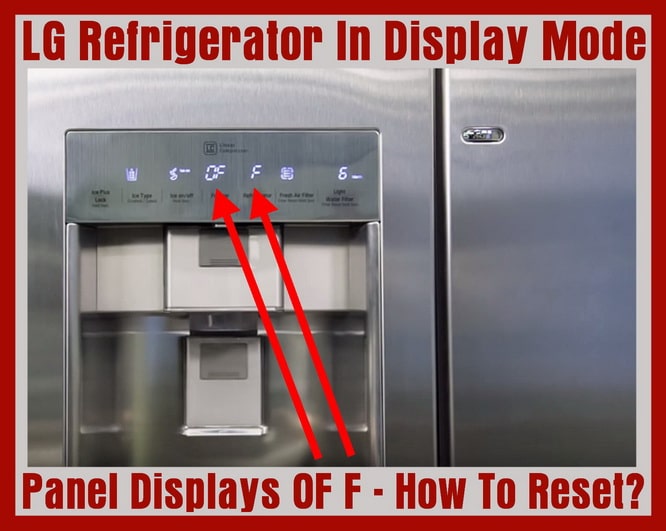 LG refrigerator displays OFF on panel – Demo Mode
How to get your LG refrigerator out of Display or Demo mode:
1. Be sure the refrigerator is plugged in and you are seeing OF F on the display panel.
2. Open the right side door.
3. Keep left side door (where panel is located) shut.
4. Press and hold down the ICE PLUS/LOCK button and the REFRIGERATOR button at the same time.
5. Hold the buttons down for 3 to 6 seconds.
6. The panel will return to its normal setting and you will hear an audible “ding”.
7. The refrigerator dispenser will initialize.
8. The temperature numbers will appear on the display, set the desired temperature for the freezer and refrigerator.
9. Make sure the refrigerator is now cooling and the LCD panel is functioning properly.
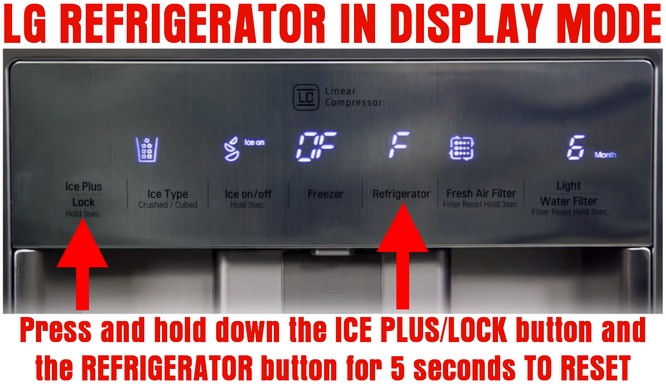 LG refrigerator – How to reset display demo mode
Hold both ICE PLUS and REFRIGERATOR buttons for 5 seconds
In other LG refrigerator models, you may see the LED scrolling from 1 to 7. To reset this and get the fridge off of demo/display mode, you have to open the right door and press both the “REFRIGERATOR ADJUST” button and the “ICE PLUS” button for 3 to 6 seconds.
If you buy a floor model refrigerator, scratch and dent refrigerator, or a refurbished refrigerator, chances are it will be in DEMO mode. Follow the steps above and you will have your LG refrigerator back to cooling and freezing. If you have any issues with your refrigerator not cooling, here is a page that can help you to troubleshoot the issue. If you have other error codes that display on your refrigerator panel, here is the LG refrigerator error codes page.
If you have any questions about your LG refrigerator getting stuck in demo or display mode, leave us a question below and we will get back to you with an answer ASAP.

Written by Keith Schneerer
Certified Appliance Tech · Founder, RemoveAndReplace.com
Keith has spent 30+ years repairing machines, starting as a military mechanic and later maintaining food processing equipment before moving into appliance repair. He founded RemoveAndReplace.com to share field-tested repair advice.
More about Keith →

I have an LG top freezer refrigerator, model LTC22350. The LED light on the temperature control panel is not lit up. I don’t know what temperature I have the fridge set to because there is not LED lit up. I did the steps to take it out of demo mode (ie: hold down both the freezer and fridge buttons while also holding down temperature adjust button). I heard compressor come on after that but LED light still not on. When you do this to make sure fridge isn’t in demo mode, which temp setting will the fridge default to? 3? Thanks
I have an LG GN-M492CPC model refrigerator, the green plasma panel indicated “d” in the refrigerator’s bottom. What is the problem? and How to fix or reset it? I cannot click any bottoms now, the fridge has 3 bottoms: green plasma on/off; refrigerator; and super cool
Model # LFX25976SW
I’ve done everything above. With resetting it. Even tried unplugging it. Nothing seems to work. No beeping sound when we try to reset, nothing on the display. I went off the owner’s manual.
Hi….went away for 2 days and come back and the fridge has lights on and the display still working..( no one at home to play with it)…but both fridge and freezer has stopped working….fridge only 9 days old…been working great for 8 days previous….LG insta-view Gf-V708MBSL.
My lg refrigerator, model lnxc23726, will not keep display lit. Is not in Demo mode. Have researched and used the manual but nothing seems to work to keep the display lit.
Good afternoon, I bought LG refrigerator 247CSAV from LG outlet yesterday and I was giving the display model. Have been trying to disable the display mode by following the steps above but nothing seems to be working my way. Please is there anything you think I can do to it