A 5E error on a Samsung dryer means the control board has detected an overheat condition at the temperature sensor (thermistor) in the exhaust duct or heater housing. It usually shuts the heater off automatically to protect the unit, and the fix is almost always replacing the thermistor, checking for a blocked vent, or testing the heating element circuit for a short.
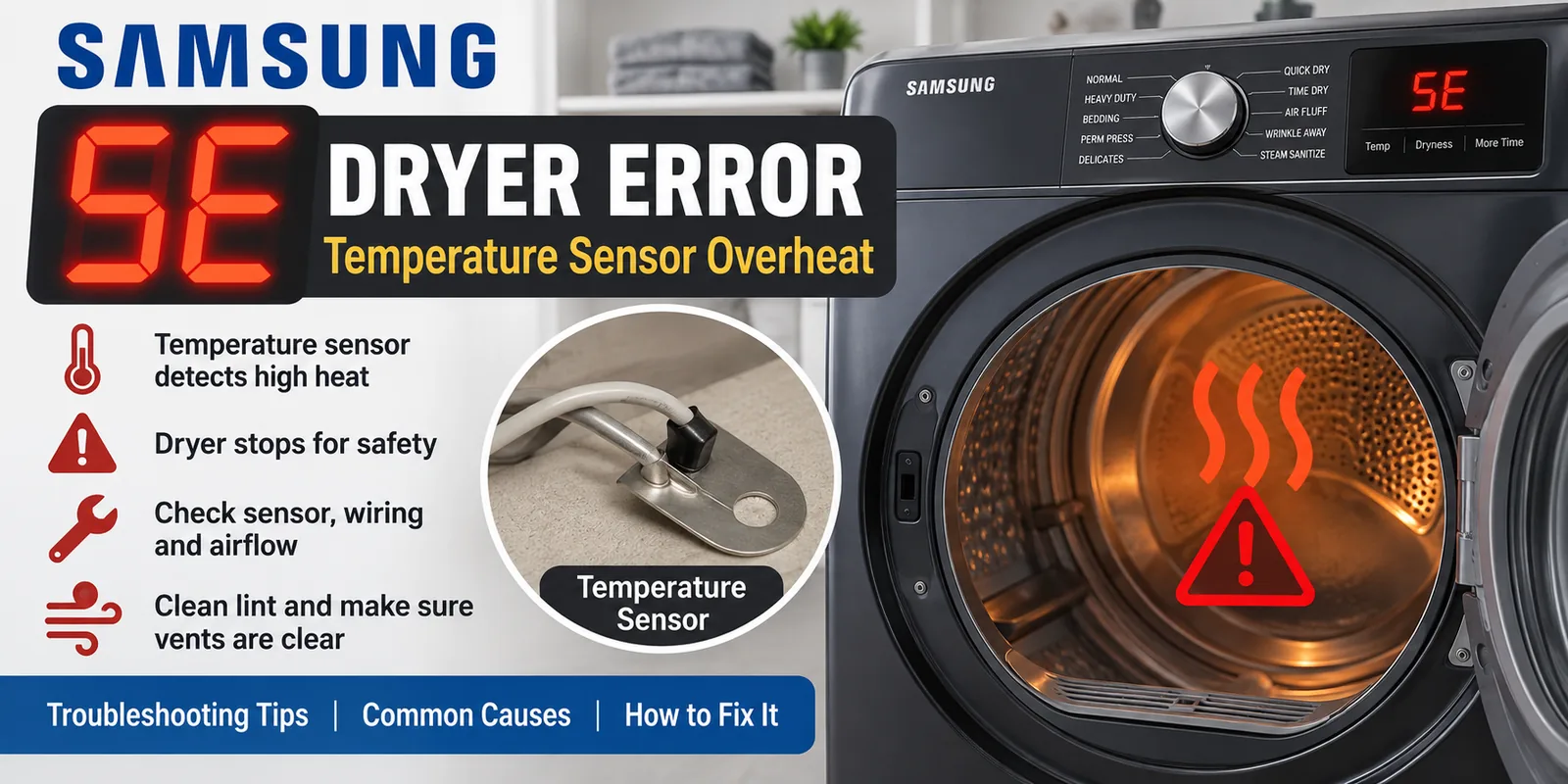
The 5E code is Samsung’s way of telling you the dryer noticed something running hotter than it should and cut power to the heater as a safety measure. That’s a good thing — it means the safety circuit did its job — but it also means you’ve got a real problem to track down before you run another load.
This video walks through where the thermistor sits inside the dryer and how a tech would go about testing it, which lines up with the same diagnostic order I’d use on a service call.
I’ve spent years chasing overheat and no-heat complaints on gas and electric appliances alike, going back to my time working on aircraft environmental and hydraulic systems in the Air Force, and the pattern with a Samsung 5E error is pretty consistent: it’s rarely the control board itself. The board is just reporting what the sensor tells it.
What Actually Triggers a 5E Code
The temperature sensor Samsung uses in most of these dryers is a thermistor — a small two-wire component mounted near the heating element or in the exhaust duct housing, depending on the model. When that sensor reads a temperature above its normal operating range, or when it fails and sends a bad signal to the control board, the board throws the 5E code and locks out the heater.
There are really three things that cause this in the real world:
- A failed or drifting thermistor that’s reporting inaccurate temperatures even though the dryer isn’t actually overheating
- A genuinely restricted vent or clogged lint path causing actual heat buildup inside the drum and duct
- A heating element or heater relay on the control board that’s stuck on, pushing real heat past the normal cutoff point
In my experience, a bad thermistor is the most common single cause, but I never replace one without checking the vent run first. If the dryer really was overheating because of restricted airflow, a new sensor is just going to trip the same code again in a few weeks.
Check the Vent Before You Touch Any Parts
Pull the dryer out, disconnect the exhaust duct, and look through it with a flashlight. A vent that’s more than about 20-25 feet with several bends, or one that hasn’t been cleaned in a year or more, is a legitimate fire and overheat risk, and Samsung’s own troubleshooting guidance flags restricted venting as one of the first things to rule out on a heat-related error. If the dryer is genuinely getting hot enough to trip a real overheat condition, this is where I’d look before ordering any part.
If you clear the vent and the dryer still won’t heat properly afterward, that’s a separate issue worth checking against a Samsung dryer that runs but isn’t getting hot, since a tripped thermal fuse from the overheat event can leave you with a no-heat symptom even after the root cause is fixed.
Testing and Replacing the Thermistor
With the dryer unplugged, the thermistor can be tested with a multimeter set to resistance — it should read a specific value at room temperature (usually in the 10-50k ohm range depending on the exact part), and that resistance should change smoothly as it warms up. A reading of zero, infinite resistance, or a value that won’t move at all is a dead sensor.
Samsung’s most common thermistor for these dryers is part number DC32-00007A, and both Repair Clinic and PartSelect have detailed walkthroughs on pulling the old one and swapping it in — it’s typically a straightforward job once you’ve got the back or front panel open, usually just two wires and a couple of screws or a spring clip holding it in place.
I’d rather replace a questionable thermistor outright than trust a borderline ohm reading, since a sensor that’s drifting slightly now tends to fail completely within a few months. It’s a cheap part, and chasing an intermittent 5E code with a bad sensor still in place wastes more time than just swapping it.
When It’s Not the Sensor
If the thermistor tests fine and the vent is clear, the next suspect is the heating element circuit itself — either a stuck relay on the control board or an element that’s shorting to the housing and generating more heat than it should. That’s a less common cause than a bad thermistor, but I’ve seen it often enough that I always verify the sensor and the element separately rather than assuming one fixes the other.
Error codes across Samsung’s lineup follow a similar logic to what you’ll find with front-load washers — a specific fault reported by a specific sensor rather than a vague “something’s wrong” signal — and if you’re troubleshooting other Samsung equipment in the house, the general breakdown in our washing machine error code guide is worth a look for the same reason: knowing which component triggers which code saves a lot of guesswork.
Samsung also maintains its own support page listing what triggers a dryer error code and general troubleshooting steps, which is a solid double-check once you’ve done the physical inspection yourself.
Should You Repair or Replace?
A thermistor swap is inexpensive and usually worth doing on any dryer that’s otherwise in good shape. If you’re dealing with an older unit and the 5E code is showing up alongside other issues — worn drum bearings, a control board that’s acting up in other ways — it may be worth comparing repair cost against a new unit using our current dryer lineup comparison before sinking more money into it.
Most of the time, though, a 5E code on an otherwise healthy dryer comes down to a $15-30 sensor and a vent that needed cleaning anyway. Start there before assuming the control board is bad.

Written by Keith Schneerer
Certified Appliance Tech · Founder, RemoveAndReplace.com
Keith has spent 30+ years repairing machines, starting as a military mechanic and later maintaining food processing equipment before moving into appliance repair. He founded RemoveAndReplace.com to share field-tested repair advice.
More about Keith →