Is your Samsung washing machine showing the error code DC? The DC error code appears when an unbalanced load prevents a Samsung washer from spinning. Try to redistribute the items inside the washer and press the Start/Pause button to clear this error.
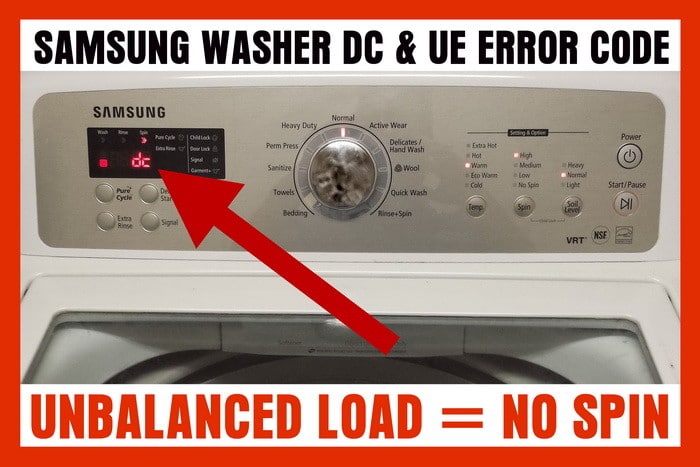
Samsung washer DC error code
What is Samsung DC Error Code?
The DC error code on a Samsung washing machine signifies that the load is unbalanced. This typically happens when there’s too much laundry loaded on one side of the drum, restricting the washer’s ability to spin properly. The Samsung DC error code can also appear when the washer is attempting to spin but can’t due to an uneven load distribution.
Fixing the Samsung DC Error
- Redistribute the Load: The first step to solve the DC error code issue is to redistribute the laundry load. Open the washer door and rearrange the clothes inside the drum. Ensure that the weight is evenly distributed to help the drum maintain balance during the spin cycle.
- Remove Some Items: If redistributing doesn’t solve the issue, try removing some items from the drum. Overloading the washer can lead to an unbalanced load, so take out a few pieces and try running the machine again.
- Run a Rinse/Spin Cycle: After redistributing the load or removing some items, run a rinse/spin cycle. This process will help the machine rebalance the load.
- Press the Start/Pause Button: If the error code still appears after following the above steps, press the start/pause button to clear the error.
If these steps don’t clear the error, you may have overloaded the machine. In this case, remove some items and try again.
Preventing Samsung DC Error Code
- Avoid Overloading: Don’t fill the drum to its maximum capacity. An overloaded machine is more likely to produce a DC error.
- Balanced Loading: Whenever you’re loading your washing machine, make sure to distribute the clothes evenly. Balance heavy items with lighter ones.
- Use the Right Cycle: Select the appropriate wash cycle for your laundry. Delicate items and heavy items should be washed separately to prevent imbalance.
The DC error code on your Samsung washing machine is an easy issue to resolve. By following these simple steps and tips, you can prevent this error from occurring in the future. If you continue experiencing this issue, it might be worth consulting with a professional or leaving a comment below and we can assist you to fix it.
See the chart below for the load and type of clothing load recommended for Samsung washers:
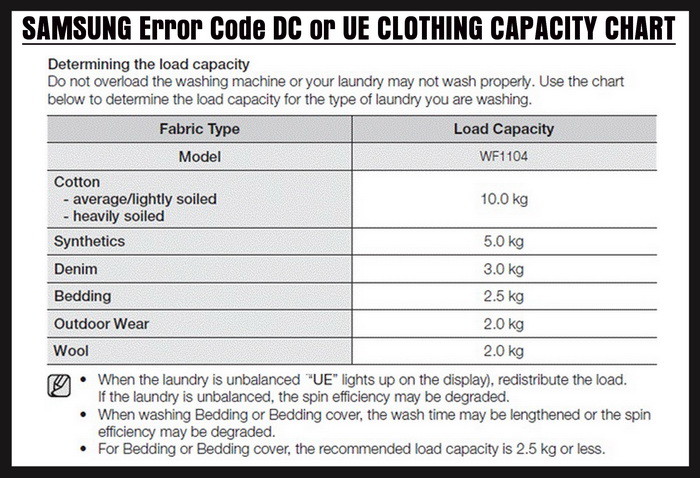
Samsung washer load capacity chart
Samsung Washer DC Error FAQ
What does the DC error code on my Samsung washing machine mean?
The DC error code on your Samsung washing machine signifies a problem with the machine’s drum balance. This often means that the load inside the machine is unbalanced, causing the drum to spin unevenly.
You can fix the DC error code by redistributing the load in your washing machine to ensure that it’s balanced. If the error persists, you might need to check for loose or damaged parts in the suspension system or drum assembly.
While the machine may still function with the DC error code showing, it’s not advisable to use it. The unbalanced load could cause further damage to the machine or result in poor washing results.
While redistributing the load can often fix the DC error code, if the problem persists or if there are damaged components, it’s advisable to call a professional. A trained technician can diagnose and fix the problem without causing additional damage.
To avoid the DC error code, ensure that you’re loading the washing machine correctly. The load should be evenly distributed and not exceed the machine’s load capacity. Regular maintenance checks can also help detect and rectify potential issues early.
If you still need help or have issues with the DC or UE error code on your Samsung washer, please leave a question below and we will be happy to assist.

Written by Keith Schneerer
Certified Appliance Tech · Founder, RemoveAndReplace.com
Keith has spent 30+ years repairing machines, starting as a military mechanic and later maintaining food processing equipment before moving into appliance repair. He founded RemoveAndReplace.com to share field-tested repair advice.
More about Keith →
I have the washer that was recalled and had the part replaced and ever since then it keeps giving the out of balance code and won’t finish through the spin cycle. Can someone please advise on how to fix this problem yet again.
It does not matter what I put in this washing machine I get a “DC” code every time! I can do as much redistributing in the world and it still does not work!!! It takes forever to get a load of clothes washed with this stupid Samsung washing machine!
Hi Guys,
I came across this issue with my Samsung top load washing machine and below troubleshooting helped to resolve this issue. This may work for other top loads as well.
1) Try running the machine in spin mode with no clothes. if it runs and you hear lot of vibrations then its a purely alignment issue.
2) Identify the correct alignment spot. its easy to identify the correct spot. While spinning try to tilt the machine forward (little bit) and at one particular angle you will hear no vibration at all.
3) identify the gap between Machine and Floor.
4) Keep some flat object underneath with the same height.
5) Prefer to keep wooden piece.
In case your machine doesn’t spin with out any cloth, then also you can try the above, however its going to be hit & try. You really need to try with multiple angles.
My Samsung top load does the same. Suspension rods have been replaced and the machine is still under warranty.
But all of a sudden, Samsung doesn’t have anyone to fix it.
Mine will do this with EVERY load, no matter how small or big. I can often put it in repair mode to make it spin out and it will work fine, but when in normal mode it will throw itself off balance every time. It’s even doing it some without any clothes in the washer.
Sharon Deen,
The DC error code occurs when a Samsung washer is unable to spin due to an unbalanced load.
Try to redistribute the items inside the washer and press the Start/Pause button to clear this error.
-RR
My Samsung washing machine keeps saying DC.
I would redistribute the clothes but still it keeps saying DC.
What should I do?