Refrigerator Display or Demo mode is a feature built into refrigerators that completely disables the cooling components in the refrigerator and freezer. The reason for this is to conserve energy while the refrigerator is in a store as a display model. The lights and the digital control panel will still be operational. If you are having issues with your LG refrigerator, you may have purchased a floor model from the store or the refrigerator was on display or demo mode from the factory. NOTE: The display panel on your LG refrigerator (whether vertical or horizontal) will show OF F or O FF. OF F is displayed on horizontal displays and O FF is shown on vertical displays.
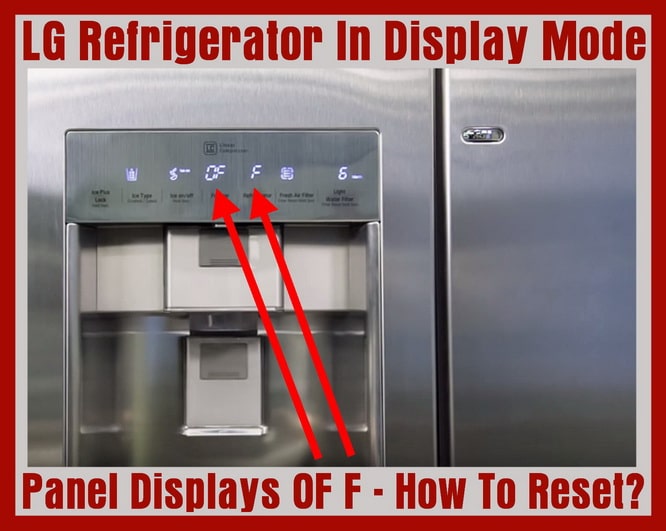 LG refrigerator displays OFF on panel – Demo Mode
How to get your LG refrigerator out of Display or Demo mode:
1. Be sure the refrigerator is plugged in and you are seeing OF F on the display panel.
2. Open the right side door.
3. Keep left side door (where panel is located) shut.
4. Press and hold down the ICE PLUS/LOCK button and the REFRIGERATOR button at the same time.
5. Hold the buttons down for 3 to 6 seconds.
6. The panel will return to its normal setting and you will hear an audible “ding”.
7. The refrigerator dispenser will initialize.
8. The temperature numbers will appear on the display, set the desired temperature for the freezer and refrigerator.
9. Make sure the refrigerator is now cooling and the LCD panel is functioning properly.
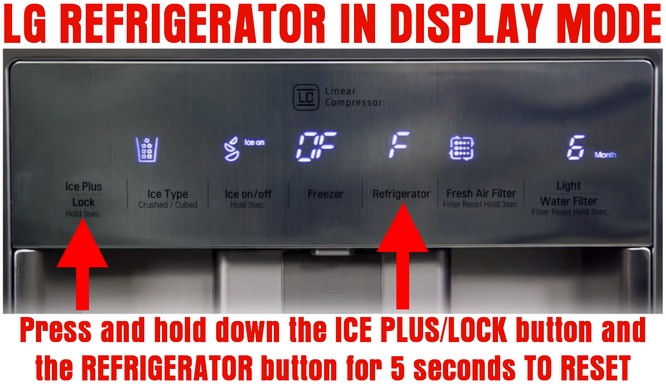 LG refrigerator – How to reset display demo mode
Hold both ICE PLUS and REFRIGERATOR buttons for 5 seconds
In other LG refrigerator models, you may see the LED scrolling from 1 to 7. To reset this and get the fridge off of demo/display mode, you have to open the right door and press both the “REFRIGERATOR ADJUST” button and the “ICE PLUS” button for 3 to 6 seconds.
If you buy a floor model refrigerator, scratch and dent refrigerator, or a refurbished refrigerator, chances are it will be in DEMO mode. Follow the steps above and you will have your LG refrigerator back to cooling and freezing. If you have any issues with your refrigerator not cooling, here is a page that can help you to troubleshoot the issue. If you have other error codes that display on your refrigerator panel, here is the LG refrigerator error codes page.
If you have any questions about your LG refrigerator getting stuck in demo or display mode, leave us a question below and we will get back to you with an answer ASAP.

Written by Keith Schneerer
Certified Appliance Tech · Founder, RemoveAndReplace.com
Keith has spent 30+ years repairing machines, starting as a military mechanic and later maintaining food processing equipment before moving into appliance repair. He founded RemoveAndReplace.com to share field-tested repair advice.
More about Keith →

I just bought a floor model and am having the same issue with it being stuck in display mode despite me following the proper instructions.
Steps taken:
-Plugged unit in
-Opened right door
-Pressed Refrigerator button and Express Freeze simultaneously for over 5 seconds
Model #GMM916NSHV (European model, we live in Italy)
LG customer support has been no help
Thank you! The model number is LFD258$0ST. I had to turn it off at the power box – I couldn’t pull it out of the cabinet. That worked!!! But do you think the board is going bad and could I do that myself? Thank you.
Carolyn,
What is the model number of your LG refrigerator?
In the meantime, try unplugging the fridge for 10 minutes, then plug back in and see if it MAY have reset the problem.
-RR
My LG refrigerator door display is resetting itself continuously! The refrigerator isn’t cooling. I’ve tried to see if it’s in display mode. Still not working.
FF LIGHT ON I TRIED HOLDING GET REFRIDGERATOR BUTTON AND ICE PLUS LOCK FOR 5 SECONDS IT HAS NOT RESET
Melissa,
Have you tried everything above to reset the error OFF MODE?
What have you tried.
What is the model number of your LG refrigerator?
-RR
LG fridge somehow in off mode. Tried a number of things with no luck