My Samsung TV will not connect to my WIFI. The TV shows my wireless network in the list, see’s my SSID but will not connect. I have had it working until the TV updated it’s firmware or my router/modem was updated. Now, no matter what I do, my TV can’t connect to the wireless network. I have tried everything. What steps can I take to connect my TV to my wireless network?
 How To Fix – TV Won’t Connect To WIFI?
A TV that will not connect to Wifi or your wireless network can be an easy fix. There are a few simple steps you can try to get the TV to connect to your WIFI.
These methods are assuming your TV recognizes or “sees” your WIFI network but will not connect. Many of these steps or methods are to attempt to simply reset the components.
FAST FIX TO CONNECT TV TO WIFI:
– Unplug all components and plug back in to reset then attempt to connect to WIFI.
– Restore your TV to “defaults” then scan WIFI and re-enter your password.
Try these simple methods to get your TV to connect to WIFI:
- Be sure you are typing in the correct password (Password is located on the router itself)
- Unplug the modem for 5 minutes and plug back in.
- Remove power to your router for 5 minutes and plug back in.
- Unplug the TV for 5 minutes and plug back into power.
- Go into TV menu – SETTINGS – GENERAL – NETWORK – NETWORK STATUS and select NETWORK RESET.
- Change IP SETTINGS in TV menu – DNS SERVER to 8.8.8.8
- Update the firmware on your TV to the newest version.
- Turn off all firewalls as a test to be sure this is not causing issues.
- Go back to TV and try to connect to WIFI.
(If connection is successful, stop here, you are done, if not continue below) - Try connecting a different way to either 2.4, 5, guest ssid, or WIFI direct.
- If successful the password was either wrong or a component needed to be reset and or updated.
Troubleshooting Internet Connection Issues on your Samsung TV
If the TV still does not connect to WIFI, try using these other methods:
- Hard reset the TV – Go to the Main Menu and select Service Menu – Click Factory Reset.
(For Samsung TVs if your TV does not have this menu, try turning off the TV, then on remote, press MUTE then 1, 8, 2, and POWER and service menu should appear, then choose FACTORY RESET – Don’t adjust any other settings!) - Try both automatic and manual ip address inputs in TV menu – Manual IP – DNS SERVER to try is 8.8.8.8.
- In your router settings, set the 2.4GHZ channel from AUTOMATIC to 1, then reboot the router and try to connect.
- In the IP settings on the TV, switch the “IP settings and DNS Settings” to “Obtain Automatically”.
- Is it possible that you moved the router further away from the TV? If so, move the router back into a position so it can connect with your TV.
Still have issues connecting your TV to WIFI?
- To check to find out if it’s a Television or Router issue, connect the TV to a wired internet connection to test if it will connect. Does it connect to the internet? If so, try to connect to a hotspot.
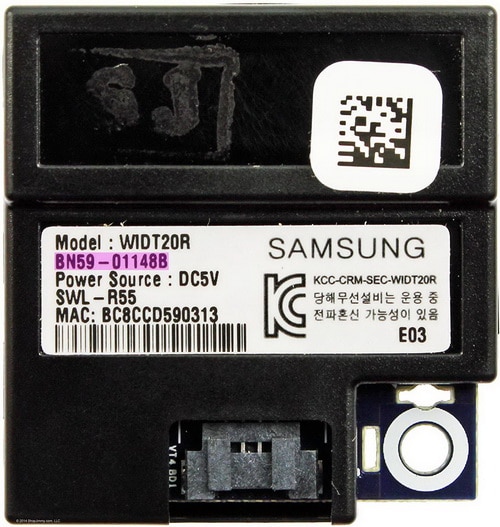
- Use the hotspot from your phone to attempt to connect the TV. If it does not connect, it may be a TV issue such as a faulty part. There may be a faulty WIFI card, internal TV wifi adapter, a board, or wiring issues within the TV.
MORE TV HELP AND REPAIR TIPS:
TV Screen Goes Black
TV Shows NO INPUT
Fix Slow Remote Control With Cable Box
Troubleshoot A DVR CABLE or SATELLITE Box That Is Slow To Respond
Fix A TV Screen That Is Zoomed IN
How To Hide TV Wires
TV still not connecting to wifi? Leave a comment below with model number of your TV and what type of router you are using and we can assist.

Written by Keith Schneerer
Certified Appliance Tech · Founder, RemoveAndReplace.com
Keith has spent 30+ years repairing machines, starting as a military mechanic and later maintaining food processing equipment before moving into appliance repair. He founded RemoveAndReplace.com to share field-tested repair advice.
More about Keith →
Samsung smart Tv model UHD TV 6500 D. It worked fine when I was connected to Cox wireless. Now we had lost that service and have to use Tengo internet wireless.
The Tv finds the Tengo service and says it’s connected. There is an X blocking it to connect and there is no way for me to put my password key code.
I have managed to connect internet my Toshiba TV to my new BT smart hub 2. I cannot however get any programmes with my BT remote. How do I sort this out please
Hi – I have a Samsung LE40C750R2K (that is in serious danger of being chucked off the danger of being smashed with a hammer)! I live on a residential site and connect to their wifi (so no physical connection at all to the any network). The TV has been working fine and then 4 days ago I could no longer connect to wifi. I have tried everything!! The SWL button is greyed out and I cannot change it – there is no option in network setting to switch to wireless – just seems to be stuck on wired! I had no idea how stressful technology could be! I have tried to reset the TV (think I did it but every site I visit – and there have been many – tells me something different) – have updated the software about 6 months ago with the latest version (so I doubt it’s that) – checked with the park and everyone else is connecting fine! If you can solve this one, I will be amazed and very very grateful – do you accept the challenge lol – Suzie
I have a toshiba tv 32l3753db I cannot change wired to wireless network been trying all morning to connect to internet wirelessly but can not change it please can you help regards mick
Charles Hughes,
Here is a step-by-step method to connect your Samsung TV to WIFI.
If this does not work, you may need to reset or change some settings on your tp link router model AC1750.
-RR
I have the Samsung model number LN46A650A1FXZA … and I can’t get the WIFI to connect..Im using a tp link router model AC1750… I can’t get the wifi to connect.. can you please help me with this issue.
the network reset function fixed the problem on my Sharp TV