This simple contact form tutorial will teach you how to create a very simple contact form for an HTML based website. The first file will contain the proper HTML code for the form and the second file will process the data from the form using php. Download the 2 files needed HERE. (The download file is 1 HTML file and 1 PHP file – Total of 2 files) They are zipped together and the single download contains both files.
HTML contact us code will look like this:
Below is the HTML code of the contact form that is contained in the download file above.
<form action=”contact.php” method=”post”>
Your name
<input type=”text” name=”cf_name”>
Your e-mail
<input type=”text” name=”cf_email”>
Message
<textarea name=”cf_message”>
<input type=”submit” value=”Send”>
<input type=”reset” value=”Clear”>
</form>
And this is how the HTML contact form will look in your browser:
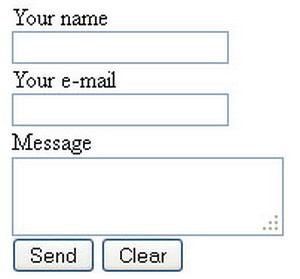
HTML contact form
PHP code will look like this:
Below is the .PHP code of the contact form that is contained in the download file above.
<?php
$field_name = $_POST[‘cf_name’];
$field_email = $_POST[‘cf_email’];
$field_message = $_POST[‘cf_message’];
$mail_to = ‘YourEmailHere@Email.com’;
$subject = ‘Message from a site visitor ‘.$field_name;
$body_message = ‘From: ‘.$field_name.”\n”;
$body_message .= ‘E-mail: ‘.$field_email.”\n”;
$body_message .= ‘Message: ‘.$field_message;
$headers = ‘From: ‘.$field_email.”\r\n”;
$headers .= ‘Reply-To: ‘.$field_email.”\r\n”;
$mail_status = mail($mail_to, $subject, $body_message, $headers);
if ($mail_status) { ?>
<script language=”javascript” type=”text/javascript”>
alert(‘Thank you for your message. We will contact you shortly.’);
window.location = ‘contact_page.html’;
</script>
<?php
}
else { ?>
<script language=”javascript” type=”text/javascript”>
alert(‘Message failed. Please, send an email to YourEmailHere@Email.com’);
window.location = ‘contact_page.html’;
</script>
<?php
}
?>
Here is how to add these 2 files to your website:
1 – Download both files using the link at the top of this page.
2 – Once you have both files unzipped go into the ‘contact.php’ and change the email addresses to your email address.
3 – Then upload the ‘contact.php’ file to the root of your server.
4 – Next add the ‘contact_form.html’ to your website by adding the link to your ‘contact us here’ text.
5 – Once complete then upload this file to your website using FTP.
6 – Next go to your website and test the contact form by filling it out and sending yourself an email.
7 – Everything should be working. If not check all links and directory levels to make sure the links point to each other.
Please Share The Love


Written by Keith Schneerer
Certified Appliance Tech · Founder, RemoveAndReplace.com
Keith has spent 28 years repairing machines, starting as a military mechanic and later maintaining food processing equipment before moving into appliance repair. He founded RemoveAndReplace.com to share field-tested repair advice.
More about Keith →


Leave a Reply