A blinking or flickering television can occur randomly. This dimming TV screen effect can seem like a strobe light and show flashes of black. A flickering TV that blinks can sometimes be fixed by simply turning the TV off and back on.
A component attached to the TV could be at fault. Cables may not be secure or a cable may be faulty. Check to see if your TV has an energy efficiency feature that can be causing the issue.
Disable some of its energy efficiency features such as the Eco Sensor or the Energy Saving feature to keep the brightness level consistent. (Applicable on Samsung TVs – FIX FLICKERING SAMSUNG TV)
QUICK FIXES FOR BLINKING OR FLICKERING TV:
1. Turn the TV OFF and then back ON to RESET the TV.
2. Unplug the TV from the POWER OUTLET for 5 minutes to reset.
3. Check the CONNECTION OF CABLES going to and from the TV.
4. Disable ENERGY EFFICIENT features in TV MENU.
5. Check if there is a FAULTY COMPONENT connected to the TV.
6. Change the INPUT SOURCE to see if issue is with the TV or a component.
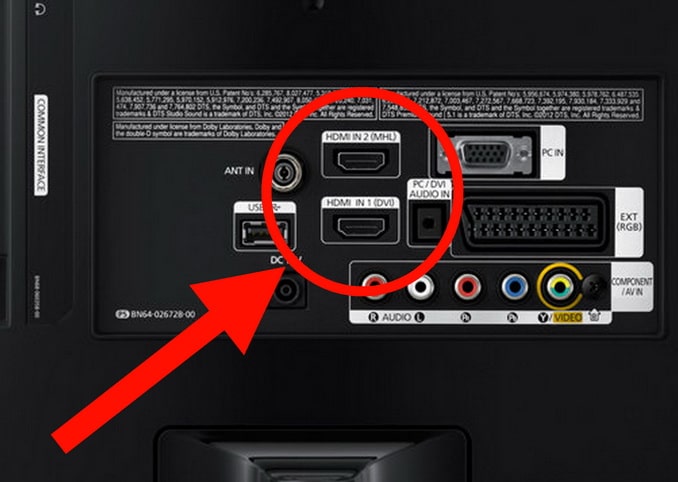 Check all HDMI COAX COMPONENT cables on back of TV
LOOSE CABLES CAN CAUSE ISSUES
TV FAULT, CABLE ISSUE, or COMPONENT MALFUNCTION?
If the TV does not have any cable issues and all components check out to be working, the TV itself may be malfunctioning. Most TVs have a backlight that can malfunction and have an issue with the liquid crystals. When this occurs it can cause the picture on the screen to blink, flicker, or dim.
If these steps above do not fix your TV, check the videos below for further troubleshooting or contact your TV manufacturer. See below for links to TV manufacturers…
How to Fix Samsung LCD TV Flashing Flickering Screen
LED TV Flashing, Flickering, Blinking problem
Flickering TV Screen Repair LCD & LED TV Flashing Troubleshooting
If the fixes above do not fix your TV, use the links below to find out more information regarding your TV warranty.
TV brand links for warranty claims listed by popularity: Samsung, Vizio, LG, Sony, Sharp, Panasonic, Insignia, Toshiba, JVC, Philips, Magnavox, Sanyo, and Emerson. These links will help you to contact the manufacturer to file a warranty claim if applicable.
More TV Screen Troubleshooting & Help:
TV Has Different Color Vertical Lines On Screen
TV Turns Off By Itself
TV Screen Is Black – Powers ON But No Picture
How To Fix A Broken Flat Screen LCD LED TV With Lines or Cracks
TV Wall Mounting – Screws From Wall Bracket TO TV
Do you have other suggestions for fixing a blinking TV? Please leave your solutions in the comment section below.
Please Share The Love


Written by Keith Schneerer
Certified Appliance Tech · Founder, RemoveAndReplace.com
Keith has spent 28 years repairing machines, starting as a military mechanic and later maintaining food processing equipment before moving into appliance repair. He founded RemoveAndReplace.com to share field-tested repair advice.
More about Keith →
My TV Samsung 55′ inch pictures or moving up swiftly that you can’t access settings or even read anything. what’s the remedy?
Everything I turn on my tv it turn on the it goes to where when you turn on and it says Emerson then turn of and has red and green light showing and I unplugged and plugged back in tried a different outfit and still won’t work what do I do
My tv flickers and blinks a lot with no sound. But if I use roku it does not blink or flicker, how come?
I have a panasonic flat screen smart tv ,it comes on for about an hour or less n cuts off I have to unplug it for hours and repeat the same thing ,the picture is still pretty no lines it just cuts off
My flat screen tv when you turn it on at the wall the light flashes on and off and no picture
I have a Sony Bravia KD49X720E. Won’t turn on, won’t turn off. The Sony icon flashes on the screen about every 30 seconds and then a white light blinks at the bottom of the TV. I have checked all the lines, I have unplugged from the wall for as long as 12 hours. Can anyone offer any help?… Please and thank you
I have a 55 inch RCA Flat screen TV.
2 years old or a little less.
You turn it on and it starts flickering right away, some times real fast then it slows down then speeds up.
The TV has a beautiful picture.
I have tried to reset it, what else can cause this?