

Tired of spending too much money on your Satellite TV bill? Well for around $50 you can purchase and easily install an HDTV Antenna that will give you quality HD TV programming. Of course you will not get as many channels as before using DirecTV, but there are hundreds of channels available broadcast into the airwaves for free from the stations you already know and love. This is a tutorial for most people who can no longer afford the cost of satellite television. Cancelling DirecTV or Dish Network will save you from $75 to $300 dollars a month. Admit it, most of the channels that you are paying your hard earned dollars for are completely worthless. Cancel the service, buy an HD Antenna, and get Netflix. You will not miss most of the TV you watch and you will be saving mountains of money per year. So ditch the monthly bill and follow our tutorial below for saving your money…
Step 1: CANCEL SATELLITE TELEVISION
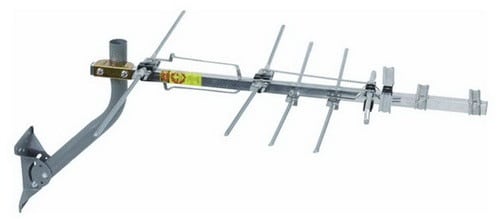 Step 2: Buy an HD (High Definition) Television Antenna.
Here is the HDTV Antenna we purchased from Amazon for around $50 dollars.
(You may also need a coax cable splitter, antenna amplifier signal booster, or new coax cable)
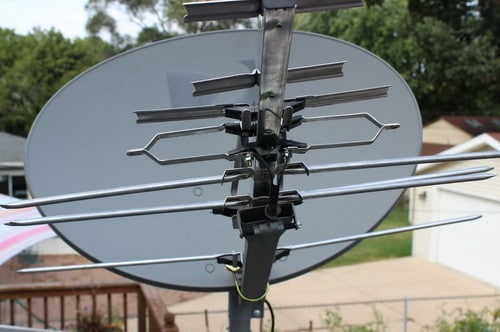 Step 3: Remove the cone and place the HD Antenna on your existing Satellite Dish.
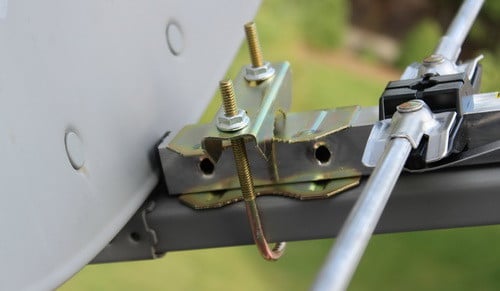 Step 4: Install the U-bolt that is included with the antenna and secure it tightly in place.
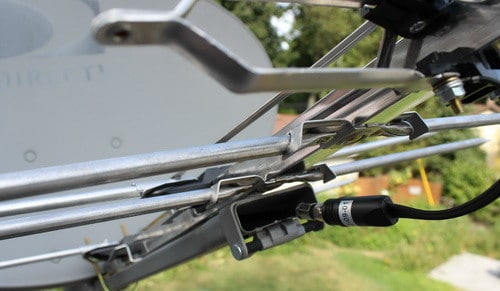 Step 5: Connect the already existing coaxial cable to the HD Antenna.
(The cable is already going from your TV from the dish, so just disconnect and re-attach to the hd antenna)
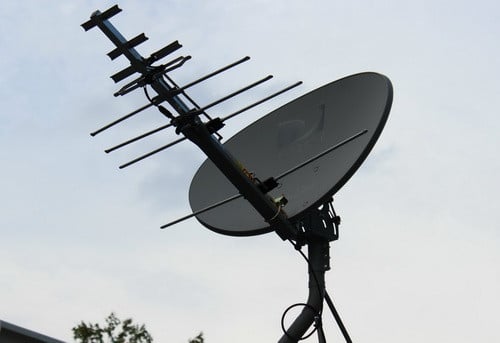 Step 6: Check all connections to make sure everything is secure and tight.
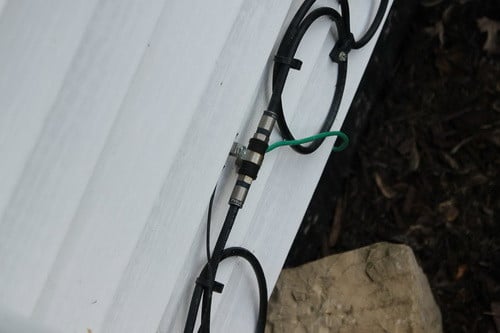 Step 7: There should already be a coaxial cable going into your home from the roof.
If it was disconnected then look along the side of your home for a connection like this and plug back in.
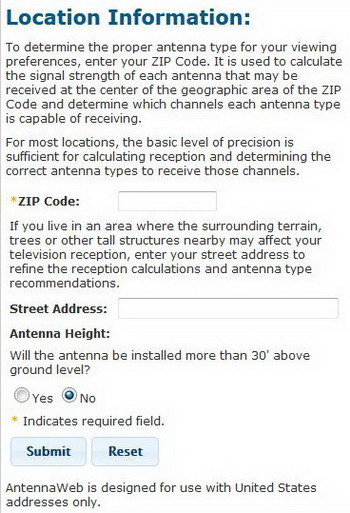 Step 8: The next process involves finding out which direction in the sky your local channels are in.
You will need to point your antenna in a certain direction for best reception depending on where you live.
Go to Antenna Web, FCC DTV MAPS, or Antenna Point and type in your info to find out which way to point your HDTV antenna.
Once you have the correct direction located, point your antenna/dish in that direction.
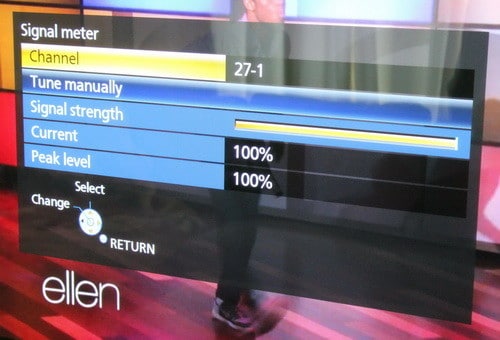 Step 9: Turn on your TV and set it to “Antenna” and let it “Find” the available free stations.
Then check the signal meter to see if it is strong.
If all is good you are done! Free HDTV!
HDTV That is broadcast free is from 720p to 1080p HD quality!
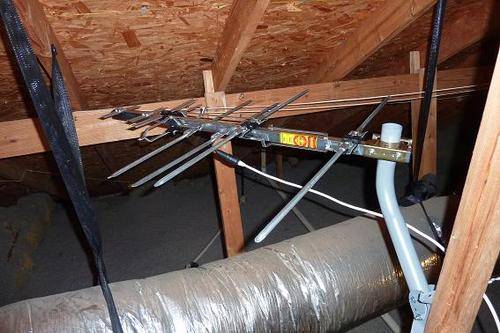 Of course you do not need an old dish to install a new HD Antenna.
You can install one in your attic too if you desire.
But remember that HDTV Antennas work best when attached to a roof and there are no obstructions.
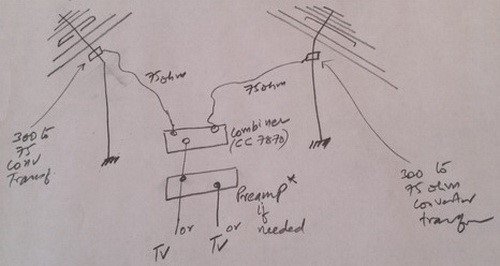 Here is a small chart for “how to connect and combine signals from 2 antennas facing different directions” if needed.

Have Visio TV model D32hn-E4 working with DISH Network dish (undisturbed) removed the three cones and attached RCA model ANT751 outdoor antenna to dish arm along with RCA TVPRAMP12E using 3′ RG6 Coax from antenna downlead to jack at left rear of preamp and 25′ of RG6 coax to transformer (Power supply plugged into wall socket) which in turn is plugged into splitter and then into DTV jack on rear of tv. Set tv to Antenna and ran Channel Search with 0 channels found and did same on Cable setting with same results? My TV has one Tuner and the Hopper 3 DVR has three. Do I need to purchase a Satellite Receiver Box to make this thing work? Please advise.
There is likely a multiswitch between your tv n the dish it allows multiple tvs to be hooked up to one dish it will have to be eliminated to get it to work
I found this six whole years after you posted it and the same antenna will be arriving tomorrow and I’ll be cannabalizing my DirecTV Dish the same way. Great idea!
I have the same type of dish. I have not hooked the antenna up yet, hoping to see if someone replies to this thread. Also, I have 8 different rooms that have cable to them, but watch TV in 3 of the rooms. If I buy the same model antenna, is the RCA amplifier fine or do I need a better amplifier. Drawing all signals from 35+ miles. Thanks.
I live in a project apt building i have 5 tvs in each room in my apt and there is my old dish if i attach this hdtv antenna will it work for all tvs.
My dish has three coax cables coming out of the pole out of the ground. I’ve tried all three cables to my new anteanna and none seem to work. What am I doing wrong?
Hello I have Xplornet Satellite will this work with it
We have some sever storms coming through today so I took it down. I may have to call someone as my electric box is actually about 40 yards away in the ground and I don’t have a clamp where it enters the house.
I am very surprised that it appears dish never grounded my satellite when they installed it.
I have just one tv. I had dish until last week. I went up to roof and the dish had one coax coming off it with the small wire running along that coax. The small wire stoped right before the splitter the coax was attatched to. Then I have a coax coming out of the other side of the splitter into the house.
I thought the small wire from the dish was supposed to be attached to the splitter screw. Looks like Dish never attatched it as it stops right before it!
Steve,
To be safe make sure it is grounded.
The other wire or wires need to be attached to the splitter correctly.
How many TV’s do you have or how many connections?
-RR
Is the ground really not required? I had dish and there is a small copper wire running down the coax from the satellite towards the splitter but it just ends and isn’t attached anywhere. I think it’s intended to be the ground but shouldn’t it be attached at the splitter?
Feez,
It is not illegal to install your own antenna on a DISH you already own.
-RR
My only question is will we get caught after installing the free cable TV?
I finally got the courage to climb up to my dish on the edge of my roof. I had to take off the arm of the dish and come down to get the LNB off the end and attach this same antenna to it. Next I carefully climbed back up the ladder to screw the arm back onto the dish and hook up the coax. On the ground I had to replace the two DirecTV splitters with amplified distribution splitters to get everything to work. I didn’t use a preamp on the antenna because it knocked out channels rather than boost them.
you will have to to connect the coax cable from out the wall to directly to the back of the television. but you will have to do a few more things to get it to work with all of your tv’s
I have direct tv to 5 tv’s
Coax goes into direct tv box and hdmi comes out to tv
Cables are in the wall. Will the signal go through the direct tv boxes through the hdmi to tv’s?
Or do you have to connect the coax directly to tv ?
Joseph,
Is it possible you are connecting the wrong cable?
You went into the TV and chose ANTENNA not cable and ran a channel scan?
There may have been extra or numerous cables, be sure you are using the right one.
-RR
I just replaced my DISH with an antenna. I hooked up the coax from the DISH, but when I went to program it, the TV did not recognize the antenna. It said an antenna was “unavailable”. Have you come across this before?
I would check the antenna, but it should pick up a tower 15 miles away, as it is a 45 mile antenna.
Am I missing something?
Is it possible to use a Dish network satellite with Direct tv receivers to go camping?
You can’t split HD signal like analog signals or old cable television. You will need a powered splitter or get an antenna for each TV.
http://www.amazon.com/Bi-Directional-Amplifier-Splitter-Booster-Passive/dp/B000WDR94U
I am going to head up to the roof and do this today.
#1 remove LNB from dish network satellite/tripod.
#2 attach new antenna just like your pics
#3 here is where my question is. I haven’t been up there yet – but I imagine the dish bracket is grounded – i see the grounding wire on side of my house. that is great! but, do i need to ground the antenna too???
Does it matter because it is now attached to the dish bracket with that metal u thing?
Don’t want to blow up or set on fire my house or tv’s.
Ruth,
You could hire a “basic” handyman. This is an easy process and can be done with minimal time and only having to buy a few inexpensive parts.
-RR
For those of us not talented enough to do this ourselves, what kind of person do you hire to do it and where do you find them??!! Would it be a regular electrician or is there some sort of specialist ?Thanks!!
I think I am going to do this.
I have Dish Network now, going to the main tv – then mirrored to 4 additional TVs. One box for all!
Is it just as simple as installing this antenna … and plugging the coax into it?
After doing so … I would just have the question of … will all my TVs receive the HD antenna signal?
Would I try to keep my Dish box to pump this signal out somehow?
Do I buy some kind of other box?
I am confident it can be done – just can’t visualize it right now …
I mean all my TVs have coax going to it so …
Also, perhaps will do this in conjunction with SLING TV. If anyone has moved from Dish – to HD Antenna/Sling and got it on all TVs with limited equipment let me know.
I inherited a a slimline DirecTV antenna from the previous owner, in reviewing your previous post “Theresa from August 2015” mostly fits my situation with the 16swm distribution block. However, I have a total of “4 coaxial cables” coming from the antenna (which based on Ben’s posting Feb 2016) its the different SAT azimuths (which makes sense to me).
1st question: Do I just pick ‘1’ coaxial and connect to my Clearstream antenna?
I have one coaxial going into the detached garage which in a good distance from the house. I found the SWM power module in my attic; so im assuming its whats powering the SWM16 unit. I disconnected the Power-IN (Coaxial ) and plugged it into my new Channel Master CM3414 4-Port Distribution Amplifier for Cable and Antenna Signal splitter.
2nd question: What do I do with the single coaxial coming into the garage? I’m assuming is being split somewhere before reaching the house.
I currently have AT&T Uverse w/2 wireless boxes; but, the technician has all my bedroom runs disconnected, so i’m a little perplexed with best approach to the problem. My goal in to have all TVs with a HDTV signal (9 in All) 4 outside(2 in garage and 2 on patio) and 5 bedrooms.
Ben,
You should be able to use the existing coax with no trouble at all. If you get no channels then a signal booster may be needed. The channel master amplifier for cable and antenna signals should solve your issue. Make sure the coax cables are secure and there is no damage. Sometimes a coax cable can bend in a certain area and the cable inside snaps. You can actually use a meter on it to be sure it is not damaged. If the coax is okay and you add the amplifier, it should solve your issue. Let us know what you find and how it works for you.
-RR
I have a Dish satellite and removed the LNB. There were 2 coax cables running from the dish to a Solo Node on the exterior of the house. There was one coax running from the Solo Node into the house. I have disconnected both antenna coax cables from the Solo Node as well as the one running into the house. I tried each of the coax cables from the antenna with a F-F coax connector (one at a time of course). Neither coax cable picked up any channels.
TvFool says all the major channels are at the 115-120 heading from my house, and have oriented the antenna to point that direction. The antenna is pointing at the same angle as the satellite used to, and is pointing over the roof ridge line. There aren’t any other obstructions, trees, homes, etc.
I only have one tv in the house, and don’t plan on adding any. The coax run from the antenna into the house is a decent length, would guess around 30-50′ at termination at the receiver, etc.
Do I just need an amp to boost the signal?
Getting frustrated with what should be a very simple project. Thank you very much in advance!
Oh okay. Thank you!
So, as long as the antenna is properly mounted and directed where it needs to be pointing, and accompanied by an inline amp I should be good to go?
You can absolutely mount it without the dish. It does nothing to enhance the signal. Just makes it easier to mount the antenna since the dish is already mounted to the roof.
Very good and interesting write up on this satellite conversion to break away and cut costs from cable TV. After reading the article a couple times and reviewing every comment in the post below my only question is this… I have obtained a DISH Network satellite dish and I will be purchasing said RCA HD antenna as you have used, does the Dish satellite do anything to amplify or enhance the HD antenna? Would I still get everything that you are showing if I were to mount it without utilizing the dish?
My direct tv had 2 coaxial cables hooked to the dish and in side my home it all has 2 coaxial cables to connect to the tv or box. Is thete an adapter or does anyone know how to do it with this kind of hook up?
Kenneth Halpine,
You should be able to use the existing cables. Most people do with NO issues. The cables from the dish to the box are the same you would use if you were starting from scratch. You are good to go.
-RR
I just did this today. Works perfectly! I bought the suggested RCA antenna and this amplifier.
I have four cables on my dish since I had the Genie and two DVR’s with DirecTV. So a lot of tuners = multiple cables on your dish. I took the cable with the red ring around the base of the connector which is the main line and plugged that into my antenna. Then I went into my attic and found where they had attached their equipment and lines, found the lead from the dish. (Again it had a red stripe so was easy to find.) I plugged that into the 8 port amplifier above, removed all the lines from DirecTV’s splitters, and plugged each of the lines to the five TV’s in my house into the 8 port amplifier. I then capped the three extra ports with F-Port Terminator Caps since I only have five TV’s. Once I plugged the power in and scanned for channels…Voila!!! crystal clear reception on all five TV’s with over 40 channels! You just have to be sure to remove ALL of DirecTV’s boxes from your lines including the power box that they plug into one of your cables. I live in Downtown Orlando and I didn’t even have to move my Dish to the east which is recommended. I left it pointed southwest and it picked up all the OTA channels in my area. I have added a Channel Master DVR+ to my main TV and I now have a complete 2 week program guide and can record up to two shows at a time on that TV with no monthly fees at all! Thanks so much for this post because it led me in the right direction!! Hope my information helps those with multiple tuners on their DirectTV. Only a hundred bucks to make the switch! (If you aren’t adding the cost of the Channel Master DVR which is $300.00 plus $50.00 for a One TB Hard Drive…but…No Monthly Fees EVER and you get an onscreen program guide similar to DirecTV. That is so worth it to me) This is the best day EVER!
I will be using the Direct TV dish to mount the antenna. My question is will I need to disconnect from my direct TV receiver box or will the new antenna work through the box? My TV is mounted on the wall with all cables hidden in the wall. If I have to disconnect the receiver it will be a major pain to reroute the cables.
Jennifer,
If the SAT dish has a clear unobstructed view of the correct position in the sky, then no it does not need to be on your roof. Just be sure it has a clean view of the sky in the right direction. Some people have them on the patio, or mounted near a window.
-RR
Does the Satellite and antenna have to be on the roof to work? Our Satellite is not on the roof.
This works perfectly for us in Mentor Ohio. I had to add a RCA preamp but everything was so easy to hook up and it works for 2 TV’s in the house because the previous cable lines already had the splitter. I suggest everyone to switch to OTA and cancel your cable… all we pay for here is internet and Netflix and we save over $100 a month now! Best information and instructions. It’s not rocket science anyone can do this.
Kerri,
If you use this method you should be able to use the Direct TV and the antenna. You will have to run separate coax cable and then change the input on your TV when you want to switch from watching Direct TV to antenna.
-RR
I currently have Direct TV with one dual tuner in the living room. I only have Direct TV channels in the living room and bedroom. If I use this method would I be stuck with the same option of only receiving the antenna channels on those two TVs or can I make it work for more room?
I have read about how some satellite companies put scramblers on their coaxial lines. Do you know if Dish does this to theirs? Also I am about 36 miles away from where a majority of the TV towers are and I am looking at going with the ClearStream 2V Long Range Indoor/Outdoor HDTV Antenna. Does anyone have any experience with using this antenna and what are your thoughts of it?
Josh,
A splitter should be the only item you will need in your situation. If the picture or reception is not satisfactory, use an amp inline.
-RR
I am wanting to convert my old Dish network satellite to HD OTA antenna. I know how to mount an HD OTA antenna on the mast. The problem is there is dual coaxial running out of the old Dish network satellite and into the house. Do i need to use 2 separate antennas for each coaxial or just put a splitter on the antenna and hook the dual coaxial to it?
My antenna is a “1byone” Amplified UHF TV antenna Kit sku: OUS00-0551. It’s has a 80 mile range.
It seems to be well made and sturdy. I would like to go to a Radio Shack but they all closed down in our area this past year. I have checked on Amazon but I wasn’t sure of what I was supposed to be looking for at the time. I will look again to see if I can match the specs for the one I have.
Jim,
You can buy another amplifier for the second TV or cut into the wiring on the antenna and add an amplifier before the splitter. If you are unable to do this then yes adding another amplifier to the second TV coax cable is your best bet. A good place to buy splitters and amplifiers for cable coax wiring is Amazon (online) and Radio Shack (in store). What antenna brand and model are you using?
-RR
My problem with my new setup is that the antenna I bought has a amplifier with it that probably should go before the splitter. I can’t put the amplifier in the line until after I split the signal so I am using the amplifier for only one TV. I suppose I need to buy another amplifier for our second TV. Do you have any suggestions about what I need to buy and where I can get it?
We are getting 27 channels now with this setup. That’s about 5 more than we were getting with a small indoor antenna. I spoke to an electrician about the ground and his reply was “it can’t hurt”. So I ran a ground wire from the new antenna to the clamp that Charter uses for our internet service. I feel better doing that since I do have a 8′ steel pole on my roof now.
Jim,
For this setup grounding should not be necessary unless anything electric is running through your setup. Are you receiving many HD channels with your antenna connected to the DirectTV?
-RR
I am installing a antenna using the base of a directv dish on a fence line post and I’m using Quad shield RG6 coax. My question is – do I need to ground this setup? I noticed on the old directv coax that it has a ground wire attached to it but it’s not connected to anything.
Adam,
Yes it is good to ground it for safety and can help with other factors, but not necessary.
-RR
Hi-I did this the other day and it gave us 20 more channels..excellent. Quick question though, did you ground your antenna? Dish made me give back the node so i was wondering if it was necessary to ground.
Excellent Idea!
FlyTye, have no fear…we only ever could get 12 channels over the air. I don’t live in or anywhere near a big metropolis! However, I might try it with the 4 way splitter that I already have and may be able to send the other one back if all still works well.
Theresa,
I’ll admit that I didn’t look up your brand of antenna up at first. It sounds like you have an amplified antenna. Sorry i was thinking your antenna was non amplified. With your antenna already being amplified then the advice I gave you earlier would be bad advice. If you have a regular splitter (non amplified) lying around or could go run and grab one at an home improvement store (should be pretty cheap) or so, try that. From my understanding (and someone correct me if I am wrong) you should not have 2 amps on one antenna (I think in rare cases its ok) The 2 amps may be interfering with some of your channels, so see how it operates without the amplified splitter. Once you’ve done this rerun a channel scan and see if you get more channels this way. If you find the signal quality good on all of your TV’s return the amplified splitter.
Well, FlyTye I got the 4 way amplifier and connected it all up and got nothing. No power on the antenna. I grabbed the amp that came with the antenna and connected the cable from the antenna to it. I then connected a cable to the “out to tv” port on the antenna amplifier and then to the in port on the 4 way amp. The 4 way amp also has a cable connected to it’s “power in” port. It looks kinda messy but the light came on the antenna and I have perfect reception on my 3 tv sets. Of course all that work for 12 channels may be kind of a waste of my time and energy…
Yes on everything with the exception of the “gray power inserters” inside the house. I’m trying to understand what you mean by that. There should be nothing connected inbetween the antenna and the splitter(the amplified one). You should simply have the antenna>the line going out from the antenna> line into the “in” port of the splitter. Disconnect all swim units! Everything else I think we are on the same page on.
FlyTye…
The only problem is I already disconnected all cables from the 16 channel SWM unit and all cables from the direcTV 4 way splitter. Now if I understand you correctly you are saying leave the cable plugged into the SWM 16 channel unit where it says swm/power and plug it into the power section on my amplifier. Plug the antenna into the “in” port on the amp and the other 4 cables that lead into the house into the “out” on the amplifier. I think I have one, maybe two, gray power inserters connected inside the house–since that supplies the power to the SWM–would that be where I plug the outdoor antenna adapter into it? If that’s the case, I am not sure how that will work–but I can try it when the part gets here.
Also Theresa,
Just thought of something…..That swim unit is already being powered by one of you coax cables in your house. Just take whatever cable is plugged into the power side of the swim unit and hook it into the power side of your new splitter. Then trace wherever DTV has their plug(in your house somewhere ) and replace it with the adapter that came with your unit.
I just did a little reconfiguration with mine, but this should work for you if you don’t need to make any changes.
Theresa,
From the looks of it and the reviews on Amazon, what you’ve ordered should work just fine. It works exactly the way I described earlier with the exception of it being a four port splitter. Try it out and if you have problems (which I doubt) just return it for the one I mentioned- as it is a little cheaper and has more ports.
Good Luck :) It’s awesome not having to fork over $100 a month to Directv anymore!
I had ordered this one Antennas Direct CDA4 4-Way Output TV/CATV Distribution Amplifier before I got your response back. I hope it works. Please let me know so if I need to get the one you recommended I can do so.
Dave,
55 miles is quite a distance. Buy an antenna that has a 75 to 100 mile range. That way you should have no issues.
-RR
The antenna looks great. I live approximately 55 miles from transmission towers and was wondering – will I have much luck pulling those signals with this antenna or should I invest in making/buying a larger one?
Theresa,
Replace the DIRECTV-Single multi switch with something like this:
Bi-Directional-Amplifier-Splitter-Booster-Passive
This is what I bought. Your antenna may not like to be split with splitters that are non- amplified. Every time you split a signal you will have signal lost. If you live close enough and are receiving strong signals from your TV towers you can generally split using a regular splitter to- 2 TVs at most without pre-amplification. In your case (and mines as well-just did this about 3 weeks ago) you will need an amplified splitter or pre-amp to compensate signal loss for your splits. I have the item in the link above hooked up on 5 TVs and our picture quality is excellent on all TV’s. I live about 35 miles away from our towers. I also have the same antenna the OP referenced, but splitting your signal is all the same regardless of brand. Be sure to place this unit as close to the antenna line in as possible, I would say no more than 20 feet or so(keep line- in as short as possible).
So basically I have:
1) Antenna on the roof- mounted on old satellite mask with a single line going into my attic
2) The single coax line (about 8 feet) feeding into the amplified splitter (“in” on box) in the attic bolted to one of the rafters
3) I had coax runs where DIRECTV had 2 coax lines feeding into one room when they where using the dual tuner DVRs that required 2 separate lines. Being that I only need one line for the TV in our master bedroom, I used the additional line to power the unit. The unit receives it power via coax so I took the end of the unused cable, plugged it into the adapter and into the wall. Then you take that cable and plug it into the “power” section on the amplified splitter. The splitters led will light up when it has power.
4) The splitter is located in the same place the DIRECTV Splitter-Swim unit was hooked up. So all the lines to all my rooms are already there. At this point you just connect all the lines you want for each room into the “out” ports.
(If you decide to go the preamp route you would just need to get power to the preamp and use a regular non amplified splitter.)
Hope this helps.
Thanks for the response. I figured it out. When I followed the cords from the DirectTV dish under the house, I found the wires had been cut altogether from my system. I couldn’t get into the Cable junction box on the outside of the house (I’m assuming because I currently have internet and they didn’t want me adding something), so I ran the cut directtv cord right below the spot where the tv is located. I cut the cord from the wall and connected the direct tv cord to the wall.
I had direct TV. It was set up to operate 4 TVs. On the satellite the LNB had 4 connectors. These cables are connected at the bottom of another box (16 Channel SWM) (go here if you want to see what the box looks like: DIRECTV-Single Multi Switch Channel which is connected to the side of the house. On the other side 2 more cables that indicate swm are attached on one side. No cables are attached on the opposite side. It says Legacy. My question is where do I connect my outdoor antenna (It’s a Taotronic and I’ve read it doesn’t like splitters) so I can have the option of sending that signal to all the TVs in the house. I’ve read the above comments but don’t see an obvious answer to my problem.
Richard,
Usually DirectTV will not use the same coax as your cable internet company. Should be separate if there are 2 companies involved. If they are “Sharing” the same coax, buy new coax cable and use that one for the TV.
-RR
I currently have cable internet and a flat antenna behind the TV. The previous owner of the house left me a direct TV satellite in the back yard, so I’m going to try this idea to see it it improves my signal. My one worry, however, is reconnecting the direct tv cord will interrupt my cable internet since the signal travels through the same coaxial cables through the house. Will I have to run a second coaxial with the antenna signal behind my tv?
Jim,
Yes replacing it with a splitter should work fine. You may need a signal booster depending on how close you are to the hd towers. Use a normal splitter and then add what you may need after.
-RR
My existing Direct TV dish is an SWM dish. Where the cable enters the house it connects to an SWM ODU box that plugs in. The signal enters and exits this box before being connected to an 8 port coax splitter which is where all the signals branch off to each room in my house. What do I do with this? Do I remove it and replace both the 8 way splitter and SWM ODU unit with a signal booster or will this act as a signal booster? Thank you.
Nancy,
So glad you got things figured out. Great job!
-RR
I just wanted to give an update. I went back up to the roof and unscrewed the cable that was going through the arm of the dish and was connected to the antenna. As I had suspected, it was a problem with that coax cable — the pin was broken! I disconnected the coax cable behind the dish, and hooked the antenna to that. Success!! Thanks so much again for providing this site!
DJ,
Adjust the antenna and try another channel scan. Does the 12 tower in your city broadcast HD?
-RR
The channel 12 tower is on the same mtn top as the rest of the broadcast towers and all other broadcast channels come in clearly.
DJ,
Possibly that is the furthest broadcast tower from you? Have you checked the broadcast map?
How well do all the other channels work?
-RR
Any ideas why all but (1) network broadcast channel (NBC 12 in Phoenix) would come in?
Frances,
You need to go into the TV menu and set the TV to ANTENNA. Right now it is probably on CABLE. What brand and model TV do you have?
-RR
How do I change my TV back so i can search for channels for a antenna tv. The dish tech set the tv on channel 60 so the satellite would work, but I can only see what is playing in the den, I have no box to work this TV. I hooked the antenna back up to the TV and disconnected the satellite cable but when I search for channels it still remains on 60.
Carol Wallin,
Are the 3 wires the same color? Are all 3 threaded into a small metal box? There is probably 3 that go into different parts of your home from the outside. Can you describe or explain more in detail? Can you refer us to a picture of what you are looking at?
-RR
I have 3 wires going to the Dish which one will I use for your antenna?
I think we’ll give it a try and since the dish is mounted on a pole we may be able to add an extension to raise it up. We are about 5 miles from the TV Towers that are located in Mason City, Iowa.
I’ll keep you posted!
Jody,
It may or may not. How high will the antenna be mounted? Are you close enough to the TV towers to get HDTV? Which antenna are you going to be using? Which city do you live in?
-RR
Thanks for the feedback. the current cable from the dish runs underground from the garage to the house, so it looks like this project can’t work. I really don’t want to dig up the yard again to bury a new cable. And I’m just not understanding how the cable was working 1 day (with the satellite) and is bad the next (with the antenna). I understand that cables go bad, but this doesn’t make sense to me. I think I’m better off paying someone to do this for me. Thanks again!
Our satellite dish is mounted on a pole that is not higher than 5 ft. Will this antenna still work if we attach it to that dish?
Nancy,
Yes the dish was affected but the cables cannot be as long as they are not going outside and out of sight, they may be cut. Or possibly the cable that you are using is damaged. Buy a new heavy insulated coax and run it from the antenna. Then try your test again and see if the results are different. This is just a matter of using the correct antenna, correctly positioned, with quality coax cables going to the correct places.
-RR
Sorry about all the questions. I took the new RCA antenna that you recommended off the satellite pole and brought it inside and hooked it up to the TV. I got 5 scrambled pixelated channels. I took the previously purchased, RCA indoor/outdoor antenna that was giving me local channels out to the satellite pole and got nothing. So….I believe my troubleshooting reveals that there’s something wrong with the cable that is attached to the satellite dish, since both antennas work when hooked up directly with a different coax cable to the TV, and neither antenna works when hooked to the coax on the satellite dish. I don’t understand this. If DirecTV cut the service, wouldn’t that just affect the dish, not the cable?
Ok. I’ll try your suggestions. I’m about 20 miles from the broadcast stations. I can’t move the antenna up, since there’s no room for movement with the dish in the way. I’m using the antenna you suggested. I didn’t replace any of the cables. I’m using the existing ones that are attached to the dish.
Ps. I should note that I installed the antenna that you suggested to the satellite dish. I’m not using the RCA one.
Nancy,
Yes you can try getting a signal booster and a good amp. Try moving the antenna further up and pointed in the direction of the TV towers. How far away are you from the TV towers in your city? Be sure you have everything connected correctly and tight. Be sure the coax cables are of good quality. Not the Walmart types that are brittle and have horrible insulation. Tinker with every aspect of it and you should be able to get at least 20 channels if you are in the vicinity of towers broadcasting HD.
-RR
Thank you for your quick reply. I really don’t know what the dish cone is, and I’ve googled it and think that it’s the unit wi the 3 white disks in it. I was able to get everything connected, with lots of lefty loosies. I checked all the connections and I’m getting no channels. I had an amp with an RCA antenna that I had bought, but I’m still getting nothing. Perhaps I need to get a signal booster and amp as you suggested? With the RCA indoor/outdoor model, used indoors, I picked up 2 -5 channels, with the amp that came with it. What do you think?
Again, thanks so much for this site and your help.
Nancy,
It should come off with simple tools. You are trying to remove the coax cables from the dish cone right? It should be just threaded on. Lefty loosey righty tighty. If by chance you have a different setup than normal, if you see allen bolts, then yes use the allen or hex wrench to remove. Are the coax cables just threaded really really tight onto the unit?
-RR
Help. I finally figured out that the cone is the plastic rectangular piece with the 3 white disks on it. After hours on a ladder trying to pry that thing off, I finally got it. Now I’ve spent another 30 minutes trying to get the coax cable disconnected from the LNB/CONE. It will NOT twist out. What am I doing wrong? Do I need a hex wrench to get this undone? Isn’t just a regular coax?
Rene,
You may need an amp and splitter depending on how everything was installed. The easiest way to find out is hook everything up with the new antenna and if signal is not great then you can add an amp. Have you checked to see how far away you are from the HD TV broadcasting towers?
-RR
I also have a Dish network satellite setup; but will I need a preamp? I am going to use the current dish like suggested…
Simonleecs,
You will need just a normal SIGNAL BOOSTER, and an AMPLIFIER for signal (if required). Purchase the most popular and reliable types. If needed ask them questions through eBay.
-RR
Thanks for all of this!! will try it out and one last question, for amp and booster which product should u buy?
I went thought E-bay and there are hundred of product which confusing me. can you suggest which product to purchase for amp and booster? (better if they delivery to Malaysia service as i know some have some no)
A Thumb up for your post !! cheers
Simon,
In theory it should. The only way to know for sure is to just try it out. If it does not work properly, adjusting some things will help.
-RR
the nearest i found with google map is around 38 miles, does the DVB-t2 decoder will work with this HDTV antenna in my countries Malaysia?
Simonleecs,
Yes you will need the amp and booster to get best signal. You should be okay. How far are you from main TV transmission towers in Malaysia?
-RR
I’m from Malaysia and I have yet to measure the distance for TV. What is the minimum distance for this?
*https://en.wikipedia.org/wiki/Television_in_Malaysia (most of the tv channel in here)
*http://www.geocities.ws/fahmispellman/televisyen.html (This is the Frequencies in my country and i was in “Selangor & Kuala Lumpur” area)
I notice some need purchase “Preamp kit” or “Booster”, do i have to use this to receive HDTV channel or normal channel ?
Simon,
From your preparation list, you should be perfectly fine. As for the decoder, DVB-T2, what country are you in and how far away from the center of the city are you?
-RR
Hi,
I’m preparing all the stuff for this DIY project and i’m not sure if i miss out anything or not working later.
Please let me know if there is any step went wrong for this
1) I have a Satellite Dish and i’m going to purchase the RCA antenna on internet as you mention and setup it later just like you on the picture.
2) I’ll connect the coaxial Cable to the RCA antenna and connect it to my TV antenna input.
3) I’ll start search TV channel for available channel.
*MY country is using DVB-T2 decoder, will this DIY project will work on here?
Riley,
Yes hook it up just as the old dish with all 4 coax into a splitter. You have the right idea.
-RR
Hello. A couple things: I have seen it asked but a couple times but am still not clear. My DirecTV was connected to 4 tvs. If I hook up the antenna to the coax going from the dish to the house will it be able to transmit to all 4 tvs? It seems like the DirecTV signal came in and was able to be split to the 4 tvs so the antenna signal should be able to as well, right? Also, I had heard that by definition, the dish does amplify the signal to the antenna (if placed properly), the same way it amplified the DirecTV signal to the eye.
Thank you.
Tim,
Not required but…. you could have a grounding block wired to a ground rod before the antenna wire enters your home. It won’t necessarily prevent all damage from a direct lightning strike, but it will help.
-RR
Richard H,
A splitter and amp will work perfectly. You may have to tinker with the signal for awhile to get it perfect. Remember to use good high quality cables, splitters, and amps.
-RR
I have a Dish Network Dual LNBF. 4 cables run to this dish and back to an outside splitter. When I terminate Dish they will want all their equipment returned. How to attach these 4 cables or what type of splitter do I need? Do I need an amplifier?
Do I need to ground the antenna or is the satellite already grounded?
Chris,
You may need an amp, test out first.
Use the cable that supplies the main TV input.
-RR
AJ,
Use the main TV line coming into home for the HD antenna. Go from there and if there are issues reply back and we will look into it further for you.
-RR
I have ended my TV service with Comcast but I still have internet with them. So, from the Electric pole to my house is 1 line and then a 5 way digital splitter – 1 is cable coming in and 4 going out to each room in my house. Looks like they have split off one line in Main room with Big TV & Internet ( my problem). I want to use existing cable line & splitter to hook up my new MOHU SKY 60 Outside Antenna (with amp) and Channels device. This is a multi-directional HDTV Antenna with a remote ( like cable) that gives you a Channel Guide. I want to know if I can plug outside Antenna into one of the 4 room lines that is not the main internet line and it will make the other 3 rooms come in. I know that one that has a splitter with internet on it- Ill have to run a separate line to TV possibly with another splitter. Any help with this would be great!! I think im on the right track, but if not let me know . Thanks so much.
Just cancelled DirecTV!!!! I currently have the HD dish on the side of my house and the local tv station antennas are up on a mountain about 10-20 miles away. I have a couple of questions for you. I have ordered the RCA antenna you recommended, will I need to get an amp for this or will this be all I need? Also, there are multiple cables connected to the Directv dish, can I use any of those to connect the antenna? Thank you for your time.
OK I am new to this. I moved into this house and the house already has 3 satellite dishes attached to it. is there a way to combine the signal? I ask because according to Antennapoint.com with my direct address plugged in and it says the closest transmitter is 32 miles away and up to 60 miles away. So what would I need to get the best reception?
KIRO-TV CBS 39 7.1 UHF 1000.0 kW Seattle 32.04 mi 195.95°
KONG-TV IND 31 16.1 UHF 700.0 kW Everett 32.08 mi 195.41°
KING-TV NBC 48 5.1 UHF 960.0 kW Seattle 32.08 mi 195.41°
KOMO-TV ABC38 4.1 UHF 1000.0 kW Seattle 32.11 mi 195.65°
KCTS-TV PBS 9 9.1 VHF 7.49 kW Seattle 32.69 mi 191.59°
KMYQ MY NETWORK 25 22.1 UHF 1000.0 kW Seattle 32.70 mi 191.50°
KSTW THE CW NETWORK 11 11.1 VHF 14.74 kW Tacoma 32.72 mi 191.58°
KHCV AMER1 (CH 44-1); AZTECA AMERICA (CH. 44-2) 44 45.1 UHF 240.0 kW Seattle 40.80 mi 166.82°
KWDK REL 42 56.1 UHF 144.0 kW Tacoma 40.80 mi 166.82°
KUNS-TV UNIVISION 50 51.1 UHF 240.0 kW Bellevue 40.80 mi 166.82°
KWPX ION 33 33.1 UHF 178.63 kW Bellevue 40.81 mi 166.75°
KTBW-TV TRINITY BROADCASTING NETWORK 14 20.1 UHF 90.0 kW Tacoma 46.92 mi 218.59°
KCPQ FOX 13 13.1 VHF 23.07 kW Tacoma 47.22 mi 219.17°
KVOS-TV IND 35 12.1 UHF 612.0 kW Bellingham 51.40 mi 323.92°
KBCB IND 19 24.1 UHF 165.0 kW Bellingham 51.82 mi 323.50°
KBTC-TV PBS 27 28.1 UHF 47.2 kW Tacoma 57.69 mi 196.29°
Great read, thank you very much for putting this up. I have three tvs in our house. I have one tv receiving 27 channels and one receiving 7. Any idea why this could be happening?
Thanks,
Scott
Melissa,
What you have explained is very doable. Use the highest quality splitters and possibly an amp if signal is weak. Here is a step-by-step process for installing an antenna in your attic.
-RR
Can I do something similar (using the old satellite cables/hookups) but place the antenna in the attic?
What would an attic installation involve (step-wise) that might be different from everything described above. The current satellite dish sits right above our garage. Our attic entry is in the garage. I’m thinking I’d have to remove the coax from the satellite dish (and roof) and find where it enters the house and see if I have a direct line from that entry point to run the cable to the attic. Does that sound doable? I realize an attic install depletes signal, but I already get a few stations just with rabbit ears, so I think I’ll be fine signal-wise.
Kevin,
Most of the things listed will not make much of a difference. If you get an amplifier, then you can experiment with moving some components around and fine tuning. An amplifier will help. How many channels are you currently getting and how is the picture quality?
-RR
Worked! The signal is not strong but it works. Couple of questions?
Does placing the antenna at the base to the dish improve the signal? (I placed farther away than the where you have it in the picture)
Will the Direct TV power inverter make any difference to the signal?
My dish was tilted so that the widest part of the dish was not perpendicular with the roof.
Would this help satellite signals but hinder the analogue (?) signals I am trying to get?
I did not use an amplifier. Will the above changes not make much of a difference and I should get an amplifier?
Thanks. Great article. Sticking it to the man!
Tim,
Yes remove the Dish switch node. That is used for Dish signal only. You will need a splitter. A 3 to 1 splitter will work. Put the splitter wherever is more convenient and less work for you. Less work is using the existing cable from the dish down and then add splitter but can be done whichever way you wish. Whichever requires less coax cable is best.
-RR
I am really wanting to cut the bill…I have noticed that if I set this up it appears that there are 2 cables coax coming from my dish which is routed into a switch i.e. “Solo Node” for the two hoppers. Am I going to have to remove that and get a 3 to 1 splitter to run the 3 tv’s if I only run one line from the HD antenna? Or am I better off using a splitter up high to bring it down to one cable for the HD antenna >>> leaving two in’s to the Solo Node model # 185834.
Sean,
Not sure what you mean by the end part of antenna you cannot remove. Can you explain in more detail?
You should be able to simply use the existing cables. Disconnect the existing cables from the dish and install on the antenna. Then remove the cables on the dish box in the house and attach to coax input on TV. Set up your TV to search for new channels using antenna mode. That should tell you if it is going to work before you cancel DirecTv.
-RR
I really want to get rid of Directv and try this. Bought the antenna you all recommended and havent shut off my service yet. I am having a hard time with the cables. You cables seem to run through the antenna but mine has the end part on which i cant seem to get off for the life of me. Any suggestions. Id like to make sure of what I channels I can get before cancelling service.
Steve,
Once the storm clears…. Let us know how things go. Feel free to ask us any questions you may still have. We are happy to assist you. Good luck and keep us updated.
-RR
Thanks again. I have to wait a few days anyway due to weather, rainy, windy, and cold.
I may have more questions later, once I get it all hooked up. I’ve got the general ideal now, Thank you.
There is already cable going to each room that has a tv so that’s got to help.
Steve,
If you are asking if you can take the coax coming from the dish to the antenna, yes. You are simply just using the same cable that the dish used. Also, yes you can hook up the power unit inside where the cable comes in. Test everything out and see what channels you receive. If the signal is low because it is split in multiple areas, you should be able to put an amplifier BEFORE the splitter or splitters. Find out which wires go where and if you want certain cables to go into certain rooms. If you are only having the antenna signal to supply a few rooms, remove any extra wires that won’t be used. You can remove splitters too if needed. As you stated above, it seems you have multiple splitters. Remember less is better when it comes getting a stronger signal. Meaning the more splitters you have will lower signal quality, so remove any that may be unneeded.
-RR
On the outside of my house, where the cable goes in, there is a 4 way splitter, and a two way splitter. I’m assuming the cable with the biggest nut is directv coming in. It goes out to the two way splitter. Two go to the right and two go to the left. And one goes into the house where the dvr is.
Can I take the cable from the dish, plug it into the antenna, and hook up the power unit inside where the cable comes into the dvr (soon to be gone, I hope)?
The splitters are outside so I can’t put the amp before the splitters.
Steve,
You will need to use a splitter and an amplifier. The amplifier goes BEFORE the splitter. Get an extremely high quality amplifier so it amps the signal to the max without quality loss.
-RR
Hello again.
Back to being confused. It’s been too cold and windy to do any outside work, but I did get a powered hd antenna. If I plug into the antenna from the dish on roof, this power unit shows it plugs into it and the power unit goes to the tv. I don’t think this is going to give my other tvs the benefit of the antenna, is it?
Where do I put the splitter in the line from the antenna to be able to use it for all of my tvs (4)?
“Splitting the video signal between 4 different TV’s will produce about 12 db of loss which is too much. However, if you use a Video Signal Amplifier or a Video Distribution Amp, the picture on all 4 televisions should look great. Just make sure to add the Amp BEFORE the 4 Way Splitter.” From Melody’s post.
thanks again.
I think I figured out my last question.
Cable coming into house (plugged into antenna), into preamp, into television. Preamp plugs into a wall outlet.
Thanks for all of your help.
Found out I own the dish and rent the dvr, etc.
My next question is, where does the preamp go…where is it placed? Inside or outside? Where in the line?
thanks again.
Steve,
We just meant, what you own and what you rent. Yes, check with DirecTV and hopefully you are not renting.
-RR
Thanks again, but what do you mean, “If you cancel then your situation may be unique.”?
I’ll have to check with Directv to see what I own.
Steve,
The cables used are coax and are the normal everyday cables used for any antenna also. If you cancel then your situation may be unique. Call them and ask what they take and what will be left. Do you own or rent the dish and mount? Obviously if you rent, they will take.
-RR
Hi, I’m also thinking of dropping Directv. When I ask Directv to shut me off, what happens when you use the antenna through their cables? It will just automatically work?
Also, does the directv dish and mount belong to Directv? Is there a problem with them if you mount another antenna to their equipment?
thank you
Pat,
Getting reliable UHF DTV reception beyond the curvature of the earth (approximately 70 miles) is difficult. Most digital broadcasting is broadcast in UHF. Only a small hand full of cities broadcast digital in VHF. However, you should be able to get the six towers depending on the power they broadcast at and actual distance and signal type. Let us know what you get once you get everything hooked up and tuned in correctly.
-RR
DIY Project Help Tips,
thanks again , I did manage to find a site to show me where towers are in my area . I should mention I live in Newfoundland Canada and in the province there are six towers but they are all listed as vhf .does this mean I can only receive local channels or is it possible to get uhf as well?
Pat,
It may not be accurate. Try Antenna Web or Radio Shack has a good article for pointing outdoor antennas. Hope that may help you a bit more. You should be able to get at least 2 stations if you have a long range antenna.
-RR
DIY Project Help Tips
thanks for the tip. I just tried that antenna point and it gives me nothing and below it it says there are no
transmitters within 60 miles
Pat,
Use Antenna point to find the direction and other info for getting the best reception. You may need to use a high mast to get your antenna higher into the air.
-RR
I have tried to look where towers were with tv but it doesn’t give me anything. I even tried putting in address from nearest town where I live and it doesn’t give me any channels. I wanted to hook it up at a cabin in the woods even if I only got 2 or 3 channels would be good. Cabin is 20 miles from nearest town.
Pat,
Yes it has proven to work with all old satellite dish models and brands. Your second question, how far off the grid are you? Have you determined how far the HD broadcast towers are from your present location?
-RR
Frank,
Does the SWM have a number after it? Sometimes its a 4 or 8. How many wires were going from the switch while the Dish was setup? Either way a long distance antenna may work using the switch depending on the switch itself. Give it a shot and it should work. If not you will need to replace the switch. Also, is there a splitter installed in the line too?
Using a long distance antenna, you should be able to pick up all stations. Since you have a 150 mile, it should technically work. Just be sure to “point” the antenna in the proper direction.
-RR
Im using a long distance antenna 150 miles on a 25 ft. Mass, my old dtv system used a swm, (single wire multiswtich), 1;will an antenna work through a swm? 2; local stations are 15 miles away and 3 major cities with broadcast stations each 90 miles away, will i get stations from all 4 cities?
I have a couple of questions. first can you use any type of old satellite dish? and will this work in a remote off grid location?
Jason,
It may be possible but no guarantee. You may need an extra long range HD antenna. Check other antennas to find one that can go even further. Many of the descriptions on Amazon or other sites, will tell you max range. Choose the furthest range.
-RR
I am In Omaha, one main tower is at 67.04° (ABC/NBC/CBS) and the other at 193.33° (Fox/CW), will this Antenna be able to get them both? Thanks for the great article on how to accomplish this!
Mary,
Yes give it a try. Buy a high quality LONG RANGE antenna for HD TV. If you are in the forest, it may be difficult to get a good signal. You would have to buy a mounting pole and put the antenna on that. For cable, if you are in the forest, the only other alternative is satellite internet mounted to the roof. Which would probably be more money that a normal coax cable for internet going to your home. How far away are you from a main city that broadcasts television signals?
-RR
So glad I found this! We are getting so gouged by our cable provider, I’ve had it! Now the issue is we are surrounded by trees, quite literally in a forest. We have great view of western sky, nothing but trees all around other directions. Can this still work? And is it possible to obtain any internet doing something similar? I’m desperate to get out from under then, and I’d love to not have to get DISH or DirectTV to do it.
Thanks for any advice
Jeri,
Just trial and error. Hook a coax cable to your TV to see if you are getting reception and if not, label it “CUT” and move to the next. Keep doing this until you find the one that is not cut and or working best. Make sure your antenna is pointing the correct direction for the location you are in approximation to the largest city near you.
-RR
Previous owner of my home was a tv geek. The entire house is wired to the teeth. There are two directv satellites outside, one on a 4×4 about 8 feet up and the other on the corner of the roof. Neither terribly high so quite accessible. Removed the cone with two attached coax that had been cut easily. There are two remaining coax cables in the channel that eventually go into the house (there are also two from the other satellite dish, also with the cone cables cut). So I have one antenna and potentially four coax connections going into the house. Is this a trial-and-error as to which will go to the cable port where my TV is? I only have the one tv. Just hoping there is a simpler way of troubleshooting this…..
John Lawrence,
First, make sure the antenna is facing the correct direction on your roof. Then add a signal booster. This should give you the channels you are getting when directly hooked to your TV. Also, you may have a bad or weathered coax cable running from the roof to the inside of your home, thus giving you zero channels
-RR
Hi… I hooked up my new antenna to the existing dish antenna and I am getting no signal to my tv when I go inside and try to scan for channels. However when I disconnect from the outside dish and bring the antenna inside the house and hook it up directly to the antenna outlet on the tv I get like 50 plus channels……My question is why is it when, I hook it up to the outside old dish mount and use the existing dish coax I get no signal ? is there some kind of filter dish has in they’re system that prevents me from using they’re coax or do I need a signal booster ?
Please, any advice would helpful.
Thank you in advance.
John
Michael,
Probably a second coax was installed in case of another room needed a hookup.
-RR
Dumping dish and was wondering about the coaxial…I have 2 cables leading from the dish to inside of home…what are they for in relation to that only one will attach to the new HD antenna?
James,
No the quality of the signal will degrade. Buy a new antenna.
-RR
Can I use cloth hanger to fix 4 or 5 rods that are broken on my roof antenna?
Levi,
I also reused the mount and just removed the dish. It makes the install go much faster than unbolting the entire assembly and remounting another one just like it.
Ivan,
No but it takes some work out of the equation by using the existing mount. No drilling, need of bolts, parts, etc…
-RR
Does mounting the antenna on the old dish make a difference?
L Drew,
No you do not. It is not a legal matter. No need to worry. You own the coax running through your walls, they don’t.
-RR
Today is Feb. 3, 2015. Bought the antenna you recommended and am having a guy connect it on Feb. 7, 2015, which is the ONLY day he has to give me. Legally, do I have to cancel my Direct TV BEFORE I can disconnect the satellite and use the existing cable for my antenna? Thanks for your prompt answer!
Pete,
Not necessarily. Most coax cable lines carry both signals. If there is a splitter it probably means that one line feeds into one room and one line to another. Do you have 2 coax hookups behind one TV? Do you have multiple rooms for coax hook up? Your cable layout may be different than most, do some tests to see.
You may also want to look into an amplified powered splitter to boost both signals.
-RR
I currently have internet and cable TV provided over the coax cable coming into my house. There is a splitter from the main cable provider feed that then goes to the 2 feeds into my house. I disconnected each feed on the house side of the splitter – one at a time – and figured that one of the lines is for my internet. Can I assume the other line will provide TV and that is what I should hook my antenna to?
Did this last week when I moved to a house. Well worth it. Now I actually talk to people instead of staring at a whenever possible. No $120 bill either; down to $40 for just internet. Only thing I did different (not sure if better or worse) was removing the entire satellite dish portion and reused the mast. I get the basic 5 major networks and a few odd ones in between. Not as many as some, but enough to find entertainment for free. I still have Netflix to supplement. Also took the TV out of the bedroom. Walls look cleaner and now I have one less thing keeping me up at night.
Thomas,
It may help the signal, you may need to move the old dish toward the towers in your area if you try it. If it does not work as you wish, take the dish off and use the mount.
-RR
Will the old parabolic dish help the HD antenna pick up a better signal in anyway? Or is it better to just remove the dish and use the mount?
Thanks,
Thomas
Tod,
What type of antenna are you using?
-RR
I just cancelled Dish Network. So I thought I could plug one of the three lines that were going into the eye of the dish to my outside antenna and that would give me reception going to all three TVs. I tried each cable and none gave me reception. Am i doing this wrong?
Mike,
Did you do a test to see if the coax cable is working? Try hooking something else to the cable to see if it is not cut somewhere in the wall. Also try and follow the wire up to the roof to see if there is any visual damage.
-RR
Thanks for the response!
I took the new TV downstairs, plugged it into the downstairs outlet and ran the channel search and it picked up all the channels. Took it back upstairs, plugged it into the upstairs outlet, ran same channel search and got nothing. I’m stumped.
Mike,
The only plausible reason for this (if both walls were wired for DISH) is that the TV that is not receiving the channels may not be on the correct setting to “find” channels. Make sure the TV is set to “antenna” and not “cable”.
-RR
I installed HD antenna on old DISH receiver, plugged coax cable from wall to TV downstairs and got lots of channels. But on new TV upstairs, when I plugged coax from wall to TV it didn’t pick up any channels. When we were DISH customers, both outlets worked fine. But with antenna only one outlet works. Shouldn’t the antenna signal also split to both outlets?
Kevin,
Since you are using cable tv right now, if you cancel cable they will cut (or simply disconnect) the line outside your house. All you have to do is run a cable (or use the existing) from the dish on your roof into the old existing cable hookup box outside your home. You have to do this so the cable connections on the inside of your home are then connected to the dish (or antenna) on the roof. Then simply hook up the cable from the wall in your home to the TV.
-RR
So i had directv, now i have time warner cable. I still have my dish, I use roku and would like to get rid of time warner, my question is, how would i hook this antenna up from my satelite to the box. since I know have cable and cable put a huge splitter in the cable box outside.
I am having a problem with Step 5. I have the same antenna that you recommended. I did not have a cone. There is a loose coaxial cable. There is no cone. When I take off the end of the dish where I think the cone should be, there are about 3 coax cables but none with a loose end. 2 questions: 1) do I use the loose coax cable (or how do I have to unhook something else?) and 2) how do I connect the connector from the antenna to the coax cable on the roof? They don’t seem to fit easily. Thanks in advance!
I installed a RCA ANT751 antenna and connected it to my old dish. I added a pre-amplifier to the assembly. I ran new RG-6 coaxial cable and connected to the existing cable runs in the house. According to AnntennaWeb I should receive at least 12 channels at a distance of 10-13 miles at 250-256 degrees, from Norfolk, VA. I am only able to get 3 of the listed channels, and 6 additional channels, all digital. I used the old dish mount and did not change the vertical angle of the dish. How close to I have to be on the compass readings? Any suggestions on how to get more channels?
Brett, not sure where you are, but I just installed my outside antenna, using my old satellite mount, and its great,,,get over 30 channels, BUT, it didn’t just happen. I went on antennaweb.org and found the degrees for the stations in my area and had to work a little to get the antenna aimed in the right direction. Then, I moved it up the post some more and VOILA…36 channels…boom! Good luck and be sure to get those locations.
I followed the instructions and only was able to get 2 channels. I had previously used an indoor antenna and was able to get 12 channels that were intermittent. I know that all of the connections are tight. I thought for sure that putting the outdoor antenna would bring all of them in clearly. Why is this? Am I going to need a preamp or something?
Robin,
Yes if you add the HD antenna and then decide to go back to Satellite TV, no problem. Just put everything back as to where it was before!
-RR
I’m highly considering doing this. My question though, is this- if I decide to go back to Directv, can I just put the cone back on? Not so sure my husband would want to go without Game of Thrones when it comes back on… We’re still on the fence. I know, I know. We’d get locked back into a 2 yr contract with Directv if we resubscribe. But we could save so much between now and April if we do this!
I just purchased the antenna you used in the DYI instruction. Should have in 3 days. I have read all comments and responses so I am praying to take it out of the box and have HD channels in 30 minutes. I will get back to you. Thank you so very much for sharing.
Hi Omar,
The one we mentioned on our webpage is sufficient. There are other great HD antennas that can be found everywhere online. A good type to buy and use with your existing dish is an Amplified HD Digital Outdoor HDTV Antenna. This will help you to pick up multiple locally broadcasted HD channels.
-RR
I just disconnect my dish cable what kind of antenna would I have to buy. I live in ontario ca
Hi Adam,
Did you run the channel “find” on Cable or Antenna mode? On some TV’s this makes a difference.
-RR
I hooked everything up and when I ran the “find” there were no channels found. We have Internet running through the cable, could that hinder the signal and how do I get around that to get channels?
Terry,
Both of the cables coming from the dish should be the same. Simply choose one and you should be in business.
-RR
The cable coming from my dish has two cables. Does it matter which one I connect the antenna to?
Thanks got the preamp and got 30 stations on 4 TVs crystal clear !
Mike,
Did you add a preamp kit to the HD antenna? A preamp is needed to amplify the signal for best results. Also, check to be sure everything is connected, secure, and in the correct place.
-RR
I bought the RCA 751 antenna hooked it up just like you said and got nothing even tried to hook it straight in to one TV and got no signal at all , I’m bout 30 miles from station kinda stumped on what the problem could be any suggestions would be great thanks
LYNN,
Yes should be able to simply plug and play. The splitter and AMP is to simply boost each signal to optimize the quality of each line/TV. Yes turn power off to be safe.
-RR
Similar situation as Melody. 4 tv’s hooked up through dish but with one main wire. Can’t I just plug and play with the new antenna? Not sure what the splitter is for? A little nervous “playing” with the dish, do I need to turn power off?
Hi Melody,
Yes you can use one HD antenna to feed multiple TV’s. You will need a 4 Way Splitter to distribute the feed. Splitting the video signal between 4 different TV’s will produce about 12 db of loss which is too much. However, if you use a Video Signal Amplifier or a Video Distribution Amp, the picture on all 4 televisions should look great. Just make sure to add the Amp BEFORE the 4 Way Splitter. NOTE: If the signals are strong enough where you live, you may not need any amplification at all, just the splitter. Test it out with just the splitter. If the signal is not strong enough, then buy the amp. Hope this helps! -RR
I have four Directv receivers in our house. All four cables run together outside the house and connect to our dish. I am tired of the high prices so I’ve looked into switching to an antenna. I’m female and pretty handy, but this has me stumped. Can I still connect and outside antenna and be able to access all four tvs?? Any advice is appreciated!!
Can this antenna also be used for receiving FM?
I want to know what antenna is good for my area 85017 3313 w Thomas Rd Phoenix, Arizona
Hi D,
We are 27 miles from the transmission towers for HDTV that is transmitted through the air for free (using an HDTV antenna). You can go to Antenna Point to find out how far you are from your local televisions transmission towers.
-RR
How far away from the transmission towers are you?
Brett,
There should be no problem as long as the existing cable wiring has not come loose or disconnected somewhere within the wall. Check all connections and make absolute sure the connected wire to the antenna or antennas (on your roof?) are tight and connected properly. What type of antenna are you using?
-RR
This is awesome but I have a problem. The existing Dish network coaxial is still in place and I connected everything. I ran a coaxial from the outlet where Dish used to come out and connected it to my TV. Nothing. Now, when I connect any indoor antenna to any other outlets in my house, all TV’s pick up channels. Why would this one connection from the old dish to my living room not pick up anything? Thanks for any advice you can give.
I followed your instructions and our channels received went from 7 to 56! Thanks for putting this up…