

If your Samsung front load or top load washer is displaying the error fault codes 4C 4E or NF, you need to know what is wrong to repair your washer. These error codes will show on your Samsung washer if it detects a water issue. NF and 4E = No Water Feed = Washer Not Filling. This means that there is an issue that is preventing your washer from receiving water into the water inlet valve.
NOTE: These error codes indicate there is an issue with water getting to the washer. So before major troubleshooting, check the water hoses at the back of the washer to be sure no water hoses are crimped or bent. This goes for error codes 4E, 4C, and NF. Straighten out the water hoses or replace them if they are worn. Check the filter mesh in water inlet valve for clogging issues.
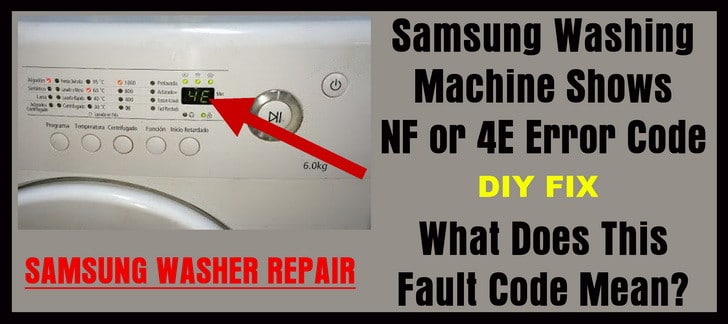 Samsung washing machine 4E, 4C, NF error code
The troubleshooting steps below apply to all types of Samsung washing machines including front load, top load, and washer and dryer combos.
The first thing to do when you see the NF or 4E error code appear on your Samsung washer:
Step 1 – Remove the unit from power! Be sure the water supply valves on the wall behind your washer are fully open.
These 2 water valves must be ALL THE WAY open to provide water to your Samsung washer. Turn them all the way counter-clockwise to be sure. If you have check valves on the wall, make sure they are turned all the way open and parallel with the water supply hoses. If both the water supply valves are fully open, proceed to step 2.
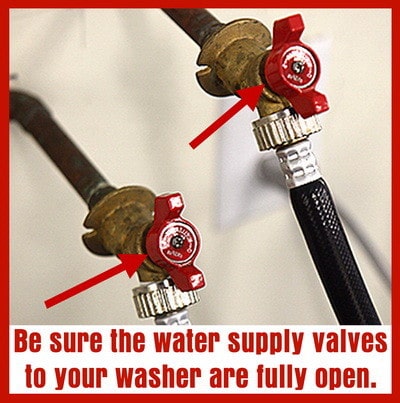 Be sure both water valves are open to supply water to your washing machine
Step 2 – Check to be sure the water supply hoses are not bent, crimped, or kinked. If the hoses are bent, this can prevent water from getting to your washer. Be sure that when you last pushed the washing machine back towards the wall, you did not inadvertently get the water hoses crimped behind the washer, as this happens often. To be sure, get a mirror and a flashlight and look behind your washer without pulling the washer away from the wall.
If the water supply hoses are bent or crimped, slide the washer out enough to get your hand down there to get the water supply hoses straight so the water can flow properly. If the water supply hoses are too short, replace them with longer water supply hoses so the water lines do not get bent when you slide it back into place. If the water supply hoses are not crimped or bent, proceed to step 3.
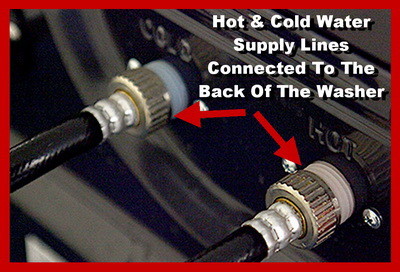 Make sure the water supply hoses going to your washer are not bent or crimped
Step 3 – Be sure there is nothing clogged inside the water supply hoses. To check this you need to turn off the water valves that supply water to the washer. Unplug the washing machine from power or turn off the breaker. Slide the washer out far enough to get to the water supply hoses that attach to the back of the washer. Remove the water supply hoses from the back of the washer. (Keep the water supply hoses attached to the water valves on the wall)
Be careful as there may be water mesh filters installed in between the water supply hoses and the water inlet valve. If so put these aside and clean if needed. Get a bucket and be sure the water supply hoses are not clogged by slowly opening the water valve one at a time and let the water flow into the bucket. If the water flows freely then the water supply hoses are not clogged. This is to test to be sure the water is flowing properly from the water hoses and valves. If the water does flow as it should from the water supply lines proceed to step 4.
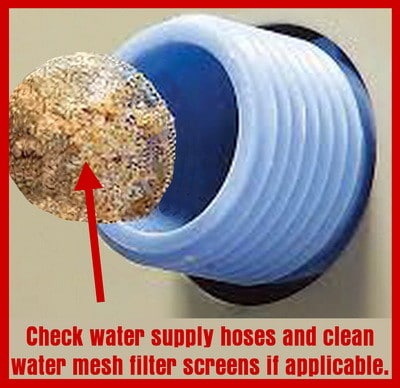 Check washer water supply mesh filter screens to be sure they are not clogged
Step 4 – Check where the water hoses were attached to the washer. You will need to pull the washer all the way out so you can get behind it. The part that the water supply hoses screw into on your Samsung washer is the Water Inlet Valve or Valves.
Check the water inlet valve to be sure there is nothing clogging or blocking the water from entering. There may be small water mesh filter screens on the water inlet valve that could be clogged, clean if needed. If you do not see anything clogging the water inlet valve or valves, proceed to step 5.
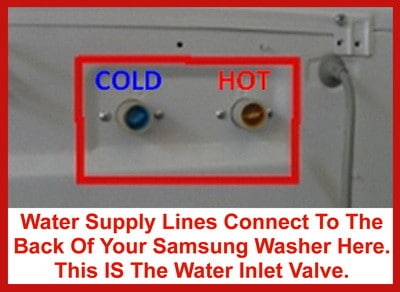 Water Supply Lines Connect Here On a Samsung Washer
Step 5 – The water inlet valve itself may be clogged internally, have a loose electrical wiring connection, or the solenoids in the water inlet valve are not operational. If you suspect the water inlet valve is faulty or has a loose connection, you will need to open the washer up to gain access to the valve. Remove power first. Check to be sure that the wiring harness is connected to the water inlet valves.
Be sure it is secure and not loose. If the wire connection is attached to the water inlet valve, you may have a bad or faulty solenoid in the water valve or valves. At this point you could test them with a multimeter or simply replace it or both.
NOTE: SOME Samsung washing machines have 2 water inlet valves, 1 for COLD water and 1 for HOT water. Other Samsung washers have a hot and cold water inlet valve as one part.
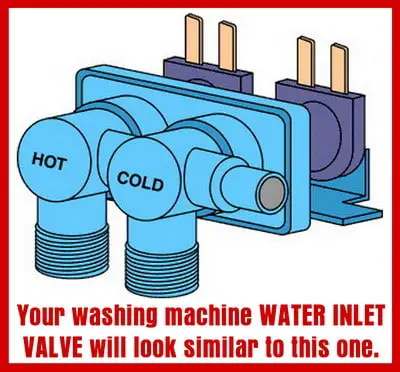 Your Samsung washer will have a water inlet valve similar to this
 Find Samsung Washing Machine Replacement Parts Here
Below are 2 videos showing how to gain access and replace the
water inlet valve or valves on a Samsung front load washer…
Samsung Washing Machine Water Inlet Valve Replacement
Washer Cold Water Inlet Valve Replacement for Samsung Front Load Washer
Below is a video showing how to test the water inlet valve on a washing machine with a meter…
How to Test a Water Inlet Valve on a Washing Machine
If you have questions about how to fix your Samsung washer that has an the error code NF or 4E and the troubleshooting methods above did not help you, please leave your washer issue below and we will be happy to assist you troubleshoot your problem.

Have a Samsung top load that will fill with water and then about 10 min into the cycle will drain the water and show error 4e. I did have the hot and cold hoses swapped, but now that’s fixed, no media stuck in the water filters and valves are full open. It’s filling so I’d assume the valves are working. Not sure what to do next…
My washing machine flooded out the bottom we fixed the leak and now it’s flashing red on the normal cycle there’s no error codes but it won’t start. Does anybody have any advice?
It fills it drains it spins it just keeps stopping and beeping and the panel has a lowercase n and a capital F.
I turned off the water valves because of vacation and forgot to turn it back on when we got home. We got the 4E flashing message when we tried to do the normal cycle. The valves are completely on now, we have a separate hot and cold valves, they are not bent or crimped. The normal wash cycle works now but the perm press and quick wash does not, the 4E error message flashes. Do we need to reset the washer? Is there a quick way to get out of the flashing 4E message to change cycles or power off? I couldn’t find anything online. Thank you
Lana,
If you have NO HOT water line…. try putting the Samsung washer in COLD wash mode only.
If that does not work, hook up a hot water line to the washer.
-RR
I have a Samsung top loader self clean washer.
I just hooked it up and error code 4E is showing.
I only have cold water supply NO hot… how do I get it to work?
Problem solved.
Changed the cycle and pulled the drainage hose up.
I tried everything but the error code did not go away
washer fills and runs fine with no clothes in basket. when placing clothes in basket nf errors are a constant, i am at my wits end i have tried everything except changing out the valve assembly any ideas?
My washing machine model Samsung WA95V3 has a problem that water continues supply to the machine without stop upon turn on the power and show error 4E.
And i already checked the water inlet valve connectivity and there is no issue.