

Samsung refrigerators come equipped with built-in self-diagnostic error recognition systems to alert you of issues. When a problem arises, you will immediately observe that the display icons begin to flash, blink, or exhibit a specific fault code message. Instead of showcasing the standard fridge and freezer temperatures, these fault messages or codes will take their place, appearing right where you’d normally see the temperature readings.
 Samsung Refrigerator Flashing – Blinking
Samsung Fridge Error Codes:
- 88 88: General Error
- 83E, 85E, 86E: Sensor Errors
- All Display Icons FLASHING: Multiple Issues
- Power Outage: Detected power loss
- PC Er: Communication Error
- OF OF: Cooling Off Mode
- 1E, SE, 5E: Function Errors
- Door Alarm: Door Left Open
This guide addresses the above-listed error codes and provides actionable steps for resolution.
| Error Code | Description | Solution |
|---|---|---|
| 88 88, 83E, 85E, or 86E | Issues with the PBA inverter | Unplug or flip the circuit breaker to remove power, wait 1-5 minutes, then restore power |
| PC Er | Communication problem between door and main control unit | Check and reset the wire harness under the top left door |
| OF OF or O FF | Cooling Off or Demo Mode | Follow instructions to exit Cooling Off or Demo Mode |
| — | Flashing Temperature above 59°F | Lower temperature setting, ensure door isn’t left open for long |
| 1E SE | Power Outage | Press Power Save and Lighting buttons for 10 seconds or Fridge and Freezer buttons for 10 seconds to reset the control panel |
Samsung Refrigerator Error Codes: 88 88, 83E, 85E, 86E
If your Samsung refrigerator shows any of the following error codes: 88 88, 83E, 85E, or 86E, you’re dealing with issues related to the PBA inverter.
Quick Reset Procedure:
- Disconnect Power: Unplug the refrigerator from the electrical outlet or flip the circuit breaker to cut off the power supply.
- Wait: Allow the refrigerator to remain disconnected for a duration of 1 to 5 minutes.
- Restore Power: Reconnect the refrigerator to the power supply or flip the circuit breaker back on.
- Check Display: After 5 minutes, the refrigerator should reset itself, and the error codes should be cleared.
This procedure essentially performs a power cycle, resetting the refrigerator and clearing the error codes related to the PBA inverter.
Samsung Refrigerator Error Code: PC Er
The PC Er error code on your Samsung refrigerator indicates a communication issue between the door and the main control unit.
Root Cause:
- The wire harness located under the top-left door may not be properly connected or may require a reset.
Step-by-Step Resolution:
- Disconnect Power: Unplug the refrigerator or turn off the circuit breaker to cut off power to the appliance.
- Locate Wire Harness: Open the top-left door and find the wire harness situated above the door hinge.
- Inspect and Reset: Disconnect the wire harness and then securely reconnect it to ensure proper communication.
- Restore Power: Plug the refrigerator back into the power outlet or turn the circuit breaker back on.
- Check Error Code: Upon restoring power, the PC Er error code should be cleared from the display.
By following these steps, you reset the wire harness connection, which should resolve the communication issue and clear the error code.
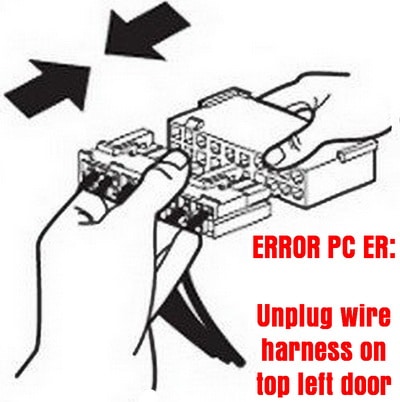
To clear the PC ER error on Samsung refrigerator
Unplug and then reconnect the wire harness in top left door
Samsung Refrigerator Error Codes: OF OF or O FF
If your Samsung refrigerator displays the error codes OF OF or O FF, it means the appliance is in Cooling Off or Demo Mode.
What It Means:
- Cooling Off/Demo Mode: This mode is generally activated in-store for display purposes and disables the cooling system.
By recognizing this error code, you can swiftly take action to exit Cooling Off or Demo Mode and restore your refrigerator’s normal function.
Check this page for instructions detailing How To Get a Samsung Refrigerator out of the Cooling Off or Demo Mode?
Samsung Refrigerator OF OF mode
How to Get Samsung Fridge Out of OFF Demo Mode?
Samsung Refrigerator: Flashing Temperature Display
If the temperature display on your Samsung refrigerator starts flashing or blinking, it’s an alert indicating that the internal temperature has risen above 59°F.
Symptoms:
- Flashing or blinking temperature display
- Audible bell sound as a warning
Common Causes:
- The refrigerator’s internal temperature has exceeded 59°F.
- The door may have been left open for an extended period.
Immediate Actions:
- Adjust Settings: Lower the temperature setting on your refrigerator’s control panel.
- Check Door: Ensure that the refrigerator door is properly closed.
- Monitor Display: The flashing should stop once the internal temperature drops below 59°F.
Note: Persistent issues may require further diagnostic steps or professional assistance.
Samsung Refrigerator: Flashing Display During Self-Test
If you notice that all the icons on your Samsung refrigerator’s display panel start flashing upon plugging it into power, there’s no cause for alarm.
What It Means:
- Self-Diagnostic Test: The flashing display icons indicate that the refrigerator is performing an internal self-diagnostic test.
Behavior:
- All display icons will flash momentarily.
What to Expect:
- The flashing will automatically cease once the self-diagnostic test is successfully completed.
In summary, this is a standard operating procedure for Samsung refrigerators and is entirely normal. The flashing serves as an indication that the appliance is running its self-check protocols and will stop once the test is finalized.
Refrigerator Components Removed
If you’ve taken out an electrical or electronic component from your refrigerator—such as the ice maker, fan, switch, or damper—you may encounter an error code on the display within a specific time frame.
Common Causes:
- Removal of key components like the ice maker, fan, switch, or damper.
Steps to Clear Error Code:
- Disconnect Power: Unplug the refrigerator from its power source.
- Reinstall Component: Place the removed part back into its designated position within the refrigerator.
- Restore Power: Plug the refrigerator back into the electrical outlet.
- Check Error Code: The error code should disappear from the display upon successfully completing these steps.
By following this procedure, you reset the system and clear the error code triggered by the removal of the component.
Samsung Refrigerator Shows 1E, SE
If your Samsung refrigerator displays error codes 1E or SE, it’s signaling that a power outage has occurred.
Symptoms:
- Display shows error codes 1E or SE.
Quick Solutions:
Option 1:
- Press Buttons: Hold down the ‘Power Save’ and ‘Lighting’ buttons simultaneously.
- Duration: Continue holding for 10 seconds.
- Result: This will reset the control panel and clear the error code.
Option 2:
- Press Buttons: Hold down both the ‘Fridge’ and ‘Freezer’ buttons at the same time.
- Duration: Continue holding for 10 seconds.
- Result: This action will also reset the control panel and remove the error code.
Choose either of these options to effectively reset your refrigerator’s control panel and clear the 1E or SE error codes.
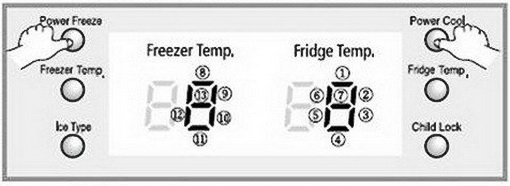 How to clear error and reset the display for Samsung refrigerators
PRESS AND HOLD POWER FREEZE AND POWER COOL FOR 10 SECONDS
Samsung Refrigerator Error Codes = Check here for ALL error codes a Samsung refrigerator can display and how to fix them.
Need help? Let us know the model number of your Samsung refrigerator and the error or issue you are having and we can assist you in troubleshooting the problem.

My fridge had a code of 66 E, I pressed and held down Coolselect and Energy Saver at the same time and it reset and is working perfect again!!!
We have ‘bars’ in our display panel and the 4th bar is blinking. We do have water but no ice and no light. I think our model number is RS263TD. Two door.
I have a fridge that was not cooling. I unplugged it for 24 hours…. when I plugged it back in 22e started flashing on the door… any suggestions?
I had the same problem with my Samsung fridge temperature light blinking. After reading a few posts, I decided to unplug my refrigerator for 24 hours to allow the ice suspected on the condenser to melt, IT WORKED!!! No service call was needed in my case.
hi I have Samsung Model # RF28HMEDBSR 4 door refrigerator on the display its showing freezer off and cooler off on the display I tried to re set by holding cooler and freezer both at the same time even though its not working if I change it manually its going back to off mode with in seconds .
What do you when the fridge is affected by a power surge/spike?
Samsung RF28HFEDBSR ice maker and freezer not cooling. On display flashing “0” (zero) about 4 days. I try reset but nothing happen, Please someone help me. Fridge works good.
Samsung RS2556SH keeps flashing the refrigerator temperature which 40 degrees.
I tried the push both power buttons at the same time but that did nothing.
Then I unplugged it and now it says the temp is 59 in fridge and 11 in the freezer.
So not sure if this will fix it or not, I tried to lower both temp back where they should be but they went back to the higher degrees.
I am open to any suggestions.
I have a Samsung RD268abwp. On the display it show 88 88. No other lights. None of the buttons work. The top line on the first 8 on the fridge side flashes.
Samsung – RF260BEAESR/AA
Our house lost power briefly twice today, and when it powered on, my fridge beeped for about 20seconds, and is flashing a “Pc Er” code. This has continued despite:
– Unplugging the fridge & plugging it back in.
– Turning the power off at the breaker for 10min, and turning it back on.
– Unplugging the fridge, then disconnecting the wire harness on top of the left door; reattaching it and plugging it back in.
Purchased last year, and it went off warranty 3 weeks ago!!
Any thoughts on a repair?
With this code, will the food stay cold or spoil?